Operator’s Manual – OPTI CCA-TS2 7-9
7 MAINTENANCE
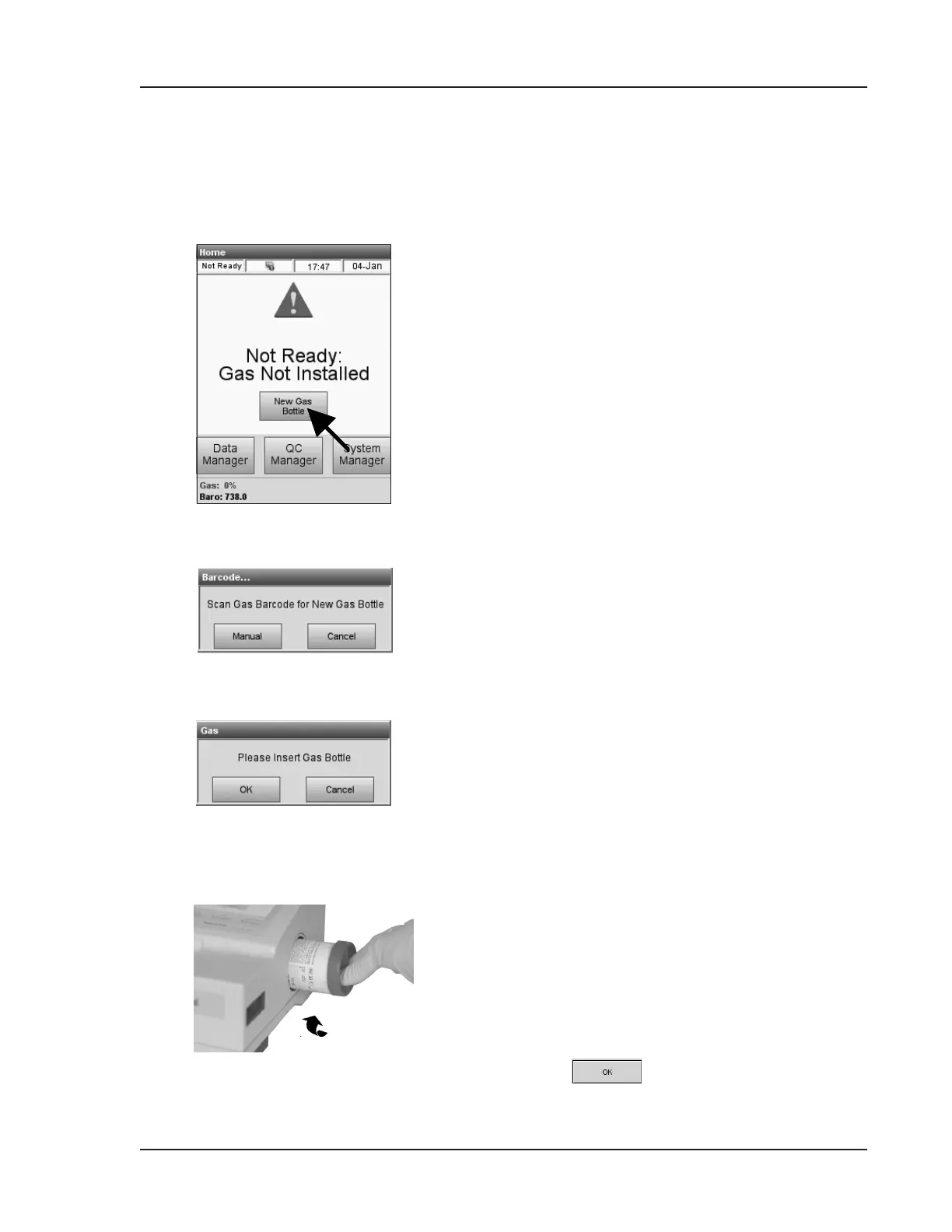
The calibration gas bottle is designed to provide
approximately 80 sampling operations (45 for
B-Lac). The following message will alert the
operator that the gas bottle needs to be changed
(Fig. 7-21).
To change the gas bottle:
1. Press <New Gas Bottle>.
2. Unscrew the gas bottle by turning the knob on
the bottom counterclockwise.
3. Take a new gas bottle and remove its cap.
4. When prompted (Fig. 7-22), scan the new gas
bottle bar code on the insert sheet by holding it
2-3 inches (5-8 cm) from the bar code scanner
on the bottom right-hand corner of the analyzer.
• The red line from the barcode scanner
should cover the entire barcode.
• The analyzer will beep when the barcode is
accepted.
• Record the date of installation on the gas
bottle for later reference.
NOTE: Iftheinsertsheetismisplaced,youcan
enterthelotnumberonthegasbottlelabel
manually.Press<Manual>(Fig.7-22)and
enterthenumberusingthenumerickeypad.
NOTE: Thebarcodecontainsexpiration
information.TheOPTICCA-TS2willalert
theoperatorfourweeksbeforethegasbottle
expires.
NOTE: Thegasbottleshouldalwaysbestoredwith
thecapon.
5. When prompted (Fig. 7-23), install the new gas
bottle.
6. Insert the bottle into its housing and turn it
clockwise until nger-tight (Fig. 7-24).
Press (Fig. 7-23).
7.5 As Needed Maintenance
7.5.1 Changing the Gas Bottle
Fig. 7-21 Select New Gas Bottle
Fig. 7-24 Gas Bottle
Fig. 7-22 Scan Bar Code
Fig. 7-23 Insert Gas Bottle


 To Next Page