Operator’s Manual - OPTI CCA-TS2 6-11
6 DATA MANAGEMENT
6.3 Miscellaneous Reports
6.3.1 Maintenance Report
This printout reports all maintenance events that
were logged in the <Maintenance> menu
(see Sections 7.2 and 7.4.1).
1. To print a maintenance report, select <Data
Manager> in the main menu.
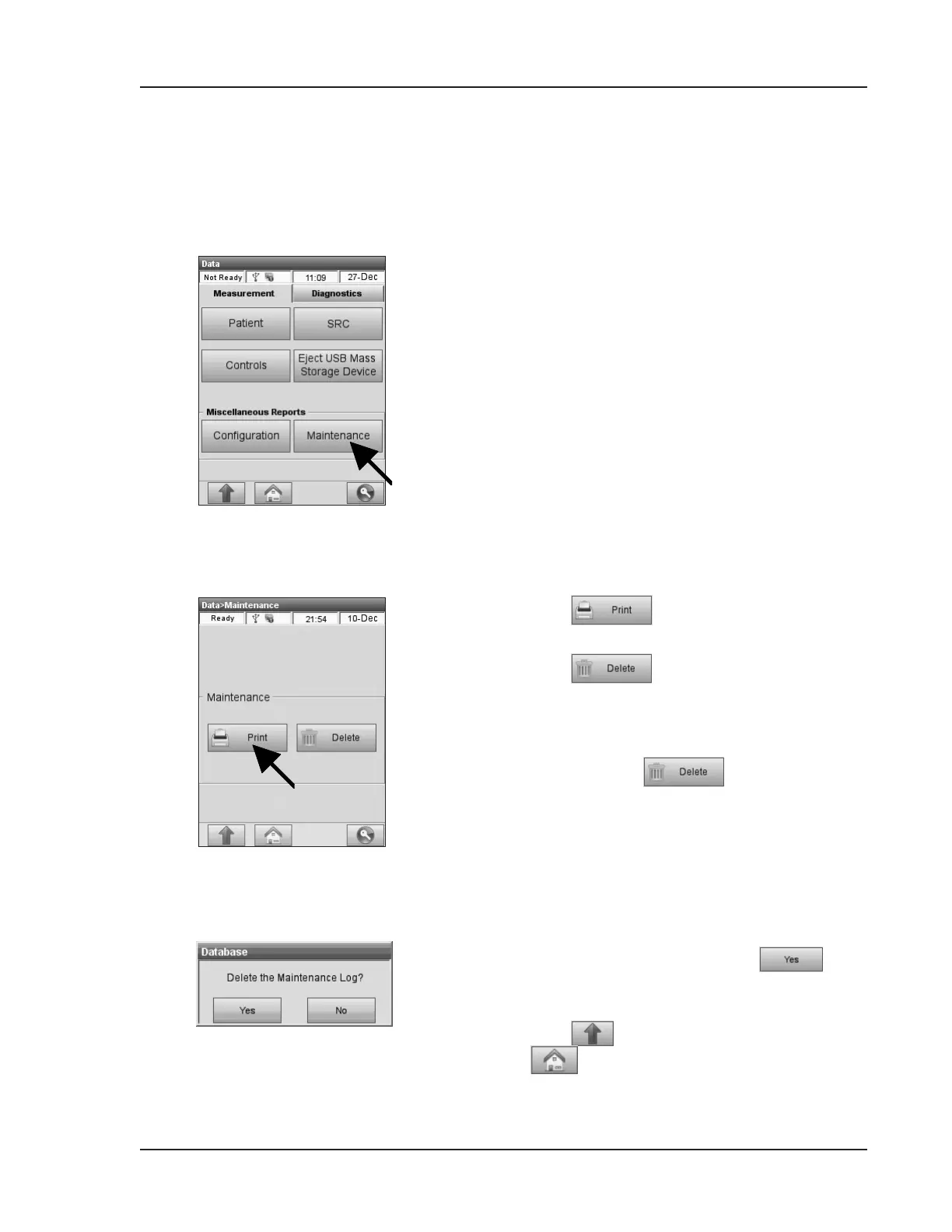
2. In the <Data> screen on the <Measurement>
tab, select <Maintenance> (Fig. 6-27).
3. Press
to print the maintenance
report (Fig. 6-28).
4. Press
to delete the maintenance
database.
NOTE: Ifyoudonothavepermissiontodelete
records,the buttonwillnotbe
active.
5. Conrm your choice by pressing
in the
<Delete the Maintenance Log?> screen
(Fig. 6-29).
6. Press
to return to the <Data> screen or
to return to the main menu.
Fig. 6-28 Maintenance Report
Fig. 6-29 Delete Maintenance Log
Fig. 6-27 Maintenance


 To Next Page