Operator’s Manual – OPTI CCA-TS2 8-27
8 DIAGNOSTICS AND TROUBLESHOOTING
8.2.15 Checking the Pump Flow
This option is designed to test the pump cartridge.
In the main menu, press <System Manager ->
Diagnostics>.
• Select the <Tests> tab.
•
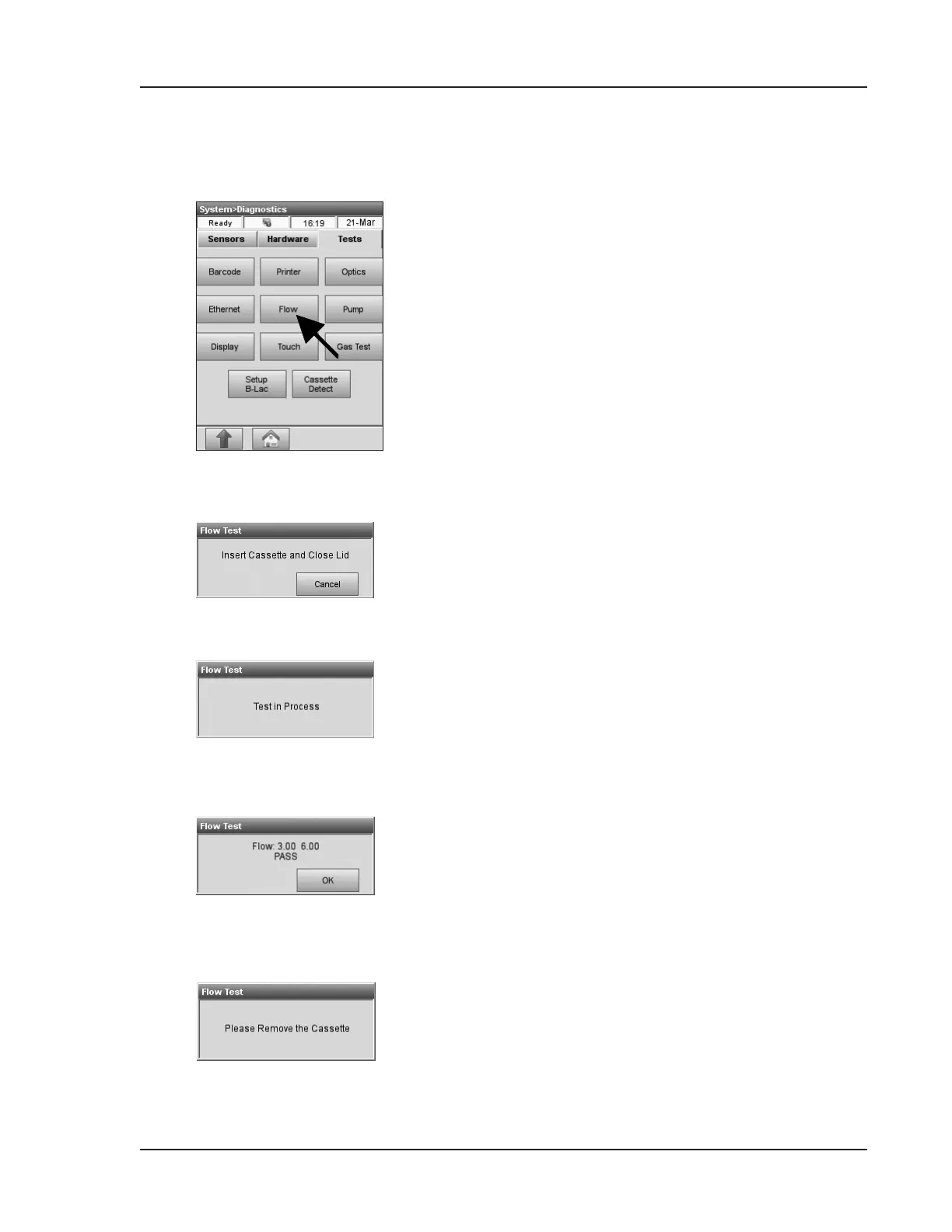
Press <Flow> to start the test (Fig. 8-22).
• Insert a new cassette (Fig 8-23).
• Close the SMC cover.
• Wait for test results (Fig. 8-24).
• The two numbers indicate the actual ow rates
clockwise and counter clockwise (Fig. 8-25).
If one of the two or both rates are out of range,
the test fails.
• Repeat test or replace the pump cartridge, if
the test fails. See replacement instructions in
Chapter 7.4.1.
NOTE: Itispossiblethatthetestfailstherst
time,evenifthepumpcartridgeisworking
correctly.
• Remove the cassette (Fig. 8-26).
Fig. 8-22 Flow Test
Fig. 8-24 Flow Test in Process
Fig. 8-23 Insert Cassette
Fig. 8-25 Flow Test Pass
Fig. 8-26 Remove Cassette


 To Next Page