3-40 Operator’s Manual – OPTI CCA-TS2
3 CUSTOMIZATION
3.2.5 Maintenance Setup
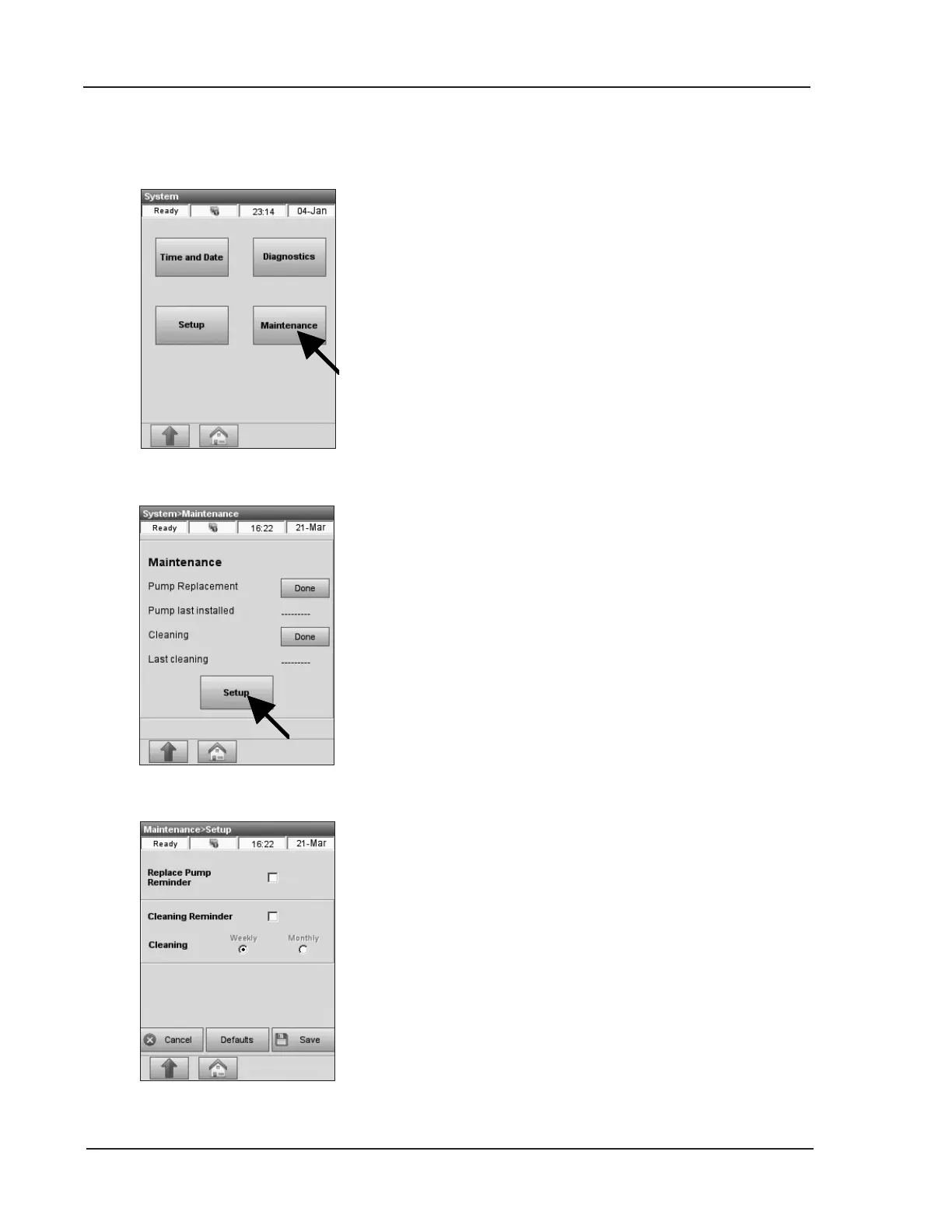
Fig. 3-89 Select Maintenance
Fig. 3-91 Reminder Options
This menu allows you to select maintenance
reminder options for your analyzer.
Any maintenance actions that you perform through
the maintenance reminders will be captured in the
maintenance log of the analyzer.
1. From the <Ready> display, select
<System Manager> and <Maintenance>
(Fig. 3-89).
2. Enter User ID if enabled.
3. In the <Maintenance> menu (Fig. 3-90),
press <Setup>.
4. In the <Setup> screen (Fig. 3-91), you can
select <Replace Pump Reminder> to
alert you when the peristaltic pump needs
replacement.
5. If you enable the option <Cleaning
Reminder>, the system will alert you when
weekly or monthly cleaning is due.
Select <Monthly> cleaning if the analyzer is
not used weekly.
Refer to Chapter 7 for maintenance procedures.
Fig. 3-90 Maintenance Setup


 To Next Page