Operator’s Manual – OPTI CCA-TS2 3-35
3 CUSTOMIZATION
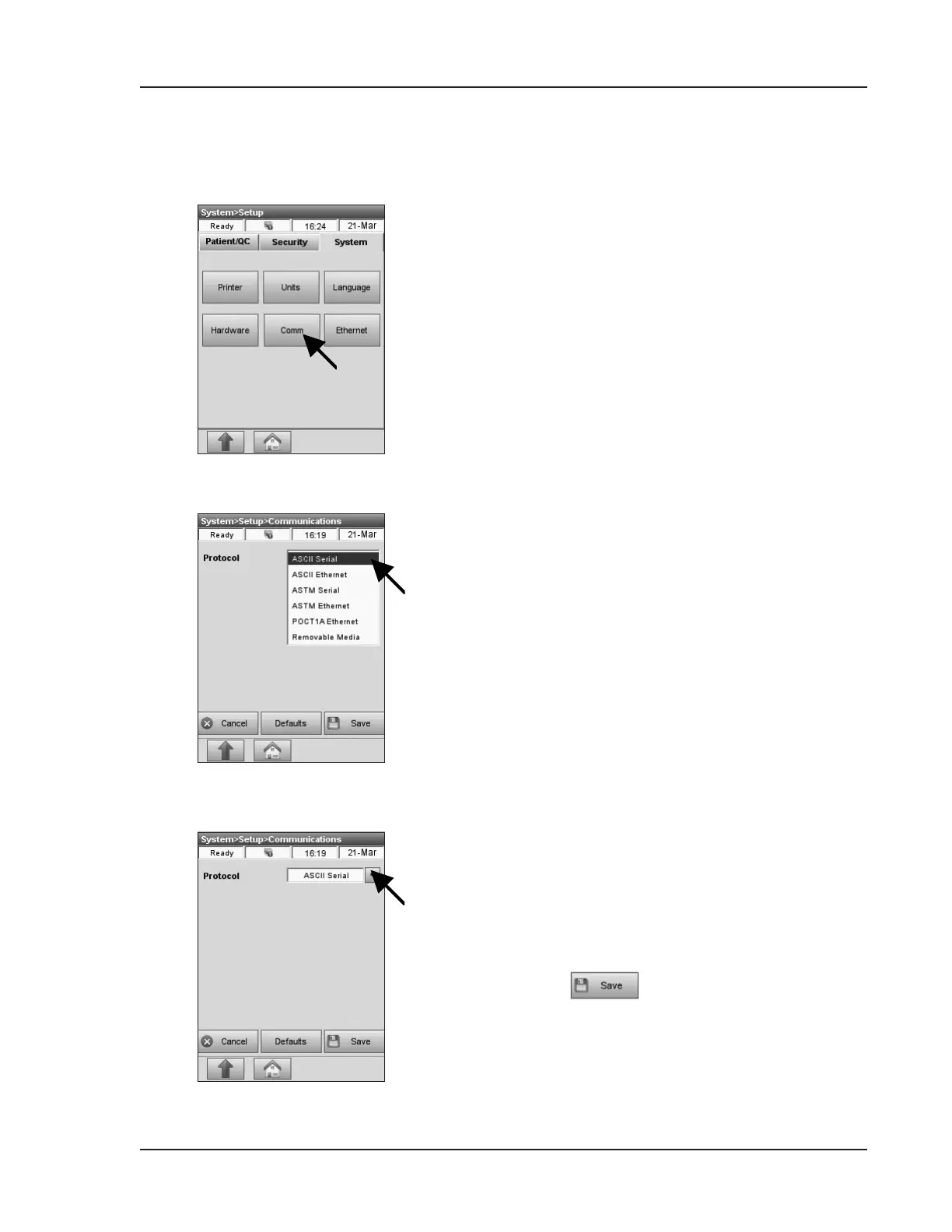
Fig. 3-77 Communications
The OPTI CCA-TS2 has a USB Type B port and an
Ethernet port that may be used to communicate with
a remote computer. These ports may be selected to
transmit data in ASCII, ASTM or POCT1 format.
A USB Type A port may be selected for exporting
data to a removable mass storage device.
1. In the main menu, select <System Manager>
and <Setup>.
2. In the <System Setup> menu, press the
<System> tab and then <Comm> (Fig. 3-77).
In the <System->Setup->Communications>
screen (Fig. 3-78), you can select the
communications <Protocol>:
• <ASCII Serial>
• <ASCII Ethernet>
• <ASTM Serial>
• <ASTM Ethernet>
• <POCT1AEthernet>
• <Removable Media>.
<ASCII Serial> (Fig. 3-79) - Data in easy to read
OPTI Medical custom format. The OPTI CCA-TS2
exports data string identical to the internal printer
output.
•
Press to accept the changes.
3.2.4.5 Setting up Communications
Fig. 3-78 Select Protocol
Fig. 3-79 ASCII Serial


 To Next Page