Operator’s Manual – OPTI CCA-TS2 3-11
3 CUSTOMIZATION
3.2.2.2 Suppressing Results for Measured Parameters
In the <Measured Parameters> menu you can
suppress results for certain parameters. The results
for these parameters will not appear in the stored
patient results or on the printout.
•
In the main menu, select <System Manager>
and <Setup>.
•
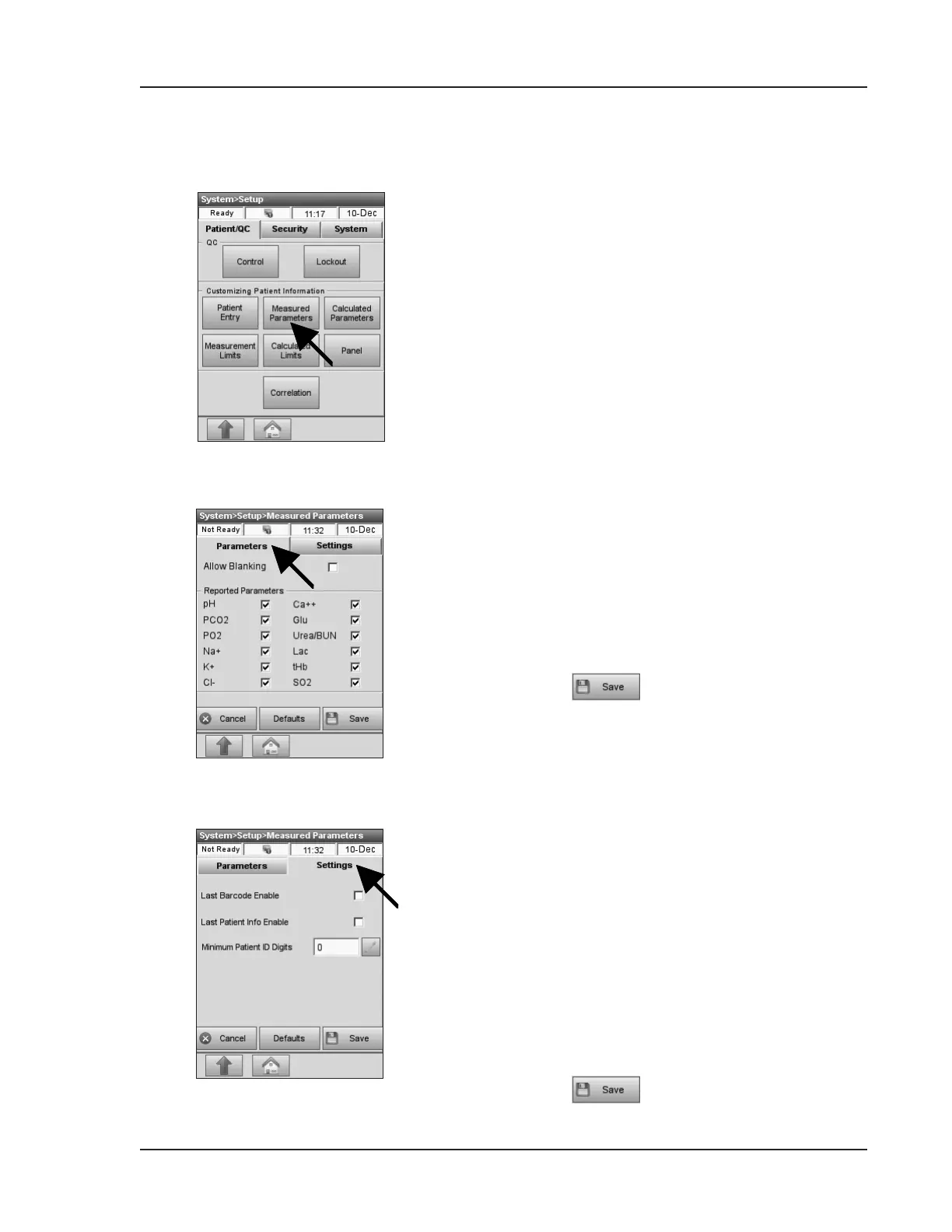
On the <Patient/QC> tab, press <Measured
Parameters> (Fig. 3-20).
The <Parameters> tab contains the following
options (Fig. 3-21):
•
<Allow Blanking> - If this option is
selected, a screen will appear before a patient
measurement giving the user the option to
suppress the results for certain parameters for
the current measurement.
•
<Reported Parameters> - To permanently
suppress results for all patient and control
measurements for all cassette styles, deselect the
specic parameters in the parameter list.
By default, all parameters are activated.
•
Press to save your selection.
The <Settings> screen contains the following
options (Fig. 3-22):
•
<Last Barcode Enable> enables the <Last
Entry> button on the main screen so that the
previous barcode scanned can be used for the
current patient measurement. By default, this
option is disabled.
•
<Last Patient Info Enable> enables the
<Last Patient Info> button shown during the
measurement so that the patient information
from the previous measurement can be used as
the default for the current measurement.
By default, this option is disabled.
•
<Minimum Patient ID Digits> lets you set
a minimum number of required digits for the
Patient ID.
•
Press to save the settings.
Fig. 3-20 Measured Parameters
Fig. 3-21 Parameters
Fig. 3-22 Settings


 To Next Page