2-10 Operator’s Manual – OPTI CCA-TS2
2 SETUP
7. The Ready Display
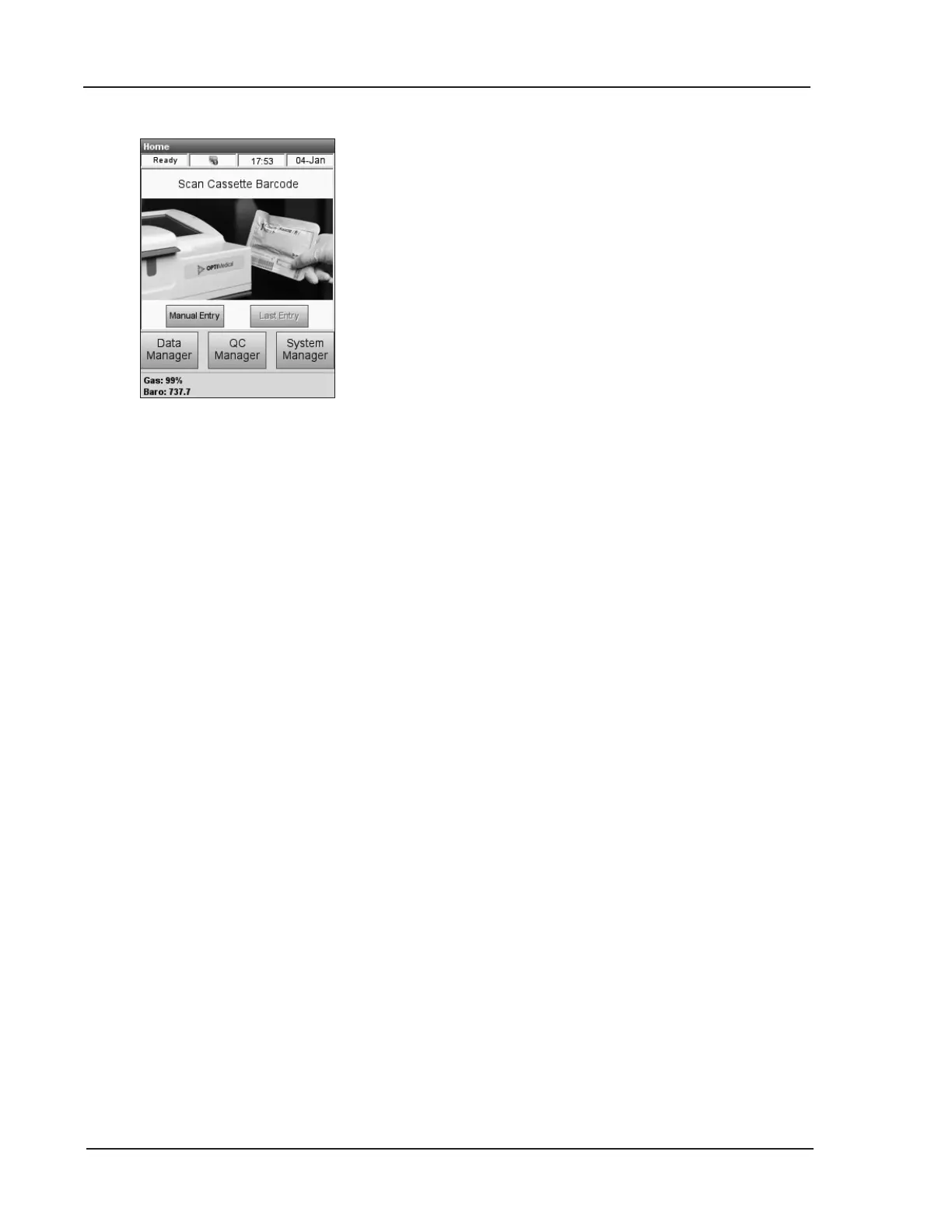
The <Ready> display (Fig. 2-25) appears when
the analyzer is ready for operation and also
displays important status information such as:
• <Gas> - Displays the percentage of gas
remaining.
• <Baro> - Displays the current barometric
pressure.
The <Ready> display also provides access to
the following system functions:
• <Data Manager> – This menu allows you
to print out patient, control and diagnostic
information. It also provides you with the
ability to import/export data.
For more information on printing and
importing/exporting data, see Chapter 6.
Data Management.
• <QC Manager> – This menu allows you to
perform control measurements.
For more information, see Chapter 4.
Calibration and Quality Control.
•
<System Manager> - This menu contains
the following settings and functions:
- Time and Date (Chapter 3.1)
- Setup (Chapter 3.2)
- Maintenance (Chapter 3.2.5 and 7.1)
- Diagnostics (Chapter 8.2)
Fig. 2-25 Ready Screen


 To Next Page