13
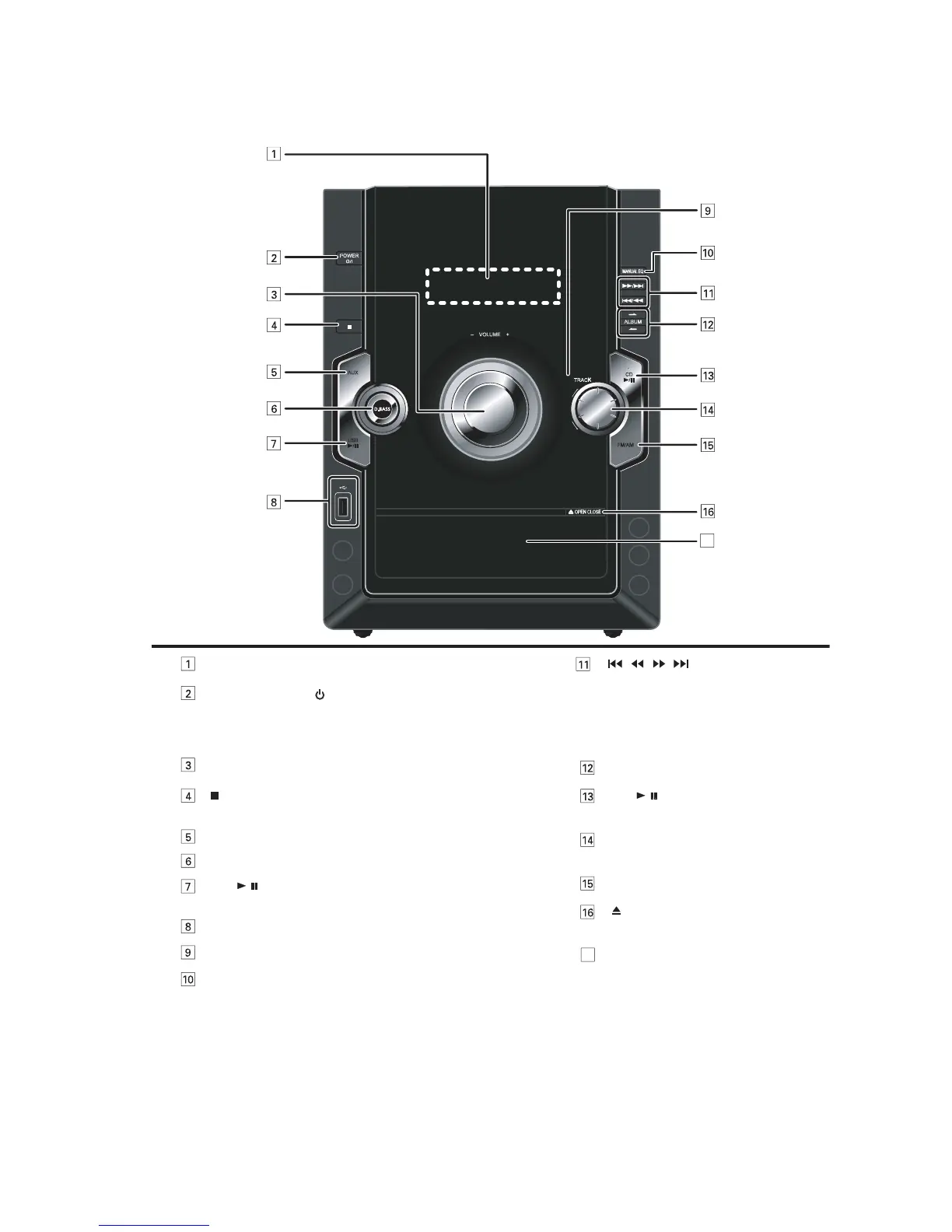
5 Location of Controls and Components
5.1. Main Unit Key Button Operation
USB
/
AUX
POWER
VOLUME +
OPEN CLOSE
MANUAL EQ
ALBUM
FM/AM
TRACK
CD
/
/
/
17
[MANUAL EQ] selection
Remote control signal sensor
USB play or pause
[USB, / ]
Stop function
[ ]
USB port
D.BASS Selection
[AUX]
Volume Control
Press to switch the unit from on to standby mode or vice versa.
In standby mode, the unit is still consuming a small amount of
power.
Standby/on switch (
/l, POWER)
Display Panel
Disc tray open or close
[ , OPEN/CLOSE]
Tuner (FM/AM) Selection
[Track]
Skip and play your desired track
Disc play and pause
[ CD, / ]
Album selection
Track skip or search,
fast-forward or rewind,
tune or preset channel selection,
sound quality adjustment,
manual EQ setting (BASS & TREBLE)
[ / ][ / ]
Disc tray
17



 To Next Page