37
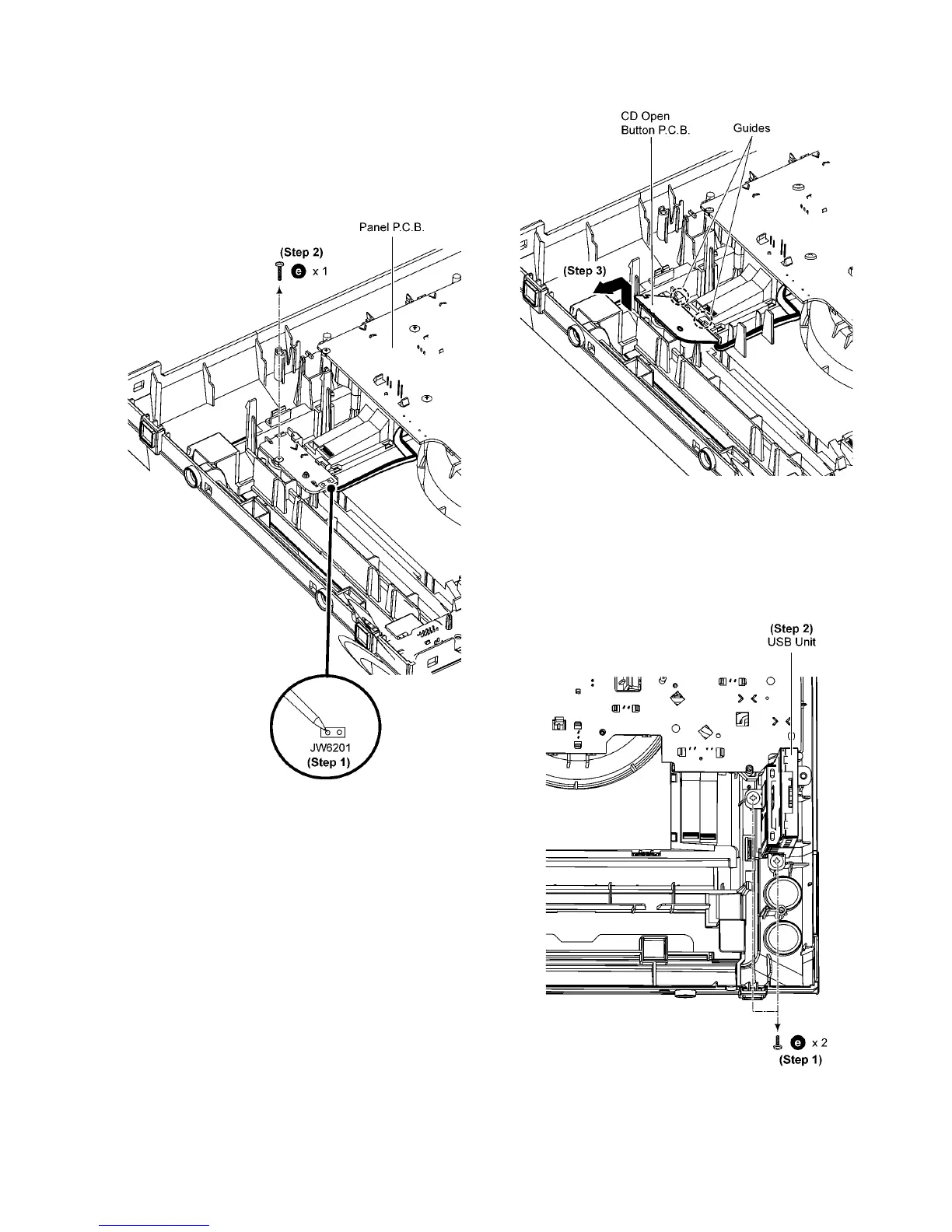
9.8. Disassembly of CD Open But-
ton P.C.B.
• Refer to “Disassembly of Top Cabinet”.
• Refer to “Disassembly of Front Panel Assembly”.
Step 1 Desolder 2 pins (JW6201) on CD Open Button P.C.B..
Step 2 Remove 1 screw.
Step 3 Lift up slightly and remove CD Open Button P.C.B. as
arrow shown.
Caution: During assembling, ensure that the CD Open But-
ton P.C.B. is properly located and seated under the guides.
9.9. Disassembly of USB P.C.B.
• Refer to “Disassembly of Top Cabinet”.
• Refer to “Disassembly of Front Panel Assembly”.
Step 1 Remove 2 screws.
Step 2 Remove USB Unit.



 To Next Page