46
9.16. Replacement of Switching Reg-
ulator IC (IC5701)
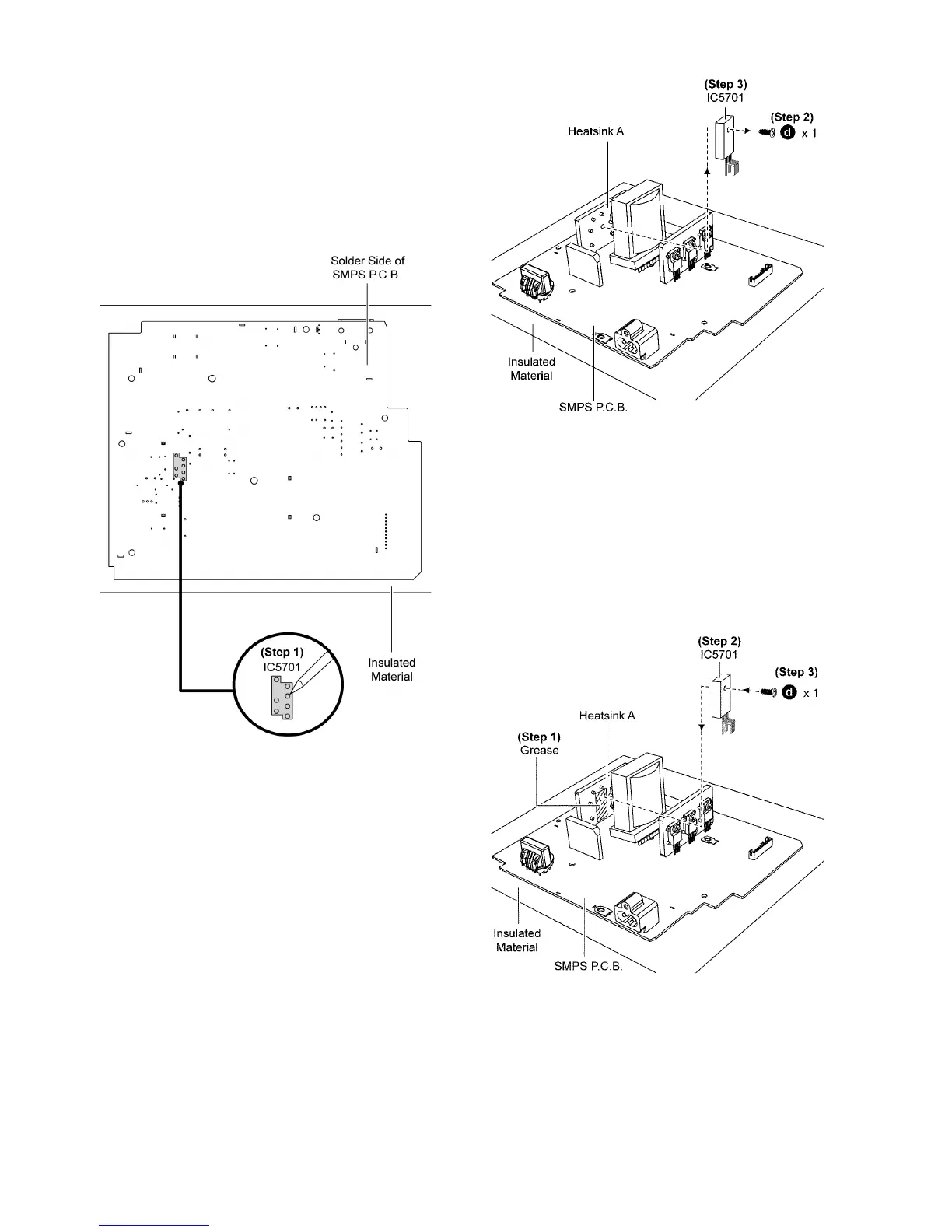
• Refer to “Disassembly of SMPS P.C.B.”.
9.16.1. Disassembly of Switching Regula-
tor IC (IC5701)
Step 1 Desolder pins of the Switching Regulator IC (IC5701) on
the solder side of SMPS P.C.B..
Step 2 Remove 1 screw from the Switching Regulator IC
(IC5701).
Step 3 Remove the Switching Regulator IC (IC5701) from the
Heatsink A.
Caution: Avoid touching the Heatsink A due to its high
temperature after porlonged use. Touching it may lead to
injuries.
9.16.2. Assembly of Switching Regulator
IC (IC5701)
Step 1 Apply grease to the Heatsink A.
Step 2 Install the Switching Regulator IC (IC5701) to the SMPS
P. C. B ..
Caution: Ensure pins of the Switching Regulator IC
(IC5701) are properly seated and soldered on SMPS P.C.B..
Step 3 Screw the Switching Regulator IC (IC5701) to the Heat-
sink A.
Caution: Ensure the Switching Regulator IC (IC5701) is
tightly screwed to the Heatsink A.
Step 4 Solder pins of the Switching Regulator IC (IC5701) on
the solder side of SMPS P.C.B..







 To Next Page