17
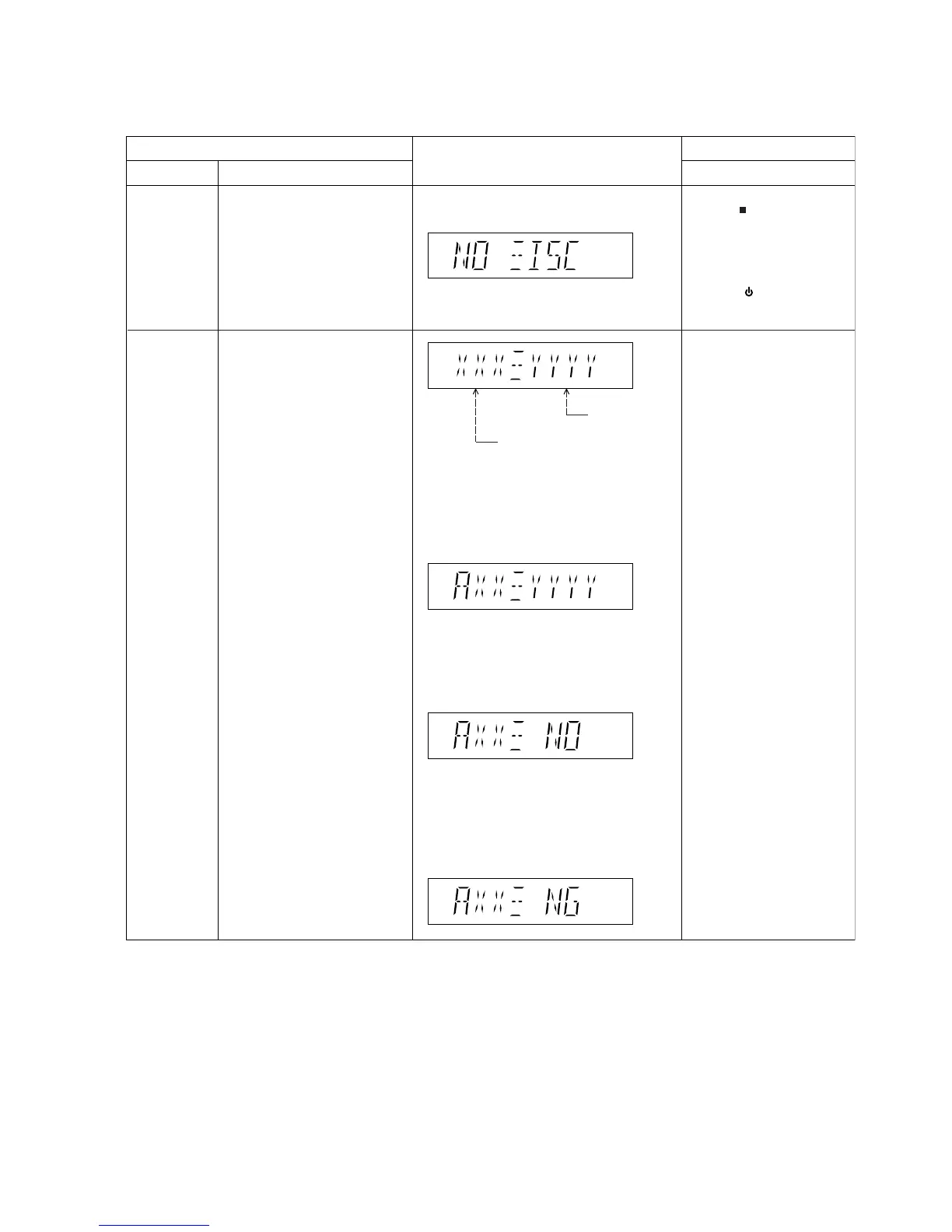
6.2. Doctor Mode Table
6.2.1. Doctor Mode Table 1
FL Display
Key Operation
Front Key
Item
DescriptionMode Name
Doctor Mode
EEPROM
checksum
check
Firmware
Version
EEPROM Checksum
(if applicable)
To enter into Doctor Mode In CD Mode:
1.Press [ ] button on main
unit follow by [4] and [7] on
remote control.
2. To exit, press [OK] button on
remote control or press
[POWER, /I] button on main
unit or remote control.
Condition 1
When EEPROM is detected and has ROM
correction.
(The correction point existing data is other
than 0 )
Condition 2
When EEPROM is detected and there is no
ROM correction.
(The correction point is 0 )
Condition 3
When the EEPROM is detected and has ROM
correction but NG.
(The file name is different even though a
EPROM is set,or no correction file is existing)
For checking of various items
and displaying EEPROM and
Firmware version.
In CD Mode:
1. Enter Doctor Mode



 To Next Page