21
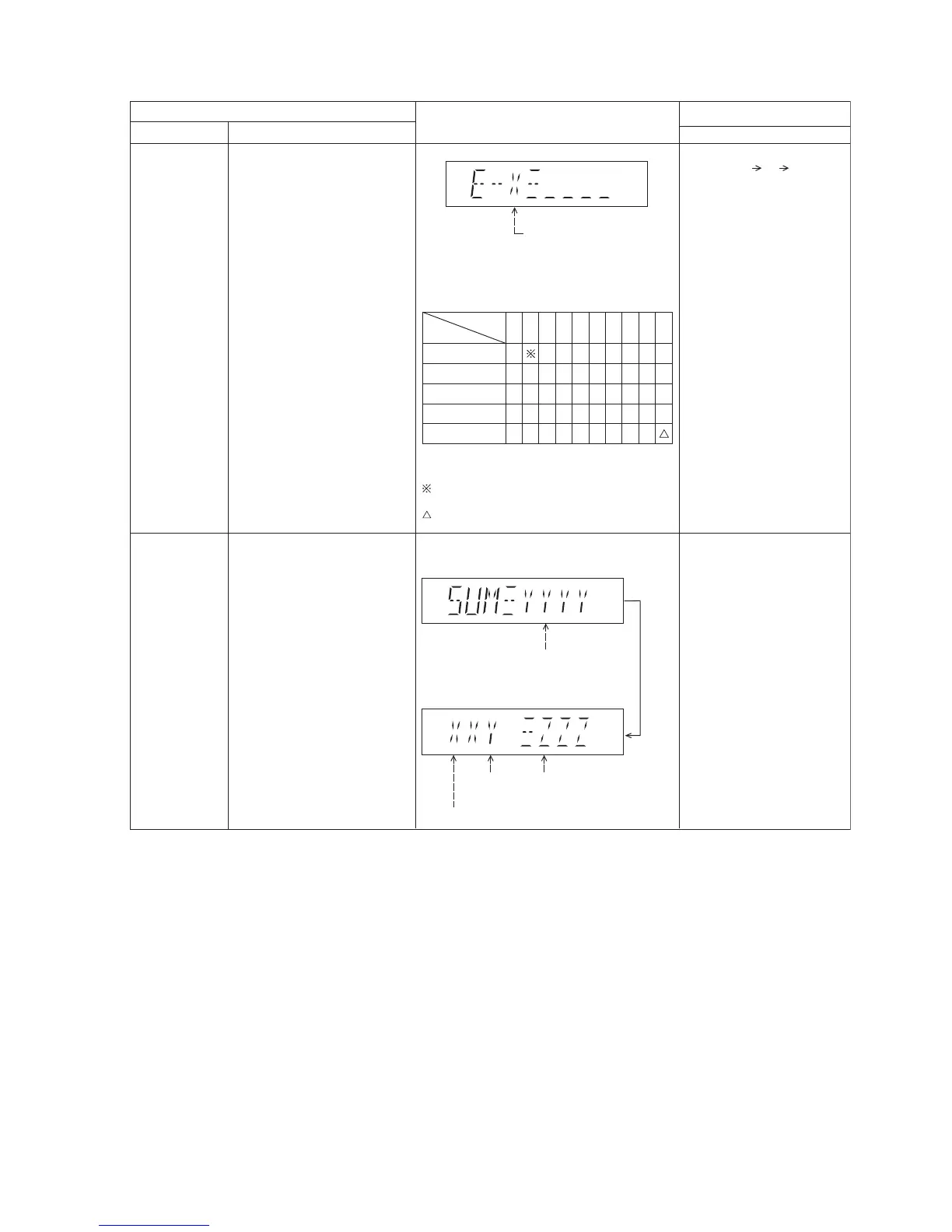
8.2.3. Doctor Mode Table 3
FL Display
Key Operation
Front Key
Item
DescriptionMode Name
CD
Self- Adjustment
Test
To display result of
self-adjustment for CD.
CD LSI Version
Check
For checking CD LSI Version and
checksum information.
In Doctor Mode
:
1. Press [10] [1] [4] button
on the remote control.
In Doctor Mode:
1. Press [4] button on the
remote control.
Display of auto adjustment
result
Reference table:
ERROR Code
Status
Condition
0 1 2 4 6 8 A C E F
AOC1/AOC2 O O O O O O O O -
ABC2/ABC1 O - X O X O X O X -
2
nd
AOC1 O - O X X O O X X -
FAGC/TAGC O - O O O X X X X -
AGC2 O - O O O O O O O
O : OK;
X : NG (In case that time out happens.)
: Either one of FO AOC, TR AOC and FO
coarse AGC is NG.
: If the AGC is NG (ignore others).
To cancel this mode, press [0]
button on the remote control.
To cancel this mode, press [0]
button on the remote control.
(Display 2)
(Display 1)
Version (Decimal)
ROM
Type
Year Develop
after
2 sec
Checksum (Hex)




 To Next Page