35
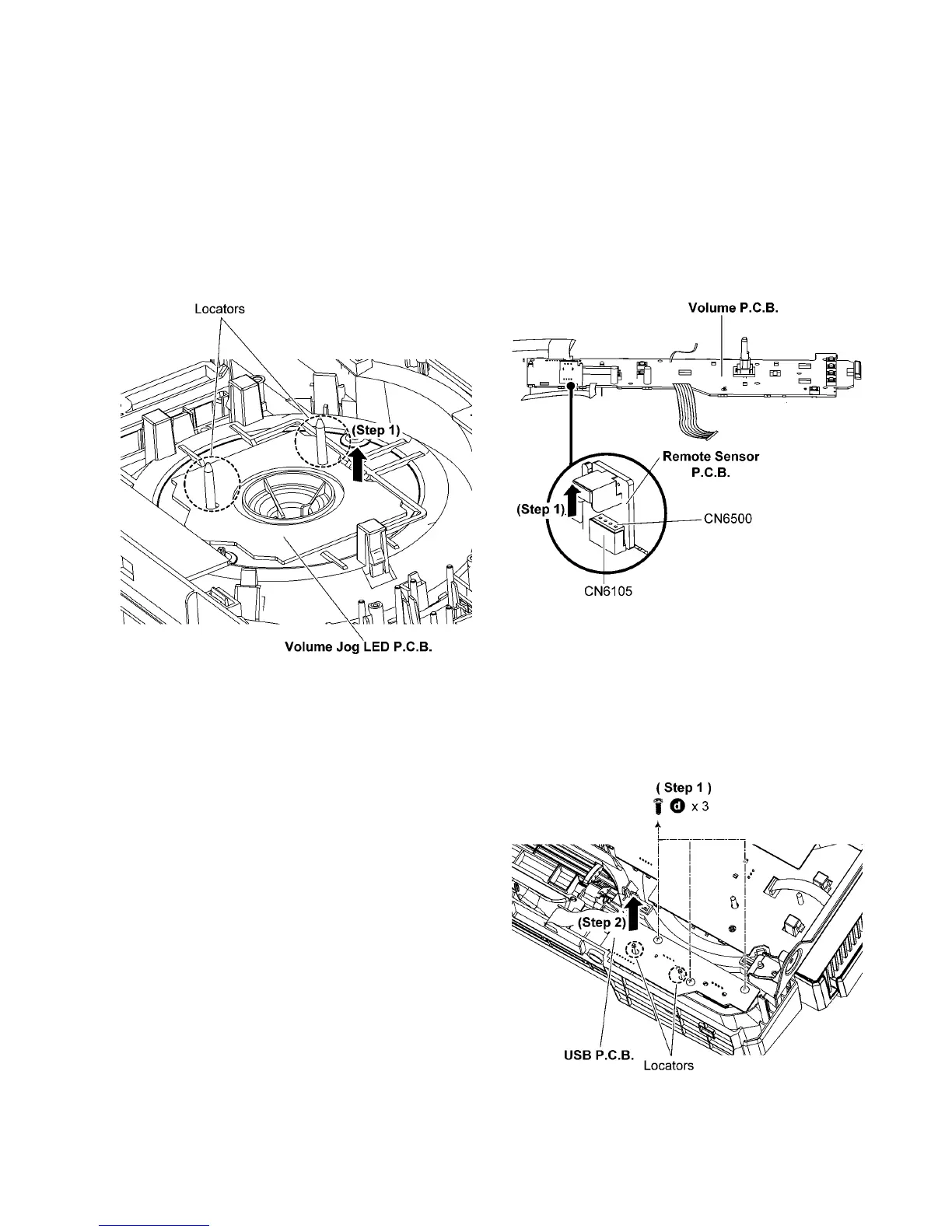
10.11. Disassembly of Volume Jog
LED P.C.B.
• Refer to “Disassembly of Top Cabinet”.
• Refer to “Disassembly of Front Panel Unit”.
• Refer to “Disassembly of FL Display P.C.B.”.
• Refer to “Disassembly of Control P.C.B.”.
• Refer to “Disassembly of Volume P.C.B.”.
Step 1 Lift up to remove the Volume Jog LED P.C.B..
Caution: During assembling, ensure that the Volume Jog
LED P.C.B. is properly located & fully seated onto the Front
Panel Unit.
10.12. Disassembly of Remote Sensor
P.C.B.
• Refer to “Disassembly of Top Cabinet”.
• Refer to “Disassembly of Front Panel Unit”.
• Refer to “Disassembly of FL Display P.C.B.”.
• Refer to “Disassembly of Control P.C.B.”.
• Refer to “Disassembly of Volume P.C.B.”.
Step 1 Remove the the Remote Sensor P.C.B..
Caution: During assembling, ensure that the Remote Sen-
sor P.C.B. is properly inserted & fully connected to the Vol-
ume P.C.B..
10.13. Disassembly of USB P.C.B.
• Refer to “Disassembly of Top Cabinet”.
• Refer to “Disassembly of Front Panel Unit”.
Step 1 Remove 3 screws.
Step 2 Lift up to remove the USB P.C.B..
Caution: During assembling, ensure that the USB P.C.B. is
properly located & fully seated onto the Front Panel Unit.




 To Next Page