23
8.4. Self-Diagnostic Mode
8.5. Self-Diagnostic Error Code Table
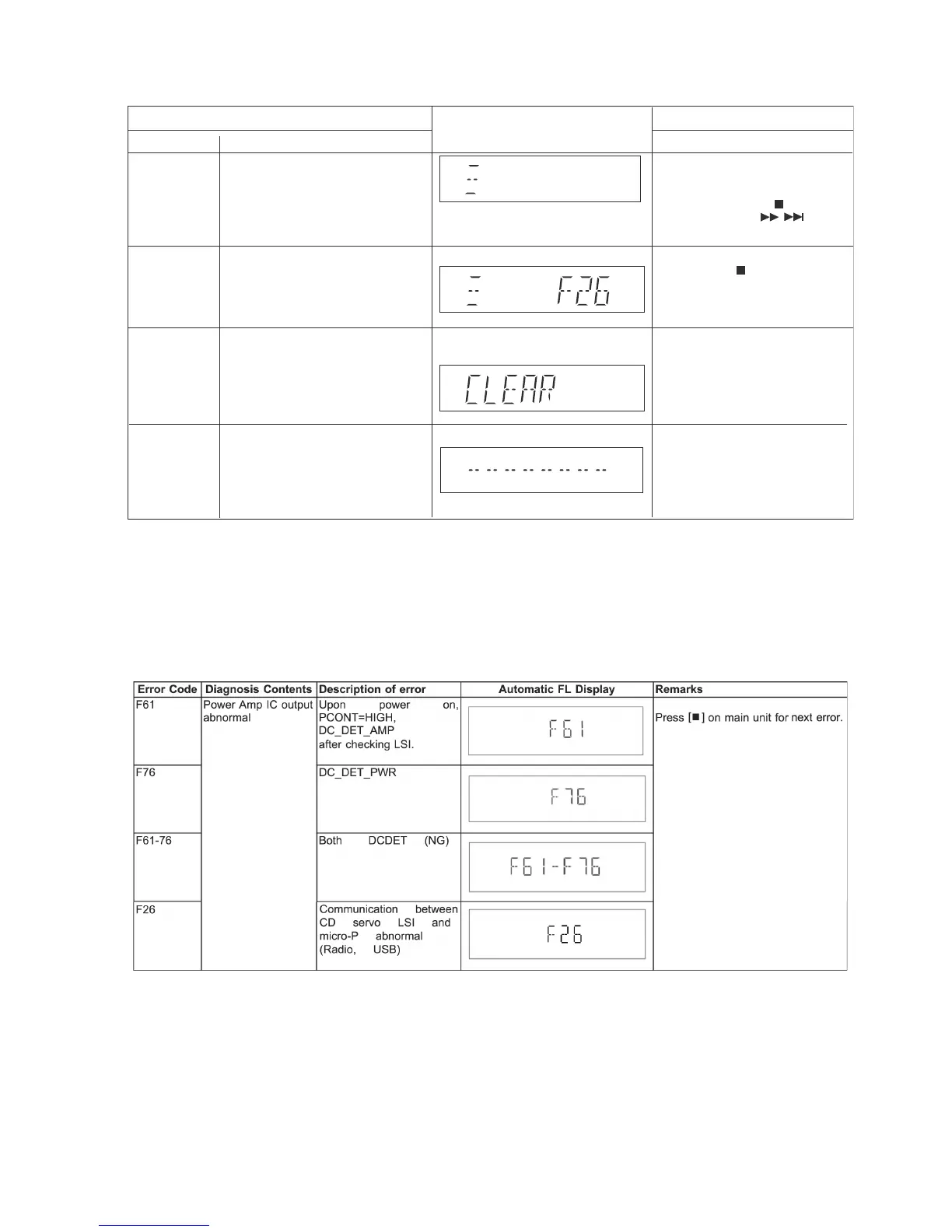
Self-Diagnostic Function (Refer Section 8.4. Self-Diagnostic Mode) provides information on any problems occurring for the unit and
its respective components by displaying the error codes. These error code such as U**, H** and F** are stored in memory and held
unless it is cleared.
The error code is automatically display after entering into self-diagnostic mode.
8.5.1. Power Supply Error Code Table
FL Display
Key Operation
Front Key
Item
Description
Mode Name
To enter into self diagnostic checking
System will perform a check on any
unusual/error code from the memory
To clear the stored in memory
(EEPROM IC)
Self Diagnostic
Mode
Error code
information
Delete error
code
Step 1: Select CD mode
(Ensure no disc is inserted).
Step 2: Press & hold [ ] button
follow by [ ] on
main unit for 2 seconds.
Step 1: In self diagnostic mode,
Press [ ] on main unit.
To exit, press [^/I] on main
unit or remote control.
Step 1: In self diagnostic mode,
Press [0] on remote control.
To exit, press [^/I] on main
unit or remote control.
Example:
/
Cold Start To active cold start upon next AC
power up when reset start is
execute the next time.
In self diagnostic mode:
1. Press [3] button on
the remote control.




 To Next Page