EasyManua.ls Logo

Panasonic SA-MAX3500PU - Troubleshooting Guide; Troubleshooting: No Power

Panasonic SA-MAX3500PU
104 pages
Print Icon
To Next Page IconTo Next Page
To Previous Page IconTo Previous Page
Loading...
18
7 Troubleshooting Guide
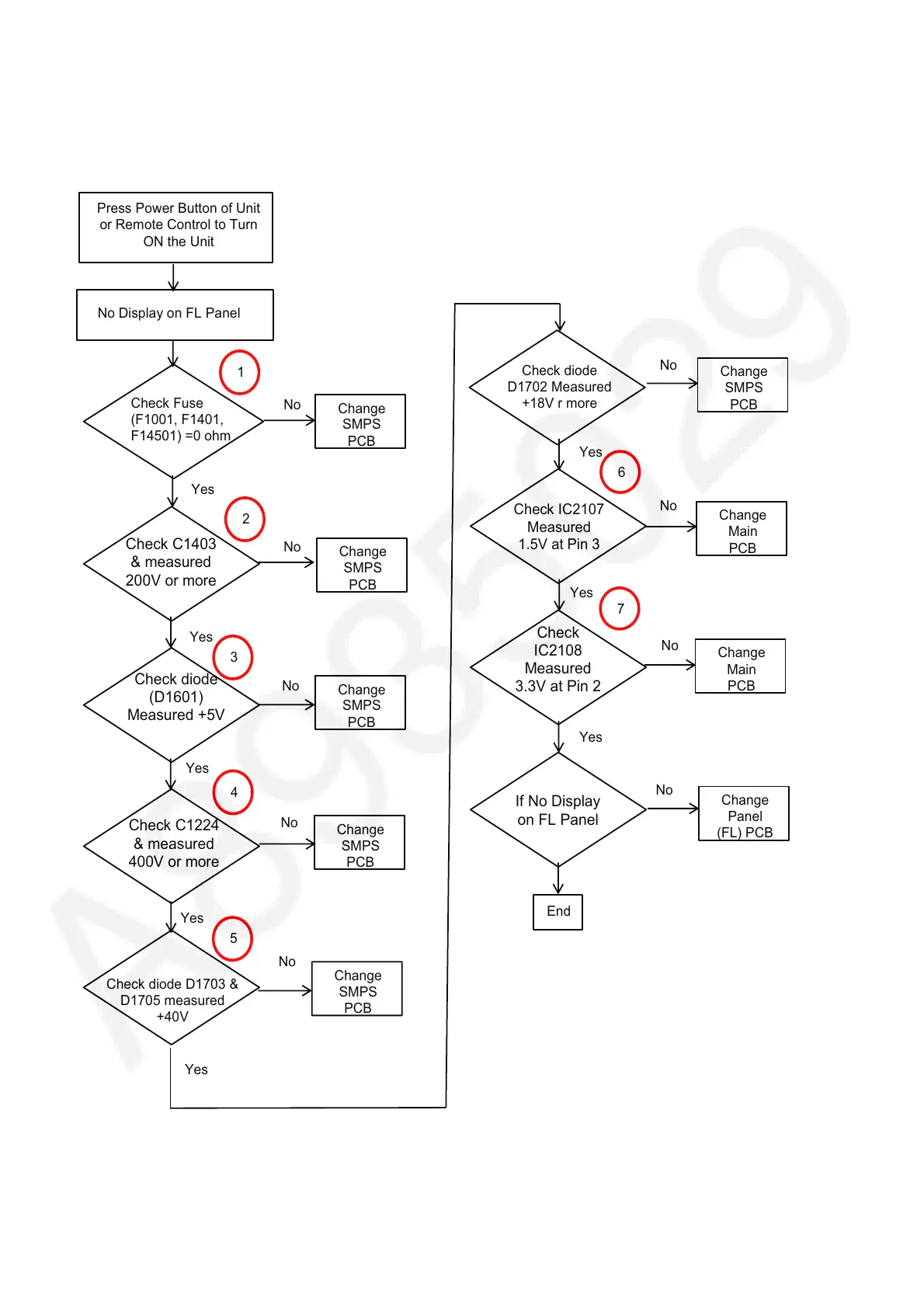
7.1. No Power ( No LED Display + No Response)
Press Power Button of Unit
or Remote Control to Turn
ON the Unit
Check Fuse
(F1001, F1401,
F14501) =0 ohm
No
Check C1403
& measured
200V or more
Yes
No
No
Yes
No
1
2
Yes
No
No
Yes
Check diode
(D1601)
Measured +5V
Check C1224
& measured
400V or more
No
Check diode
D1702 Measured
+18V r more
Check IC2107
Measured
1.5V at Pin 3
6
Change
SMPS
PCB
Change
Main
PCB
Check
IC2108
Measured
3.3V at Pin 2
Change
Main
PCB
7
Yes
Yes
If No Display
on FL Panel
Change
Panel
(FL) PCB
No
3
4
No Display on FL Panel
End
Check diode D1703 &
D1705 measured
+40V
Yes
No
Yes
5

Table of Contents

Related product manuals