BA_PH_690-100_EN_10-22.docx
11 Commissioning
Please observe the accident prevention regulations!
Before switching on, check that
• there are no loose parts on the tabletop and that all tools have been removed,
• the riving knife is correctly adjusted and the sawdust flap is closed,
• the slide table is in working position,
• the saw blade guard is properly fitted,
• the V-belt is properly tightened,
• the extraction system is connected and in working order,
• the correct speed is displayed,
• no persons are in a danger zone of the machine.
11.1 Control Elements
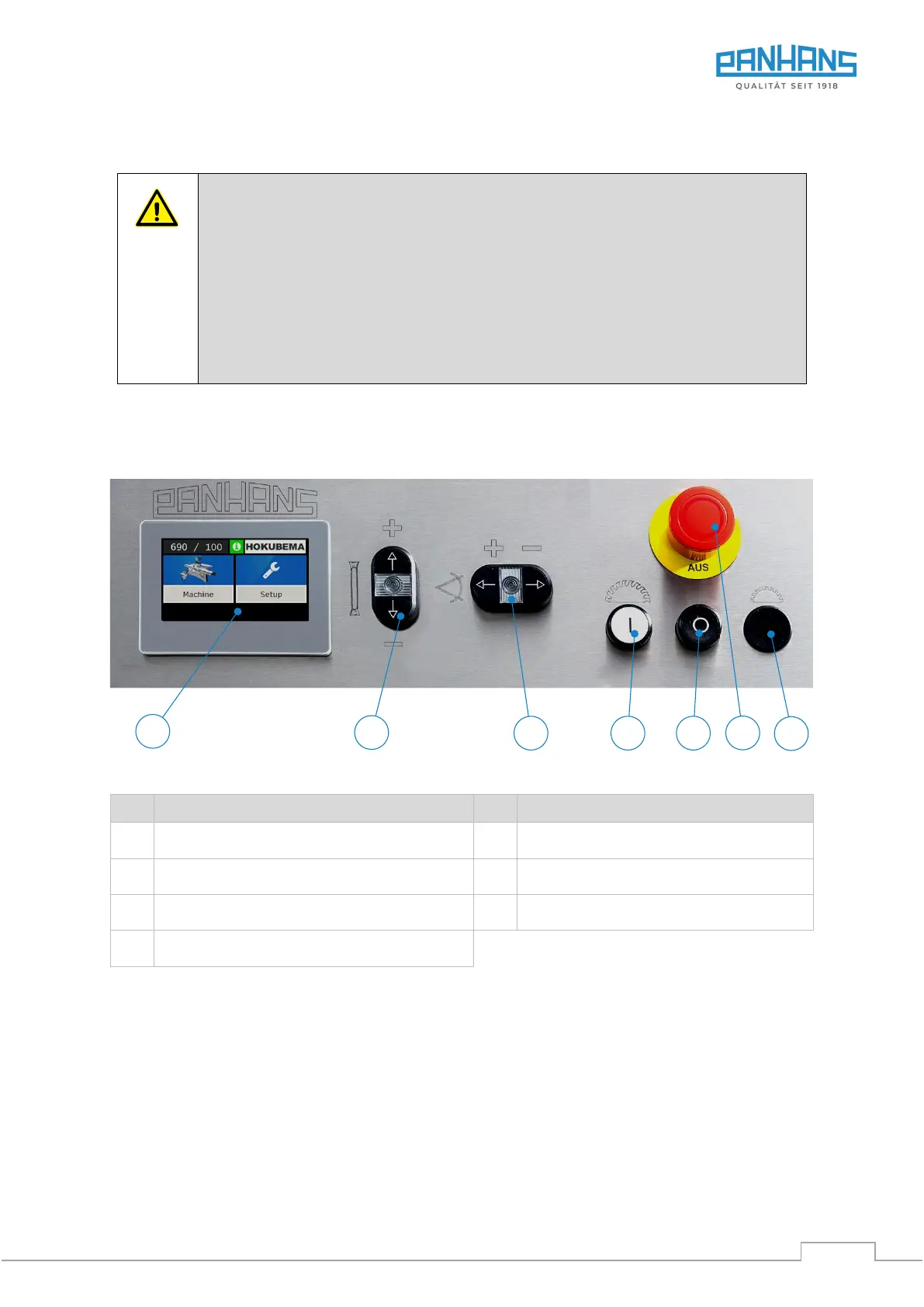
The following controls are available on the control panel of the 690|100 sliding table saw:
Figure 28: Control elements
Saw blade angle adjustment (up to 46°)
Switch on main saw (lights up when "ON")
Indicator height / angle / speed
Preparation switch scoring saw (option)
Saw blade height adjustment
11.2 Switching ON
• Turn the main switch (right on the control cabinet) to position “I”.
• Press the push-button "Switch on main saw" (2) and wait until full speed is reached.
• Start cutting operation.
11.3 Switching OFF
• To switch off, press push-button (3) → The machine is slowed down.
• Turn the main switch (right on the control cabinet) to position “0”.


 To Next Page