BA_PH_690-100_EN_10-22.docx
13 Operating the 4.7" Touch Display
The 4.7" touch display visualises the height and tilt of the saw blade as well as the selected speed.
13.1 Start Screen
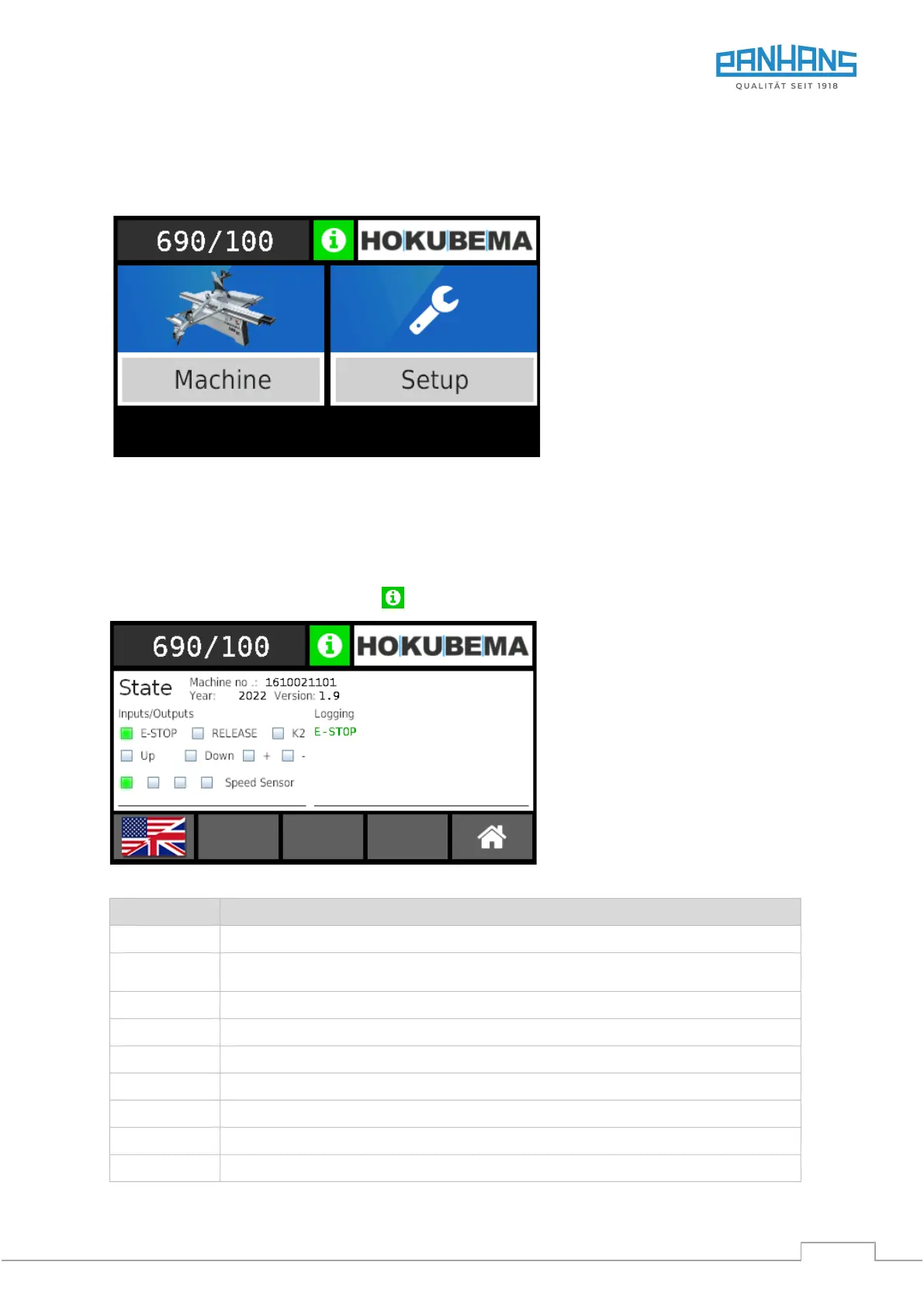
Figure 32: Start screen
• To be able to operate the machine, press the “Machine” symbol (see section 13.4).
• The “Setup” menu is password-protected and not relevant for the operator.
13.2 Status Window
To open the status window, press the icon .
Figure 33: Status window
Lights up green if emergency stop chain ok or red if malfunction in emergency stop chain.
Monitoring of the voltage release for the adjusting motors of the two axes.
→ The field must light up when one of the two positioning buttons is pressed.
Status message “Main Motor running”
Hardware test of buttons up/down (height) → Lights up when the resp. button is pressed
Hardware test of buttons +/- (angle) → Lights up when the resp. button is pressed
Indicates the V-belt position of the speed sensor
Displays present errors and faults as text (present = red / remedied = green)
Open the language menu / switch the language (see next section 13.3)
Jump back to the previous level


 To Next Page