78
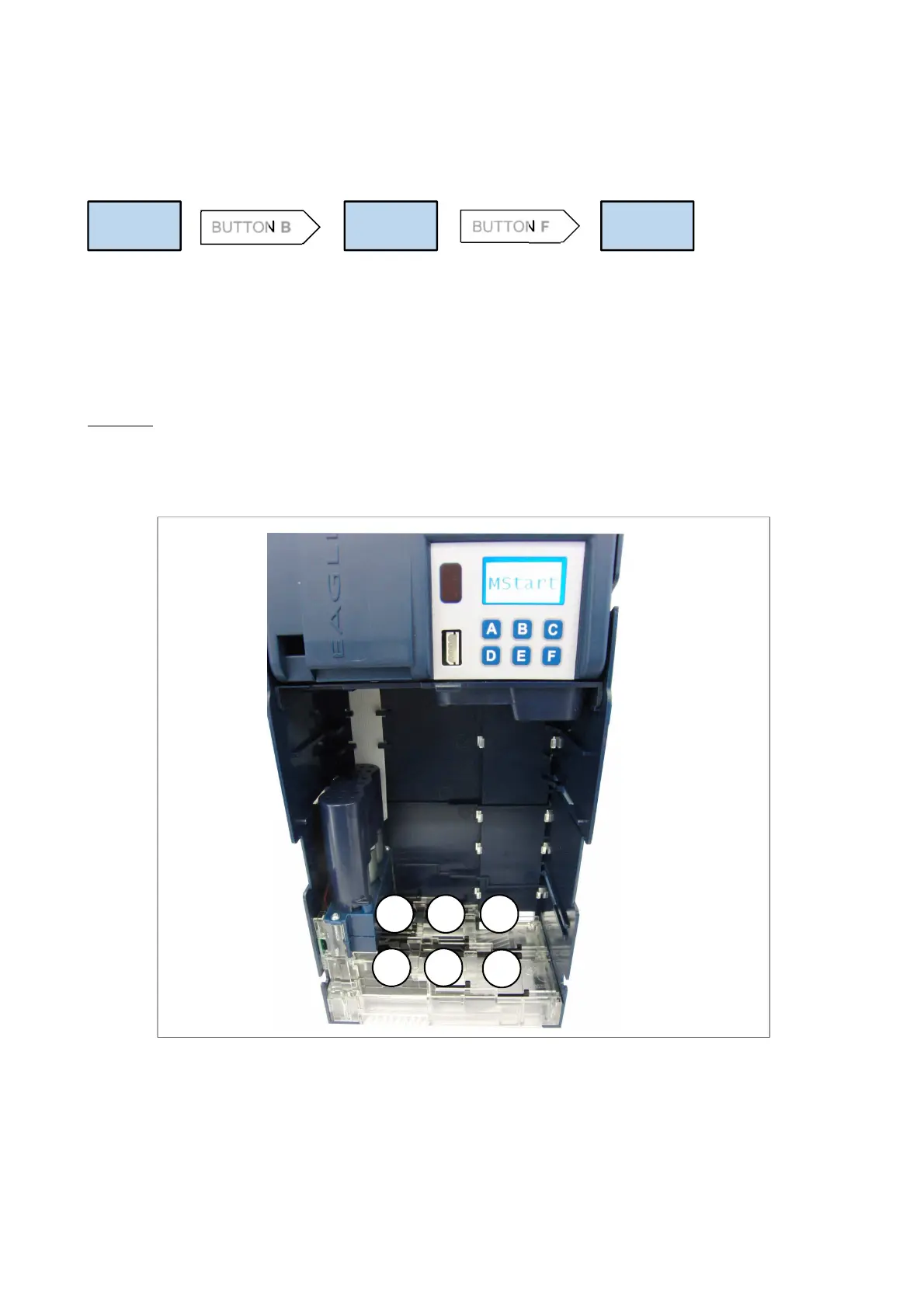
Fig.13
Using function MOVE
Remove the tube group to see the pullers’ position and restore their position manually.
Press B to switch to MOVE, when the message “Slides” is displayed.
Press F to activate function MStart, which permits to rotate pullers’ motors.
D
As soon as the message MStart is displayed, you can press ABCDEF to rotate with short steps the pivot moving
the pullers.
Press A and D to rotate upper pullers and ejectors for tubes A and D.
Press B and E to rotate intermediate pullers and ejectors for tubes B and E.
Press C and F to rotate lower pullers and ejectors for tubes C and F.
Every motor rotates a puller couple AD, BE, CF.
Example: each time A is pressed on the keypad, the motor causes puller A to rotate forward; press D if you wish
puller A to rotate back (after puller A has rotated backward, puller D starts rotating forward).
Fig.13 shows which buttons cause the puller couples to rotate.
How to exit function MOVE: switch the changegiver OFF, or press again Escrow lever + F.
Slides
MOVE
BUTTON B
BUTTON F
MStart
A
D
B
C
E
F



 To Next Page