16
CASHLESS / POS
BILL VALIDATOR
APEX 7000
LOCAL PAYTEC
READER
MDB SLAVE
MDB SLAVE
J9/J10
Connecting an MDB Slave unit
EAGLE is equipped with a serial cable for connection to an MDB Slave unit (e.g. a Bill Validator or a Cashless
reader).
The standard MDB enables parallel connection of a number of peripherals (in any case, the peak current
absorption must not exceed 1.5 A).
An MDB slave unit is automatically recognized when giving power to EAGLE.
Notice
The management of a double Cashless MDB is not compatible with the management of a local Paytec Key reader
PIT or MIFARE
(plugged on J9/J10, see p.12).
When connecting an OPTO reader (double Cashless MDB) you CANNOT connect a CAIMAN key reader.
Connecting both a Key reader and an MDB unit
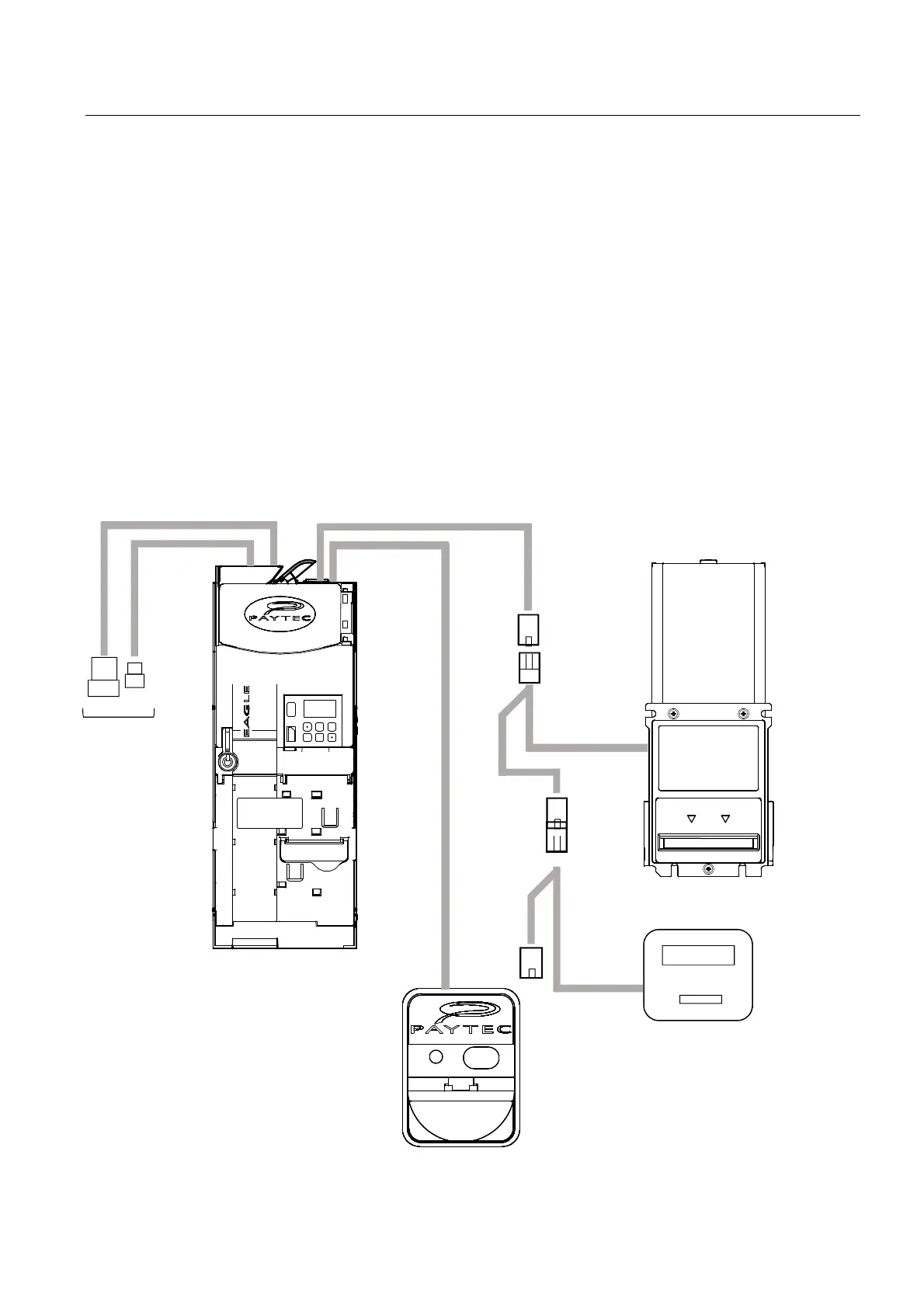
It is possible to connect both a Paytec key reader (plugged on J9) and a Cashless MDB (e.g. a Cashless POS
MDB). In such case, remember that the system will only accept the credit of the key that is inserted first.
Such solution is not valid for the OPTO MDB reader.
Here below, an example of a combined connection between a Paytec local reader, a Bill Validator MDB and a
POS MDB.



 To Next Page