XF Camera System Manual |
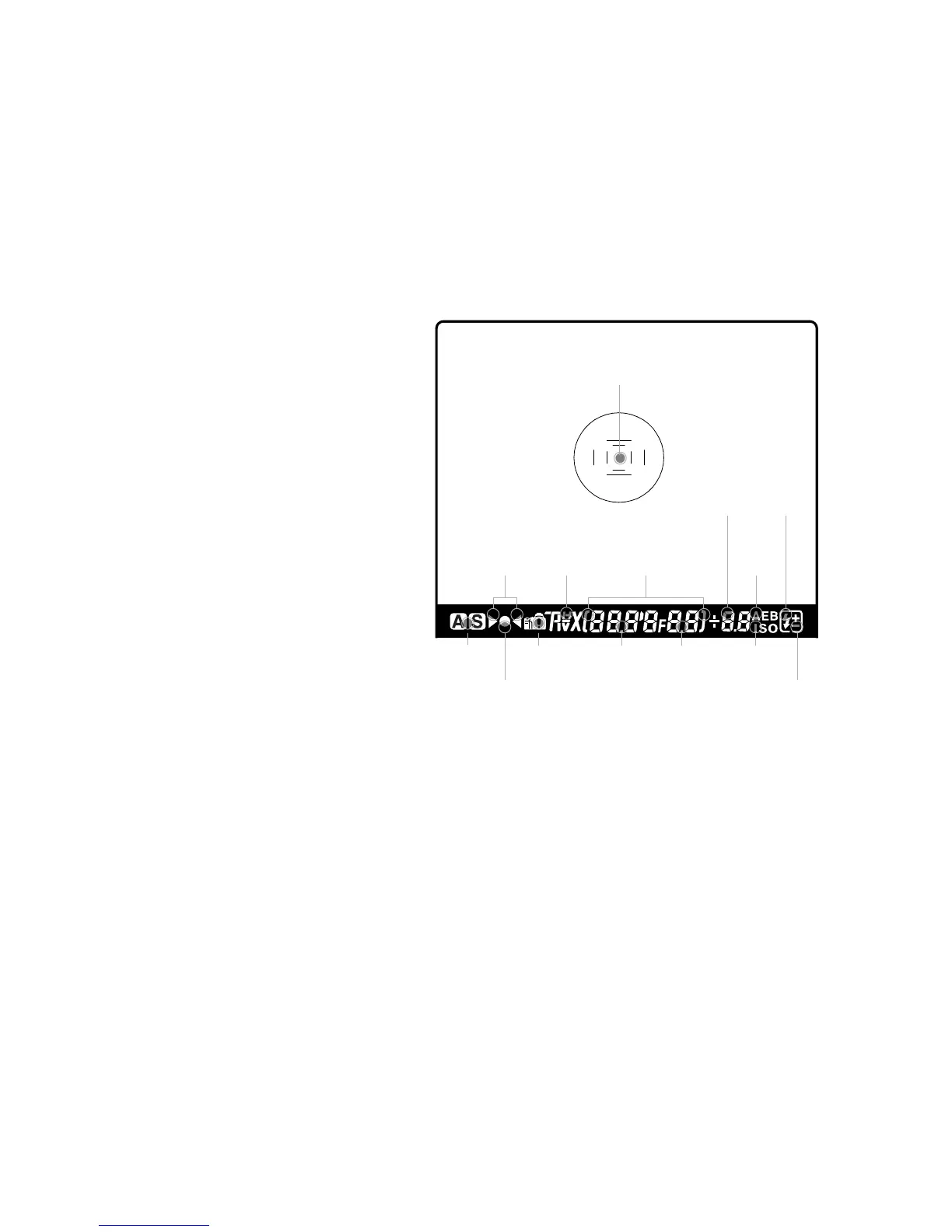
Auto focus area indicator
Prism Viewfinder Display
and Functions
Viewfinder Overview
Autofocus Area
The XF is equipped with autofocus sensor indicators in the center of the frame.
Two rectangular AF areas are displayed on the focusing screen, one within the
other, that corresponds to the Average and Spot AF mode options available
with the camera. Surrounding the AF area is a central spot that denotes the
Spot metering area only.
The AF area in use is highlighted on the XF Top Touch Screen. To change the AF
area mode, touch the icon, and select the appropriate area option from the screen.
Viewfinder Display
The XF has a comprehensive viewfinder display. However, for clarity only
relevant information is shown. Please refer to the image above for an
explanation of each possible display settings.
Exposure
Metering
Focus mark
Indicates
when in focus
Flash
Charge
indicator
Flash
compensation
mark
Caution
mark
Shutter
Speed
Aperture
Exposure
compensation
value /
Dierence
between
metered
and set
exposure
value
Defocus
indicators
AE Lock
indicator
Exposure
Mode
Auto
Bracketing
mode
ISO value
indicator



 To Next Page