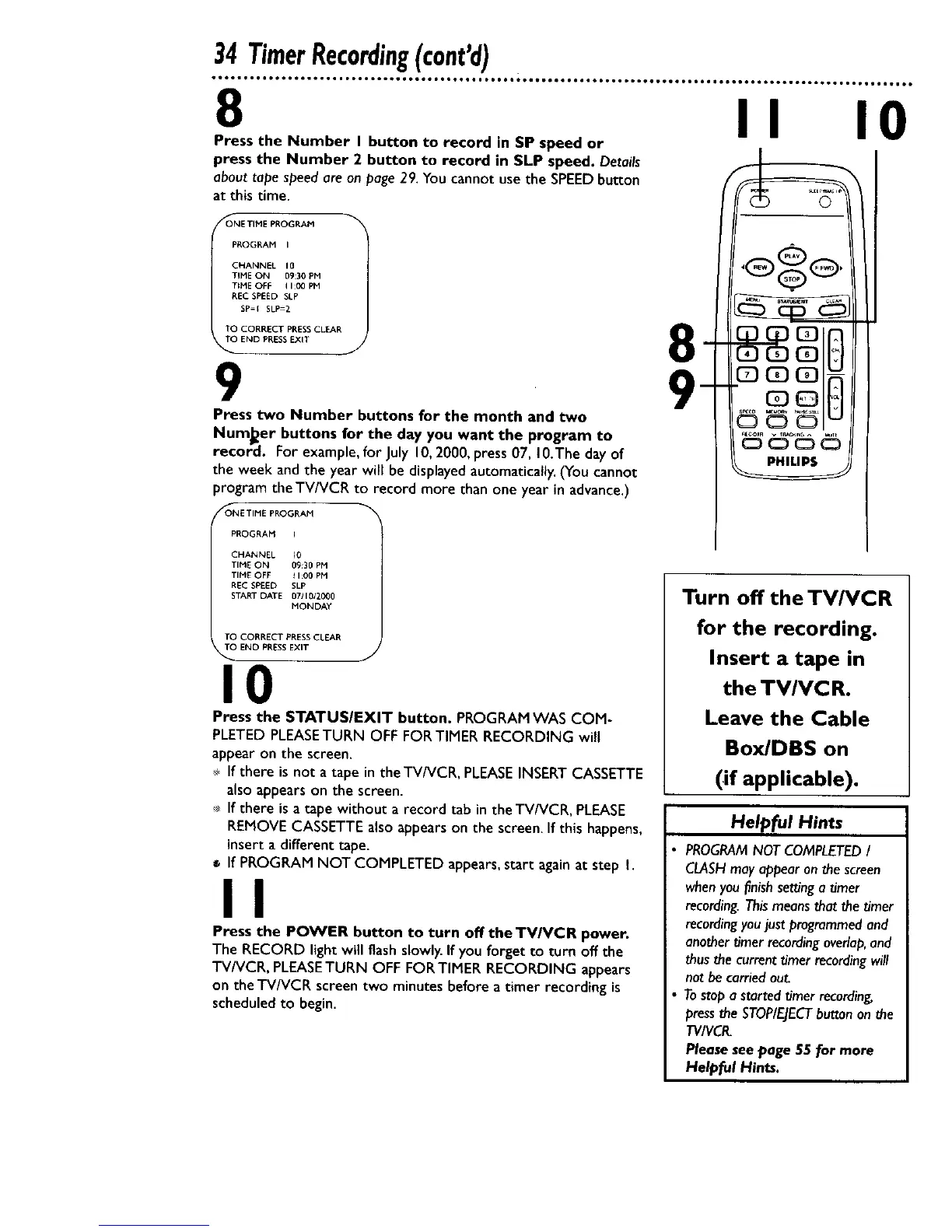
8 II 10
Press the Number I button to record in SP speed or
press the Number 2 button to record in SLP speed. Details
abouttape speedare on page 29. You cannot use the SPEEDbutton
at this time.
_OONE TIME PROGRAM
PROGRAM I
CHANNEt 10
TIME ON 09:30 PM
TIME OFF qI:00pM
REC SPEED SLP
SP={ SLP=2
TO CORRECT PP,ESS CLEAR
TO END PRESSEXIT
9 9
Press two Number buttons for the month and two
NumJ_er buttons for the day you want the program to
record. For example, for July 10, 2000, press 07, 10.The day of
the week and the year will be displayed automatically. (You cannot
program the TV/VCR to record more than one year in advance.)
/_ONE TIME PROGRAM
8
PROGRAM
CHANNEL _0
TIME ON 09:30 PM
TIME OFF t I:00 PM
REC SPEED SLP
START DATE 07110/20_0
MONDAY
TO CORRECT PRESSCLEAR
TO END PRESS EXIT
J
10
Press the STATUSIEXIT button. PROGRAM WAS COM-
PLETED PLEASE TURN OFF FOR TIMER RECORDING will
appear on the screen.
If there is not a tape in theTV/VCR, PLEASE INSERT CASSETTE
also appears on the screen.
If there is a tape without a record tab in the TV/VCR, PLEASE
REMOVE CASSETTE also appears on the screen. If this happens,
insert a different tape.
If PROGRAM NOT COMPLETED appears, start again at step I.
II
Press the POWER button to turn off the TV/VCR power.
The RECORD light will flash slowly. If you forget to turn off the
TV/VCR, PLEASETURN OFF FOR TIMER RECORDING appears
on the TV/VCR screen two minutes before a timer recording is
scheduled to begin.
©
Turn off the TV/VCR
for the recording.
Insert a tape in
the TV/VC R.
Leave the Cable
Box/DBS on
(if applicable).
Helpful Hints
PROGRAM NOT COMPLETED I
CLASHmay appear on the screen
when you l_nishsetting a timer
recording. This means that the timer
recording youjust programmed and
another timer recording overlap,and
thus the current timer recording will
not be carried out.
Tostop a started timer recording,
press the STOP/EJECTbutton on the
TVIVCR.
Please see page 55 for more
Helpful Hints.










 To Next Page