1. Back - Return to the previous screen.
2. Home - Return to the Home screen from anywhere in Envelope Printing.
3. Support - Search support content and get information on how to use the Envelope Printing app.
4. Network - View the current network type (wireless or Ethernet) and status and strength (for
wireless connection). The image here represents a wireless connection.
5. Settings View or change your device settings. This includes adjusting the screen brightness,
setting sound notification levels, and viewing wireless or Ethernet connection information.
6. Profile - Lock your device when you enable the security PIN.
Navigating the Envelope Printing app
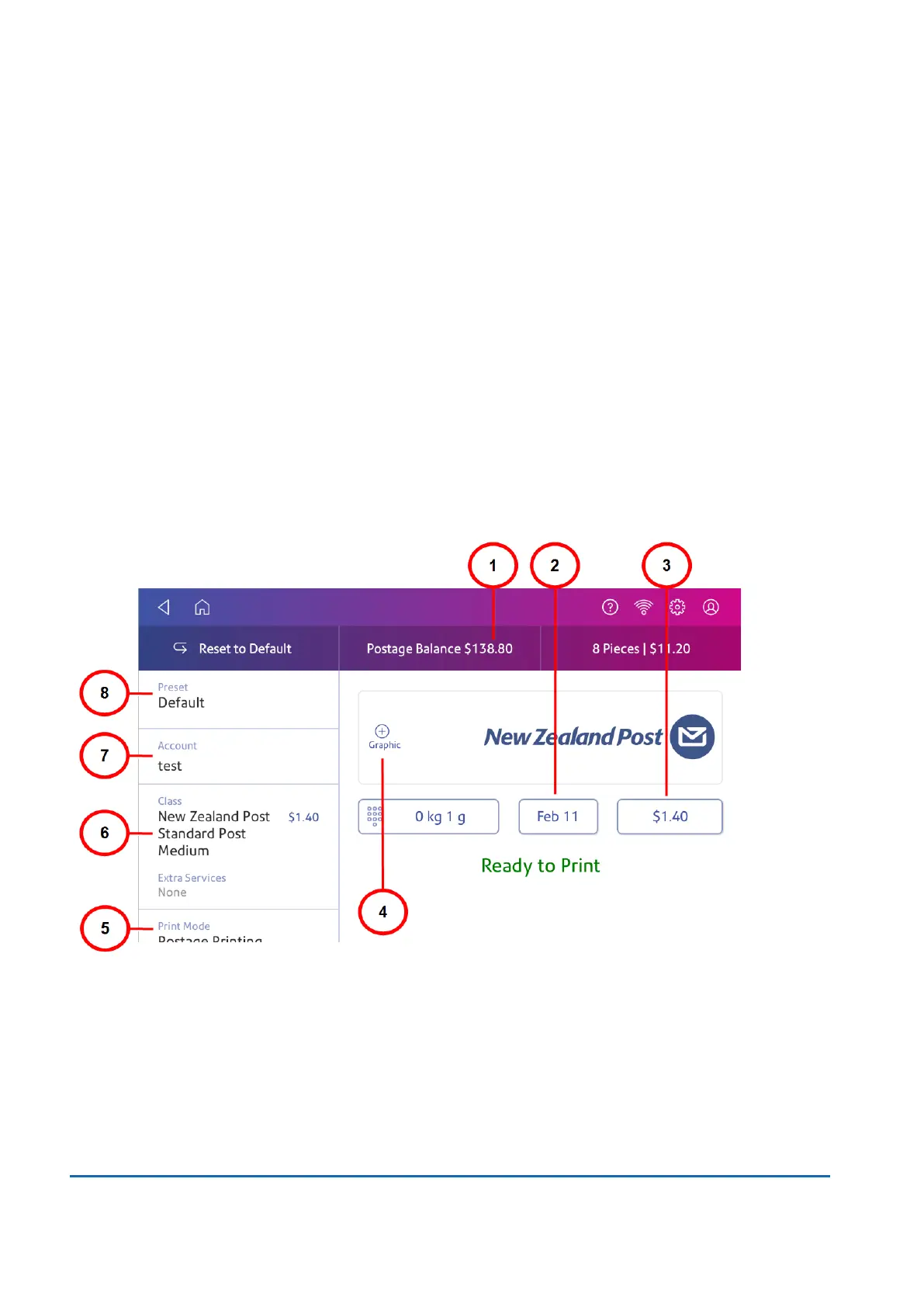
The Envelope Printing app is the starting point for printing postage on an envelope or a tape. It also
allows you to change what you print. It also allows you to change what you print.
Tap Envelope Printing on the Home screen to open the app.
On this screen, you can:
1. View Postage Balance - View the balance of funds you have left in your device.
2. View Date - Tap the date to view the date options.
3. View Total postage amount - View the total postage amount.
15 • Product Information
Pitney Bowes User Guide June 2022 107













 To Next Page