4. Print Graphic - Tap Graphic +to preview or add graphics. You can also add a custom text
message.
5. View Print Mode - View the available printing modes such as printing a graphic only, printing
the date and time, or seal envelopes without printing postage.
6. View Class - Tap Class to view available postal classes and any extra services.
7. View Account - Tap Account to charge back postage to departments or clients, and run reports
showing how you spent your postage over specific time periods.
8. View Preset - Tap Preset to store a group of commonly-used settings. Presets can store
settings such as a postage class, an account and a graphic.
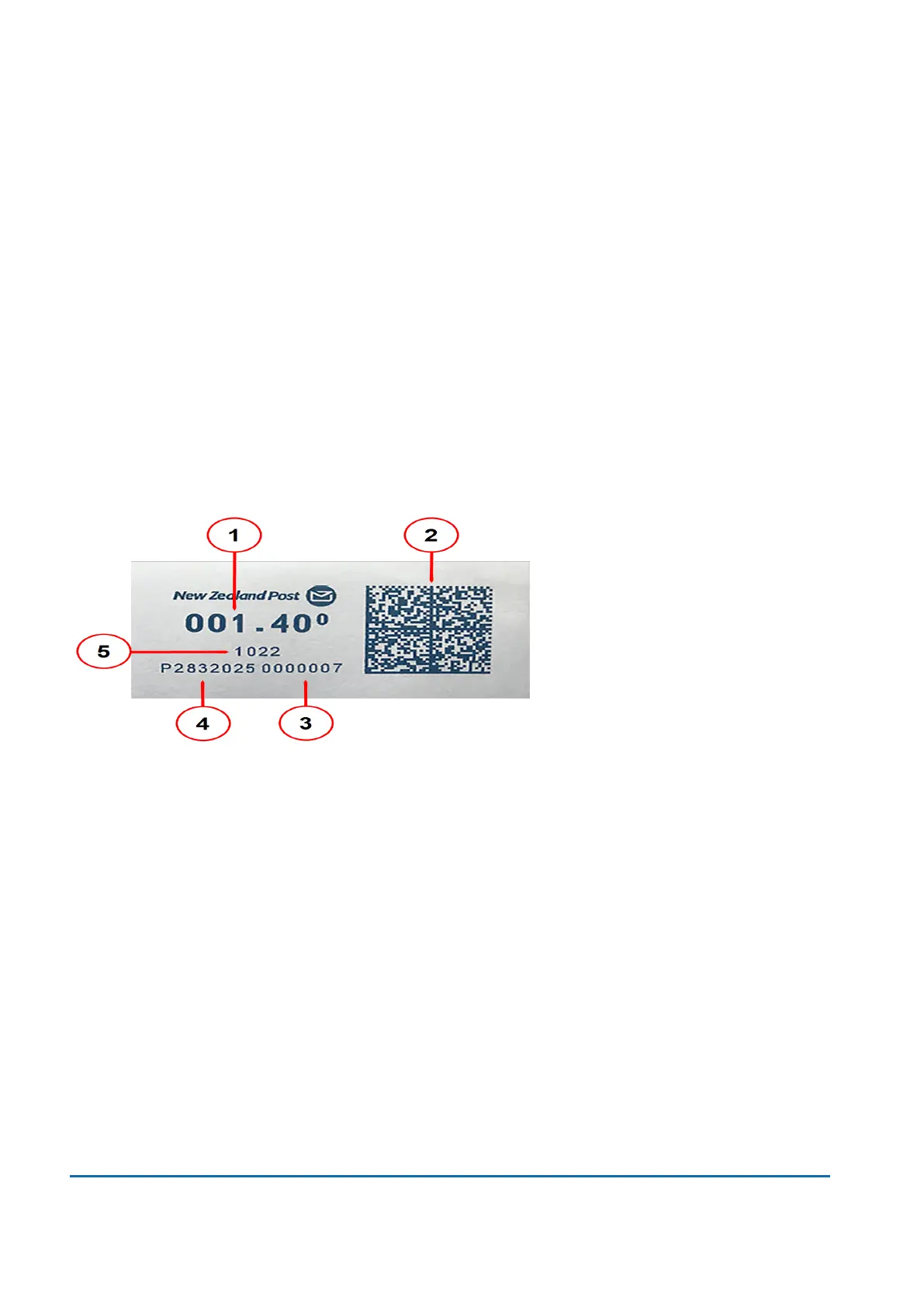
Parts of a meter stamp
The meter stamp contains elements that identify the mailer and the type of mail. Optional parts include
advertising graphics and logos.
1. Postage amount.
2. Data matrix barcode - contains postage and tracking information.
3. Piece count.
4. Device serial number.
5. Post code.
Postal Security Device
The postage meter on your mailing system is a Postal Security Device (PSD) that secures your
postage funds. It includes the latest technology approved by New Zealand Post. This technology
eliminates the need for New Zealand Post to perform physical inspections, thereby making your
device easier and more convenient for you to use.
15 • Product Information
Pitney Bowes User Guide June 2022 108













 To Next Page