34
1
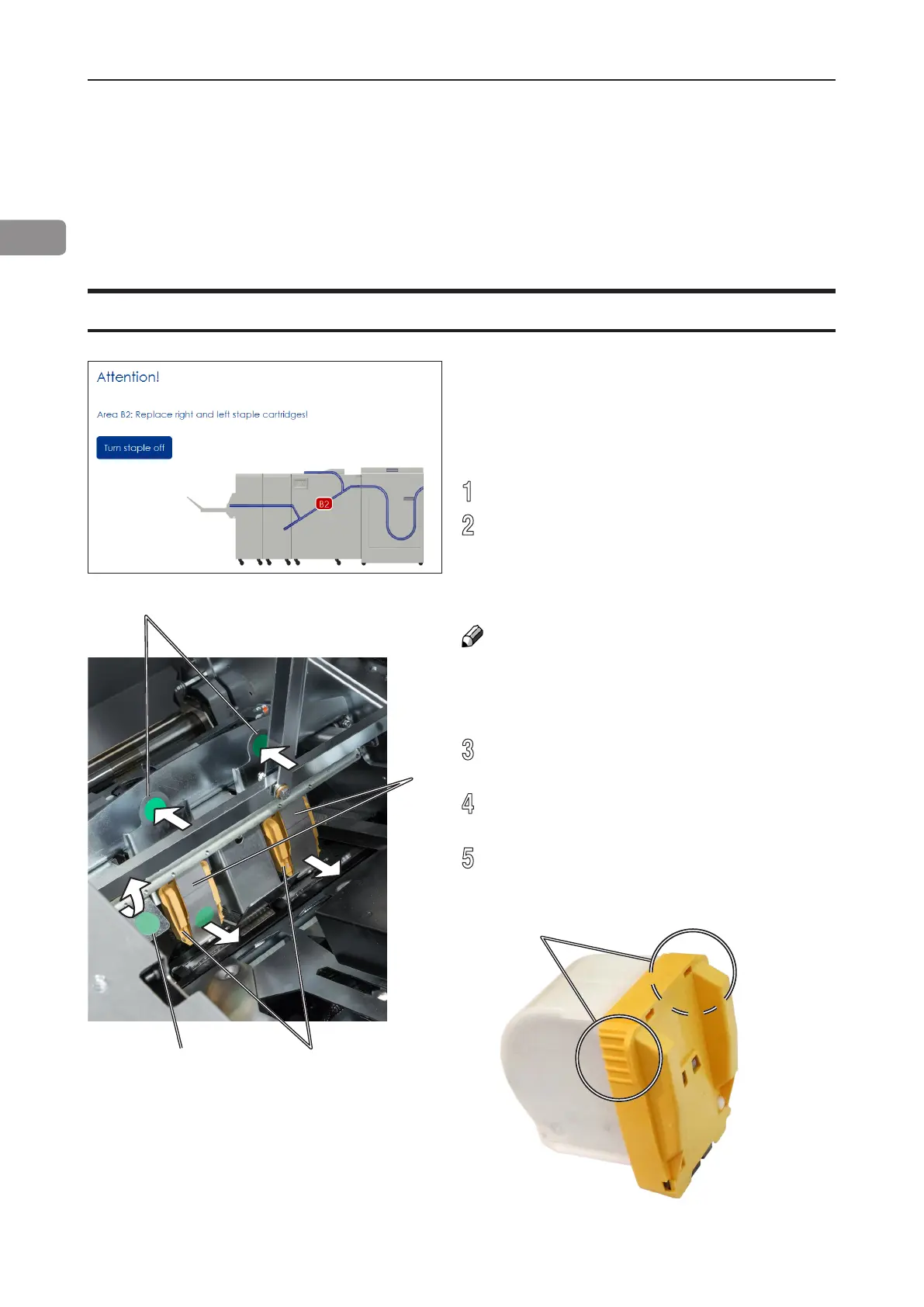
[E]
[B]
[C]
[D]
[A]
Change staple cartridges and Check Stapler
Change left/right staple cartridge(s)
The staple cartridges contains approximately 5000 staples each. Each cartridge includes
all wearable parts. The cartridges may need to be removed either for replacement or for
jam clearance.
The Booklet Maker will indicate “Replace left/
right/left and right staple cartridges” when there
are approximately 20 staples left in the stapler
cartridge. Replace the indicated staple cartridge
by doing the following:
1
Open the Booklet Maker top cover.
2
Remove one or both staple cartridges by
lifting the lever [A], pressing either or both
levers [B] and pulling either or both staple
cartridges [C] out using the grip [E] at both
sides of the staple cartridge.
NOTE:
Lever [A] controls the stapler guides [D]. It is kept
in place by a magnet and can be hard to release.
Pressing either lever [B] makes it a bit easier to
overcome the force of the magnet.
3
Replace by pushing a new staple cartridge
into stapler until it snaps into position.
4
Put the stapler guides [D] back in position so
that lever is locked by the magnet.
5
Close booklet maker top cover and restart the
job.



 To Next Page