75
6
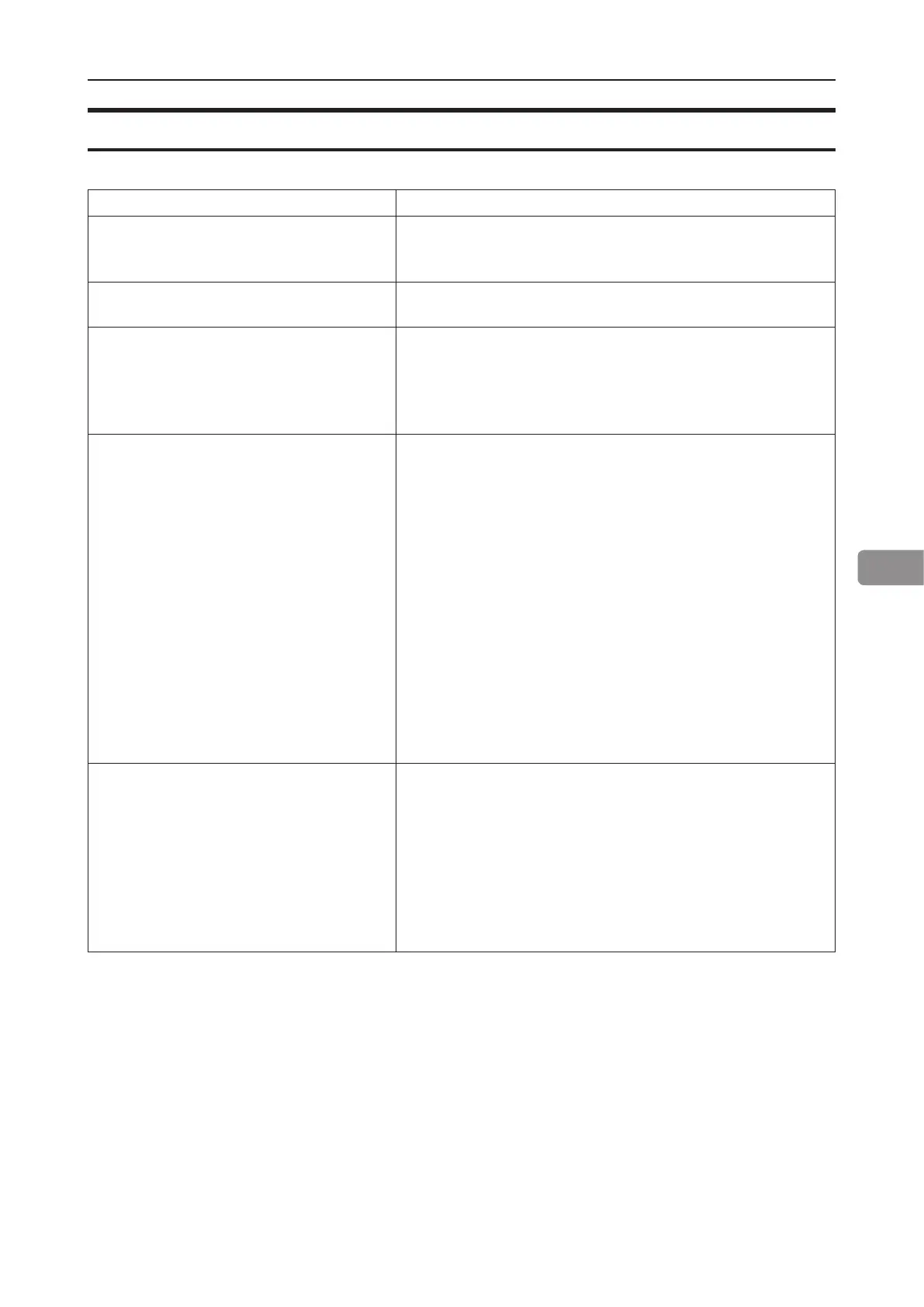
Cover Feeder
Code / message Explanation / action
CF-001 - CF-012 Possible fault in
area, please power off and power on to
recover!
Indicates that there might be an internal communication
error. Power off and on the system. If problem persists,
contact customer support.
CF-201 Out of covers, remove sheets
from Booklet Maker!
Indicates “Out of covers” in the Cover Feeder. Load
covers according to section 1, “Basics.”
CF-202 - CF205 and CF-207 Clear
misfeed!
A misfeed has occurred in the Cover Feeder.
Check cover loading according to section 1, “Basics”,
Cover Feeder.
If problem persists, clean separator pad according to
section 7, “REMARKS.”
Double feed from CF, remove double
from inside the booklet maker.
A double feed has occurred in the Cover Feeder.
If there was a true double:
1. Check for proper loading of covers according to
section 1, “Basics”, Cover Feeder.
2. Increase air ow according to section 2, “Making
Booklets.”
3. Clean feed belts according to section 7,
“REMARKS”, Maintaining your machines.
If there is a false double:
1. Check that covers are within specication.
2. Temporary turn double sheet detection off. See
section 2, “Making Booklets”, Customizing settings.
If the covers fed are thick, with dark print or with mixed
prints on the covers, double feeding may be displayed
even if that is not the case.
Cover size not equal to paper size.
Change cover size!
Indicates that there is a format mismatch between the
sheets loaded in the Cover Feeder and the sheets in the
Booklet Maker.
There are two options:
1. Correct either mismatch and press the [Done] button.
2. Turn the Cover Feeder off by pressing the [Turn cover
off] button to continue booklet making but without
feeding covers.
Cover Feeder fault codes



 To Next Page