44
2
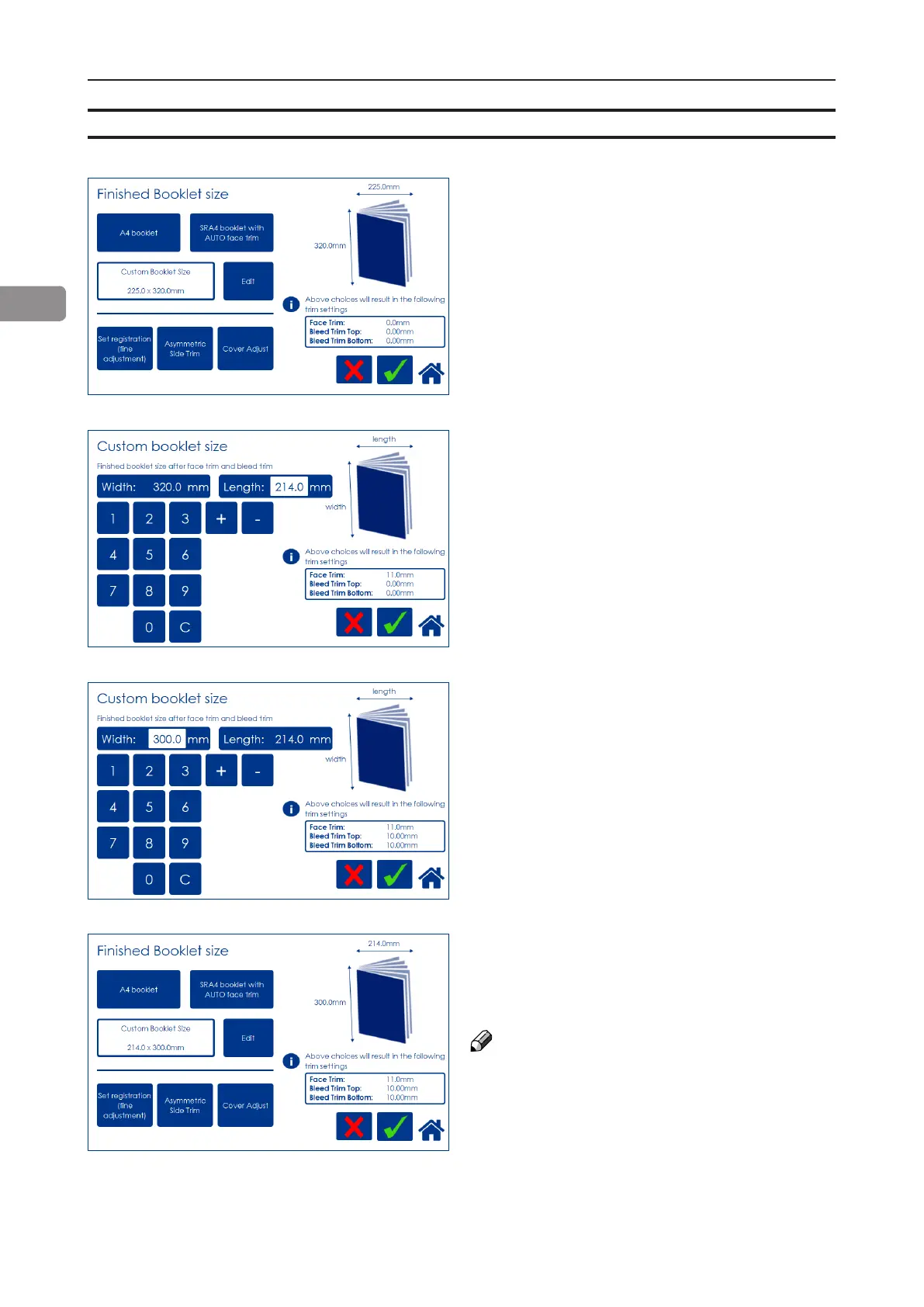
To adjust the amount of face trim, press the
number on the [Length] button and type in the
desired length of the booklet, decimals included.
Also, the [plus] and [minus] buttons can be used
to change the numbers. The amount of face trim
is displayed in the box.
Press the green [check] button to conrm or
continue adjusting the amount of bleed trim.
To also adjust the amount of bleed trim, press
the number on the [Width] button and type in the
desired width of the booklet, decimals included.
Also the [plus] and [minus] buttons can be used
to change the numbers. The amount of bleed
trim is displayed in the box.
Press the green [check] button to conrm.
Back in the Finished Booklet size screen, the
size of the nished booklet and the amount of
face and bleed trim is displayed.
Press the green [check] button to conrm.
NOTE:
When using the bleed trim function and
feeding covers at the same time, make sure
covers loaded in Cover Feeder are the same
size as sheets fed from the RCT. According
to the example on the left, covers must be
300x450mm.
Custom booklet size
To set the trim manually, press [Custom Booklet
Size] and then [Edit].



 To Next Page