51
2
Set registration (ne adjustment)
You can ne-tune the booklet quality by adjust-
ing the joggers in the booklet maker.
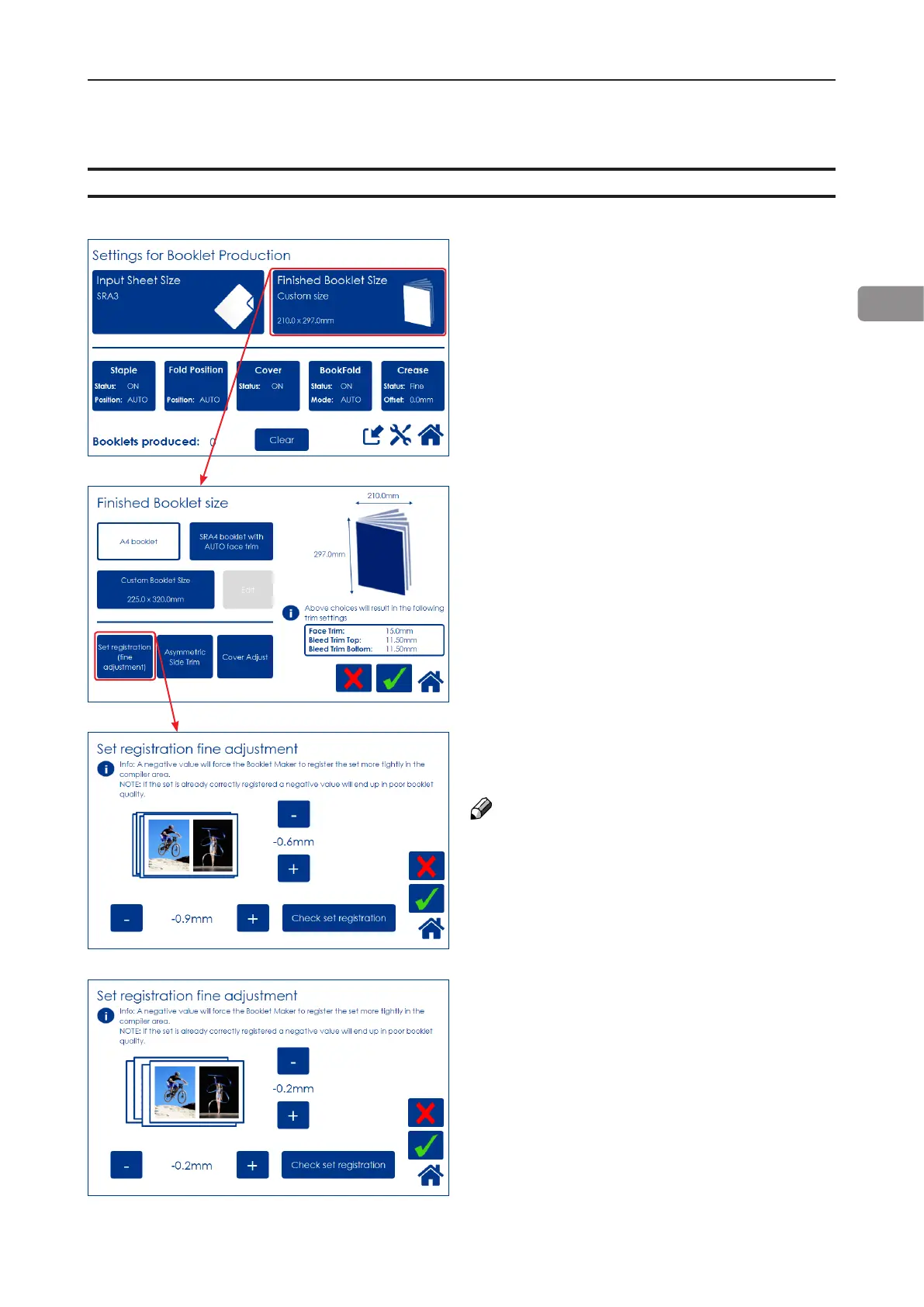
From the Settings for Booklet Production
screen, press the [Finished Booklet Size] button.
Fine-tuning booklet appearance
Press the [-] and [+] buttons to alter either or
both registration values.
Negative value means a tighter registration.
NOTE:
Too tight of a setting may worsen the result.
After setting registration value, press the [Check
set registration] button and follow the instruc-
tions on screen.
If you are satised with the registration, conrm
by pressing the green [check] button.
If not, press the [-] and [+] buttons to enter new
value. Check out the new value by pressing the
[Verify adjustments] button.
Press the green [check] button when you are
satised.
From the Finished Booklet size screen, press
the [Set registration (ne adjustment)] button.



 To Next Page