PreciseFlex_Robot
80
5. Once the appropriate project (for example CAL_PP) has been loaded into flash memory, it must
then be loaded into dynamic memory in order to execute. See the section below on “Calibrating
the Robot” for an example on how to load and execute the CAL_PP program.
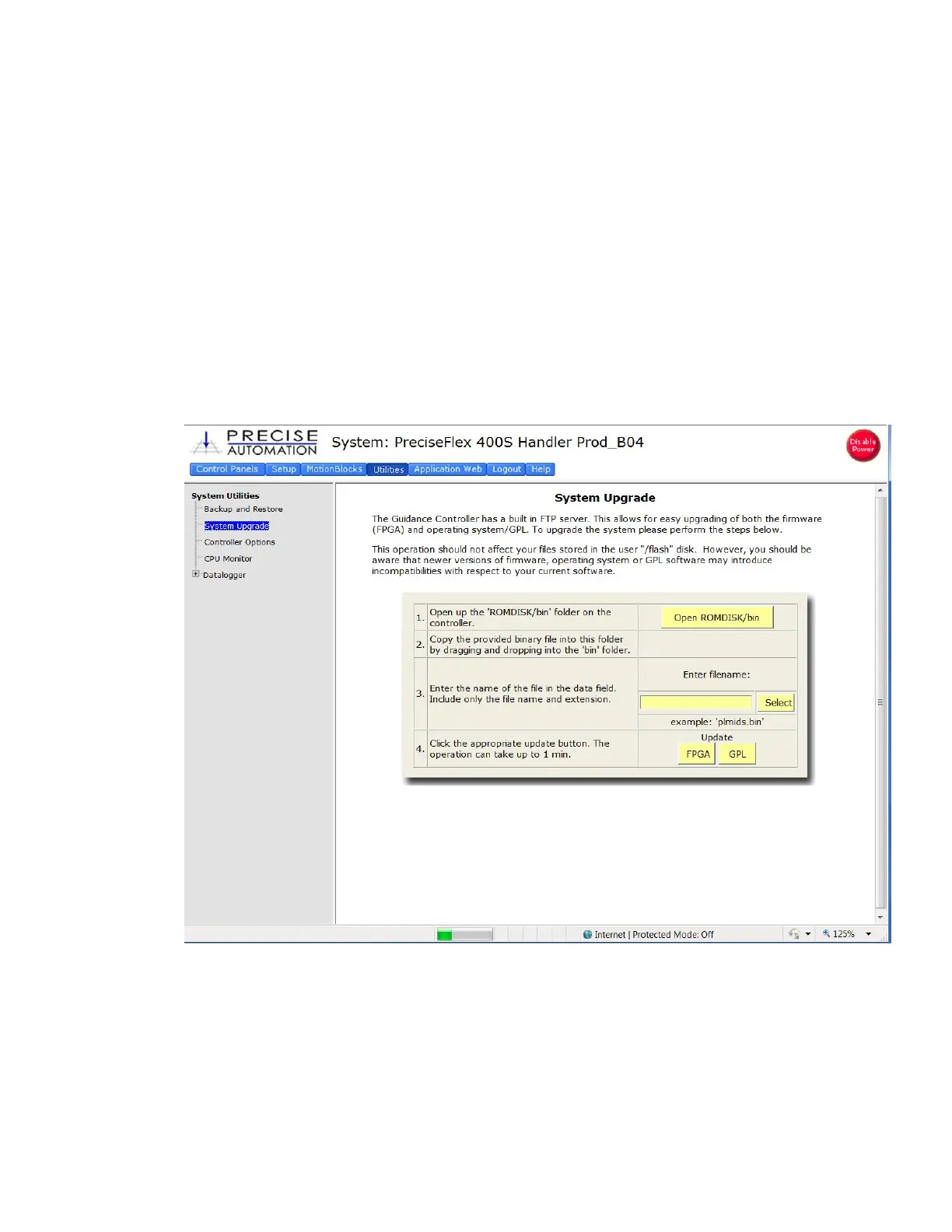
Updating GPL (System Software) or FPGA (Firmware)
Both GPL (the system software) and the FPGA firmware may be upgraded in the field. To perform an
upgrade:
1. Obtain the appropriate upgrade software from Precise, in the form of a .bin file.
2. In the Operator Interface, go to the Utilities/System Upgrade menu.
3. Click on Open ROMDISK/bin. This will open an FTP window. You will need to select “page” in
Internet Explorer and scroll to the bottom of the page menu and click “Open site in Windows
Explorer”. This will open a second ftp window in Windows. Paste the appropriate GPL or FPGA
.bin file in this window.
4. Under item 3 in the System Upgrade menu, click on the Select button. A pick list will open up.
Highlight the upgrade code in this pick list and click on the Select button again. The name of the
file will appear in the filename field.



 To Next Page