COACH INTERIOR
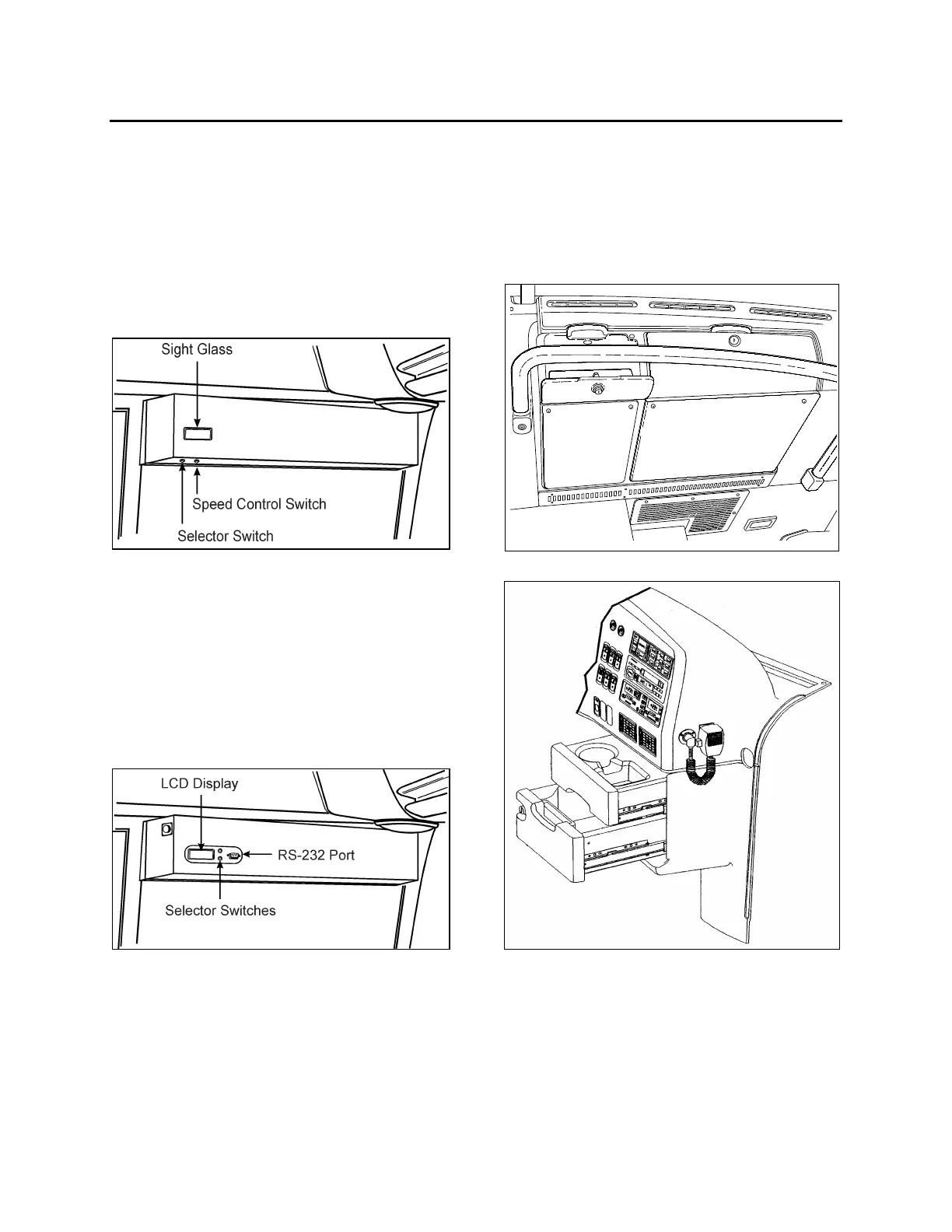
ELECTRICAL DESTINATION SIGN
Turn the optional destination sign lighting on and
off using the rocker switch located on the
dashboard. Refer to Controls & Instruments
chapter.
Depress the selector switch until the desired
destination appears in the sight glass and is
aligned with the arrow.
DESTINATION SIGN UNIT OEH3B210
Note: Use the servo control switch to change the
speed of the destination sign. Use high speed to
search for the desired destination and slow speed
to align the arrow in the sight glass.
ELECTRONIC DESTINATION SIGN
To change the destination, depress the selecting
switches until the desired destination appears in
the Liquid Crystal Display.
ELECTRONIC DESTINATION SIGN 2EH3B210
Note: The destination sign must be programmed
with a computer connected to the RS-232
connector prior to first use. Follow the
instructions on the computer disk to install and
run the software.
UTILITY COMPARTMENTS
Two lockable utility compartments are located at
the base of the windshield. Two drawers are
located on the console. The top drawer includes
a built-in cup holder and the lower one has a 12
volt appliance socket.
UTILITY COMPARTMENTS 18389
UTILITY DRAWERS IN CONSOLE 18444
STEERING WHEEL ADJUSTMENT
Push on the valve button with the left foot to
unlock the steering wheel for tilt and telescopic
adjustment.
15



 To Next Page