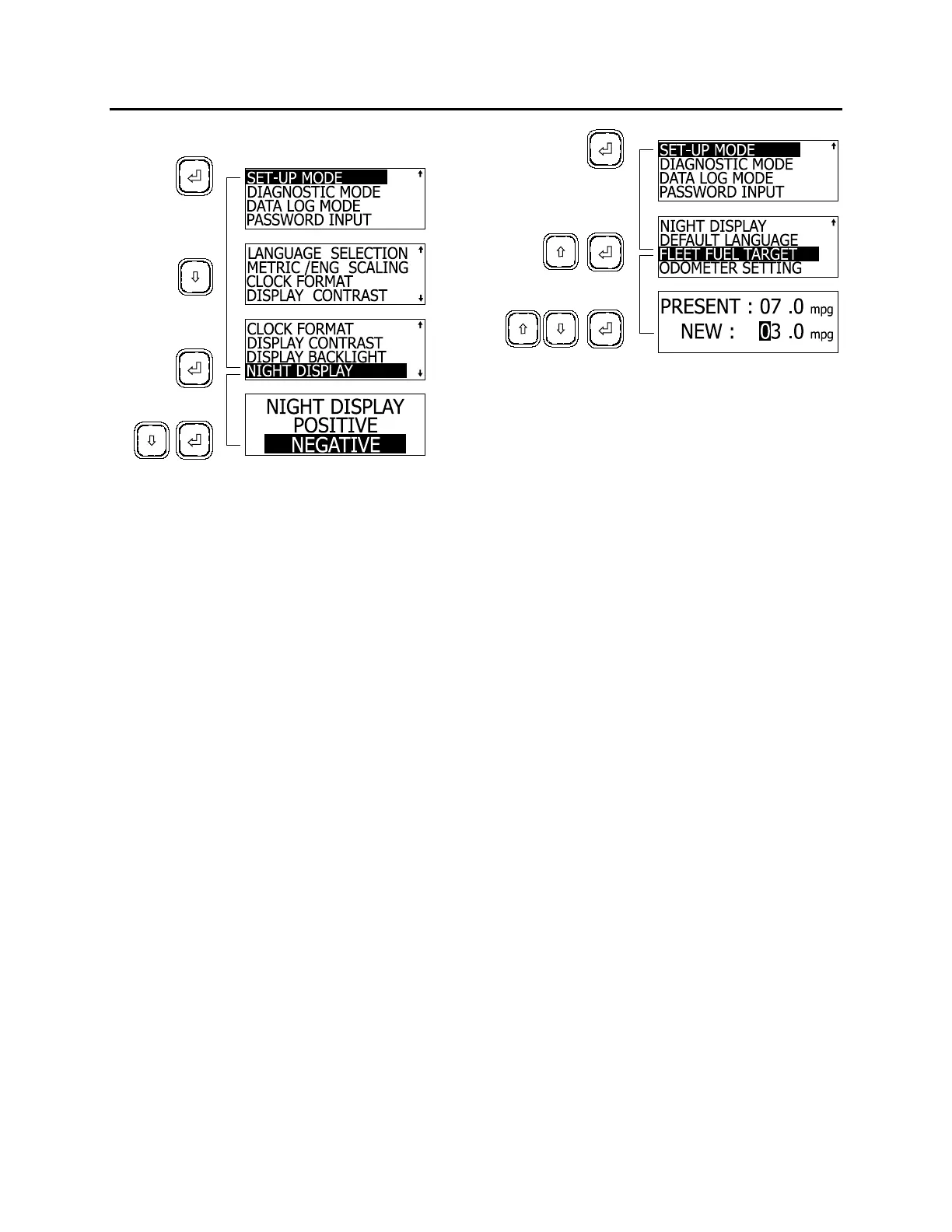
OTHER FEATURES
The MCD returns to SET UP mode.
06400
Setting Default Language
This feature is enabled when the correct
password is entered (see PASSWORD INPUT).
1. In SET UP mode, highlight DEFAULT
LANGUAGE using the arrow keys;
2. Press the enter key;
3. Highlight the desired language using the
arrow keys;
4. Press enter key to confirm.
The MCD returns to SET UP mode.
Setting Fleet Fuel Target
This feature is enabled when the correct
password is entered (see PASSWORD INPUT).
1. In SET UP mode, highlight FLEET FUEL
TARGET using the arrow keys;
2. Press the enter key;
3. Using the arrow keys set the highlighted
digit;
4. Press enter key to confirm, the following digit
is highlighted. Set as in step three;
5. When last digit is set, press the enter key to
confirm new target.
The MCD returns to SET UP mode.
06396
Setting the Odometer
This feature is disabled.
DIAGNOSTIC MODE
Diagnostic mode allows the driver to request
diagnostics from the ECU’s of components such
as the engine, brake and other instruments. The
driver can also perform a cluster self test and
read data about the ECU’s
Enter diagnostic mode by using the arrow keys
to highlight DIAGNOSTIC MODE, then pressing
the enter key to confirm.
ECU Diagnostic
To request a diagnostic:
1. Highlight ECU DIAGNOSTIC with the arrow
keys;
2. Press the enter key to confirm.
3. Highlight the component to request a
diagnostic using the arrow keys;
4. Press the enter key
After showing a fault message (if any) the MCD
returns to ECU Diagnostic screen.
To request a general diagnostic:
1. Highlight GENERAL REQUEST using the
arrow keys;
2. Press the enter key
After showing a fault message (if any) the MCD
returns to ECU Diagnostic screen.
To reset fault codes:
1. Highlight RESET ALL using the arrow keys;
2. Press the enter key;
The MCD displays RESET ALL.
58



 To Next Page