OTHER FEATURES
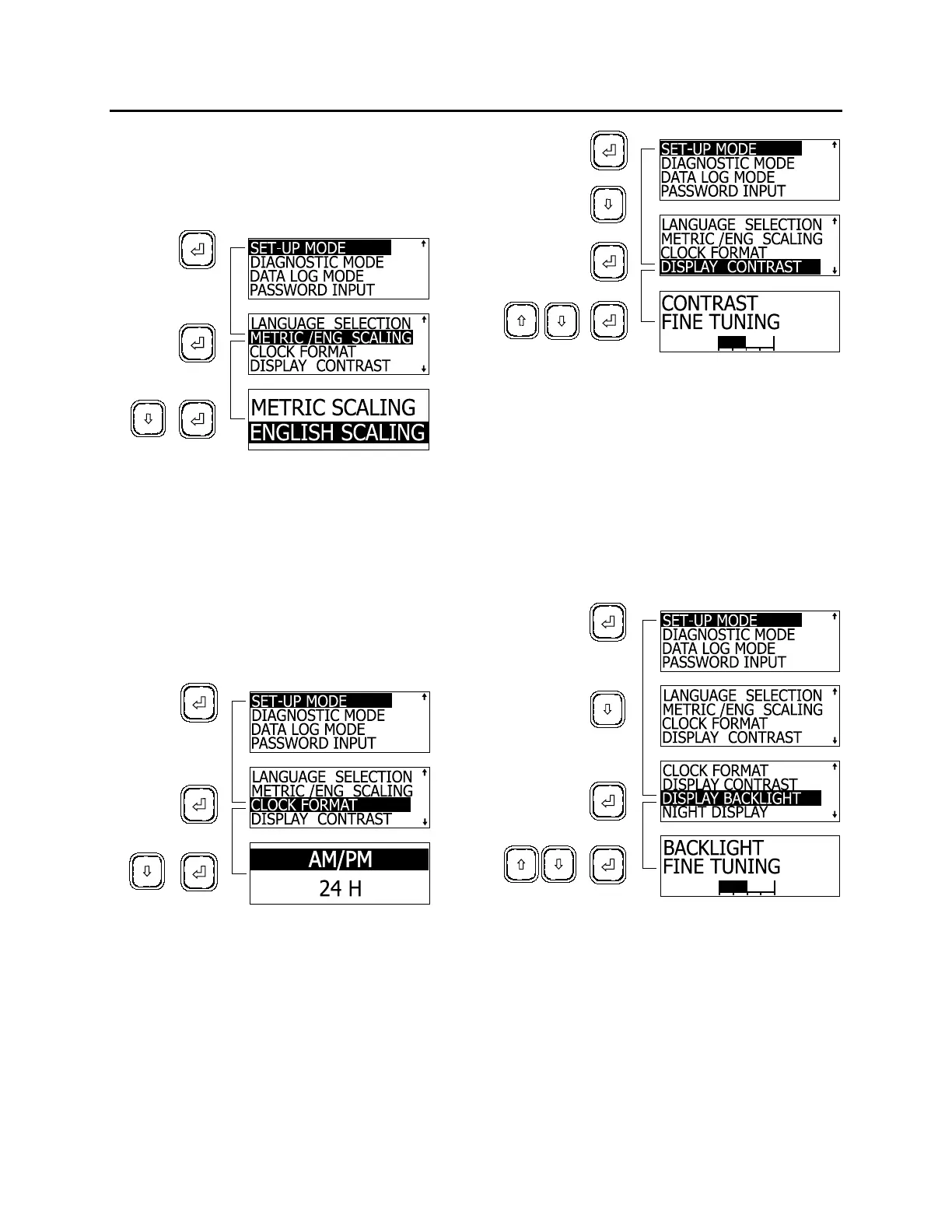
3. Highlight the desired units using the arrow
keys;
4. Press enter key to confirm.
The MCD returns to SET UP mode.
06384
Clock Format
1. In SET UP mode, highlight CLOCK
FORMAT using the arrow keys;
2. Press the enter key;
3. Highlight the desired format (AM/PM or
24 H) using the arrow keys;
4. Press enter key to confirm.
The MCD returns to SET UP mode.
06389
Setting Contrast
1. In SET UP mode, highlight DISPLAY
CONTRAST using the arrow keys;
2. Press the enter key;
3. Using the arrow keys, set the desired
contrast. A horizontal graphic shows state of
contrast;
4. Press enter key to confirm.
The MCD returns to SET UP mode.
06395
Setting Backlight
1. In SET UP mode, highlight DISPLAY
BACKLIGHT using the arrow keys;
2. Press the enter key;
3. Using the arrow keys, set the desired back
lighting. A horizontal graphic shows state of
lighting;
4. Press enter key to confirm.
The MCD returns to SET UP mode.
06386
Setting Night Display
Night display, when activated, shows all displays
in negative when the headlights are ON.
1. In SET-UP mode, highlight NIGHT DISPLAY
using the arrow keys;
2. Press the enter key;
3. Highlight the desired display using the arrow
keys;
4. Press enter key to confirm.
57



 To Next Page