OTHER FEATURES
3. Press enter key to confirm.
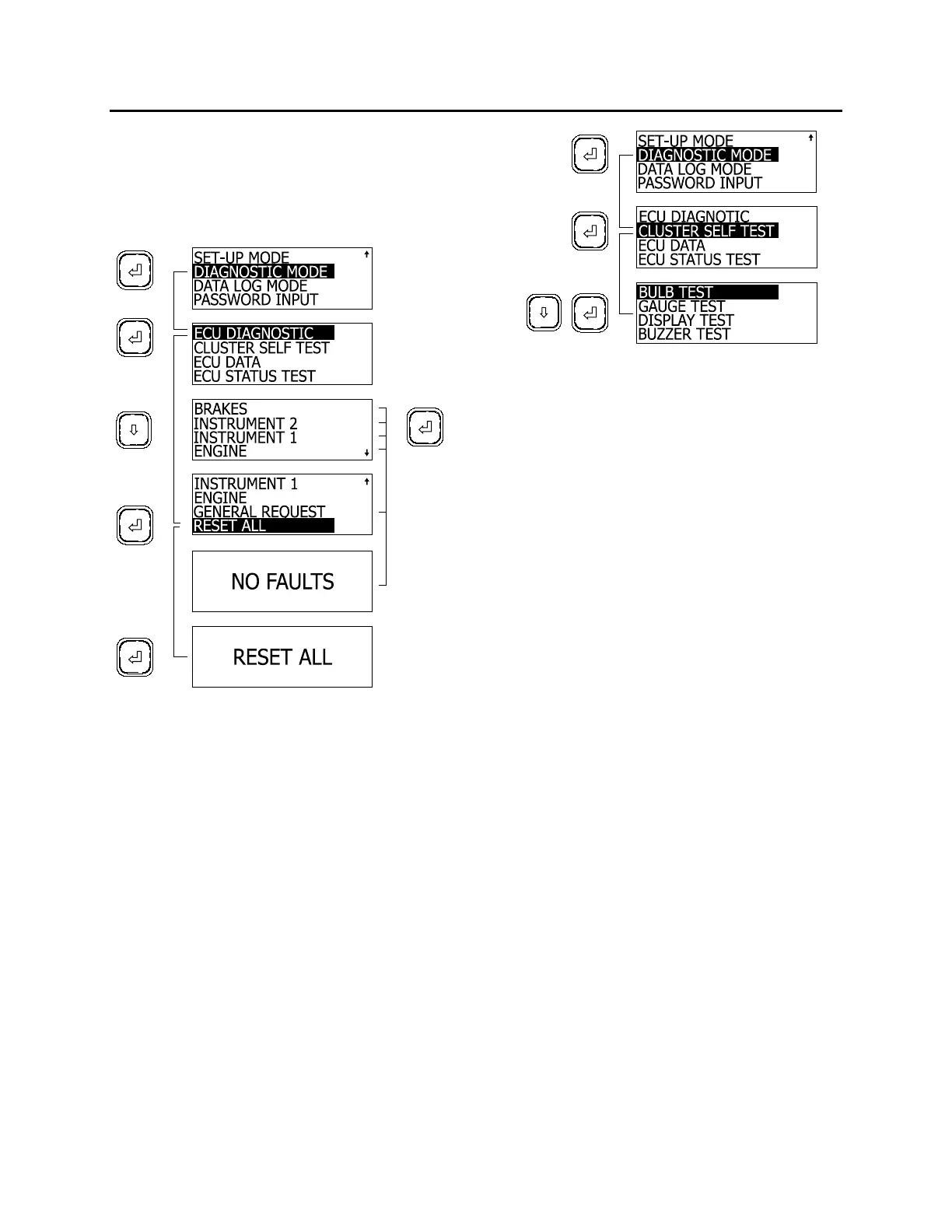
After resetting the fault codes, the MCD returns
to ECU Diagnostic screen.
Exit ECU Diagnostic and return to Diagnostic
Mode using Esc key.
06392
Cluster Self Test
Tests cluster light bulbs, gauges, MCD display
and buzzers.
To perform a self test:
1. In diagnostic mode, highlight CLUSTER
SELF TEST using the arrow keys;
2. Press enter key to confirm;
3. Highlight the test to perform using the arrow
keys;
4. Press enter key to confirm;
The test may normally take several seconds to
perform. The MCD may explain the progression
of the test as it runs. The display returns to
cluster self test mode once finished.
Note: While in the cluster self test mode, the
engine ECU data link is disconnected.
Therefore, the gauges will not function until the
cluster is out of the self test mode. To interrupt
any test, cycle the ignition key off and on.
06378
BULB TEST
Turns ON all telltale lights and red warning
LED's in the gauges which have them, for ten
seconds.
GAUGE TEST
This test causes the pointers in the tachometer,
speedometer, oil pressure, coolant temperature,
fuel and turbo boost gauges to move from
minimum scale to full scale and back, briefly
stopping at mid-scale each way. This occurs
three times. The air pressure and voltmeter
gauges are excluded from the test.
DISPLAY TEST
To help identify defects in the graphic display,
the display goes from dark to bright in about ten
seconds.
BUZZER TEST
Sounds each of the buzzer signals for ten
seconds each. The name of the buzzer is
written on the display as the test runs.
ECU Data
This feature requests information from the
available components. This information includes
the component’s SAE message identifier (MID),
its software ID (SW ID) and hardware ID (HW
ID) if available.
To access ECU Data:
1. When in DIAGNOSTIC MODE, highlight
ECU DATA using the arrow keys;
2. Press enter key;
3. Highlight the desired component;
4. Press enter key.
The MCD displays the information on two
screens. Toggle between screens using the
arrow keys.
59



 To Next Page