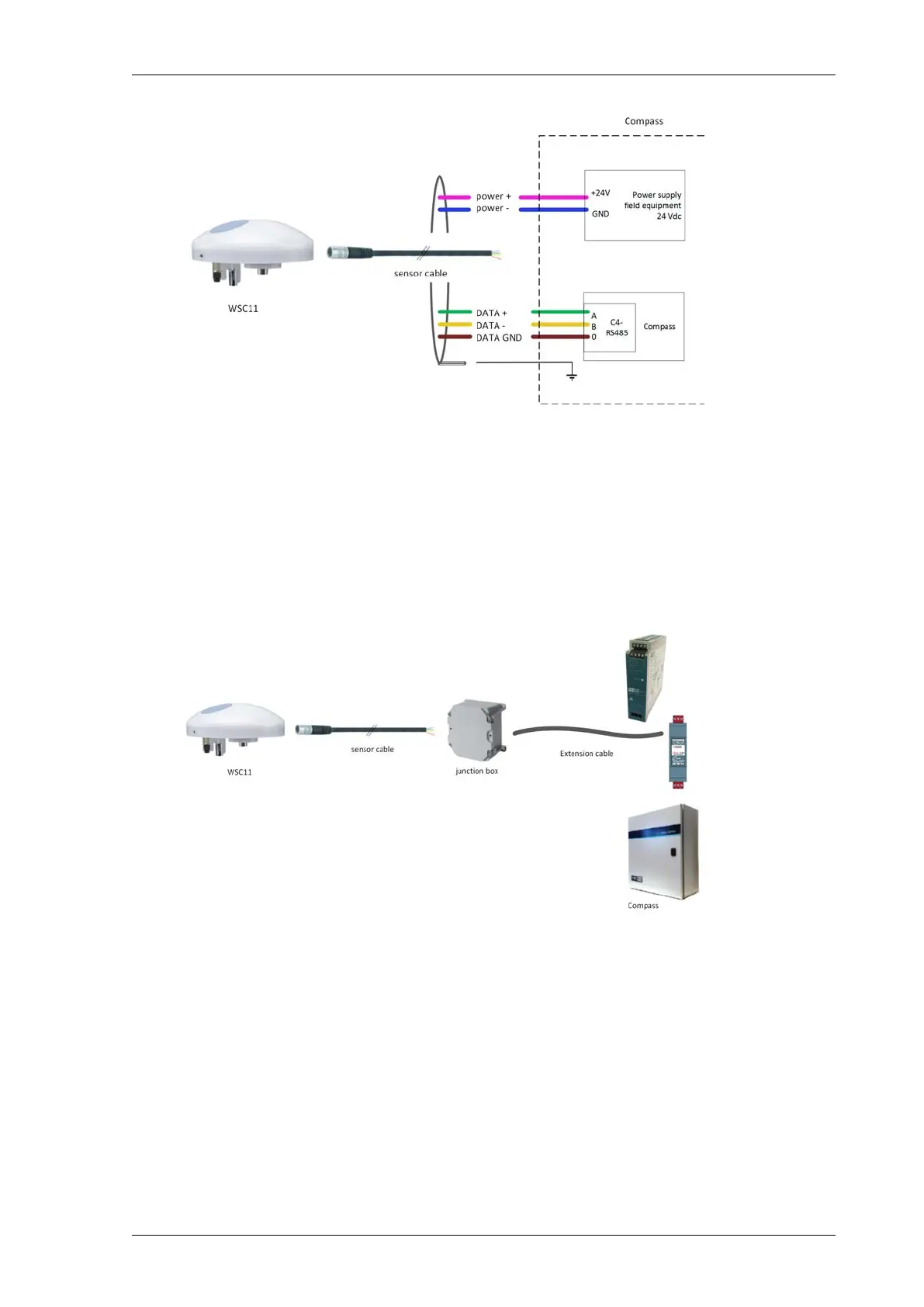
1. Connect the supplied sensor cable (AWG26) with the screw connector to the WSC11.
2. Calculate whether the 24 VDC power supply for Compass field equipment has sufficient capacity
to also power the WSC11. Add an extra power supply if the capacity is insufficient.
3. Connect the cores for power supply to the 24 VDC power supply for Compass field equipment.
4. Connect the cores for data to the RS485 port of the C4. See Connections - RS485 (page 33).
Connection (15 to 150 metres)
For distances greater than 15 metres, you must extend the cable. You must also terminate the RS485
network on both sides and ensure biasing.
• Requirements
• A junction box with an IP code of at least IP65.
• A terminating resistor of 120 Ω / ½ W
• An extension cable with 6 cores:
• 0.6 mm (AWG22)
• twisted pair
• shielded
• A bus termination and biasing on the side of the Compass. Priva recommends that a standard
module should be used for this, e.g. LT-B4 from Loytec.
45Installing Priva Compass - 00.014
Priva weather station WSC11



 To Next Page