Connecting the Compass EC sensor
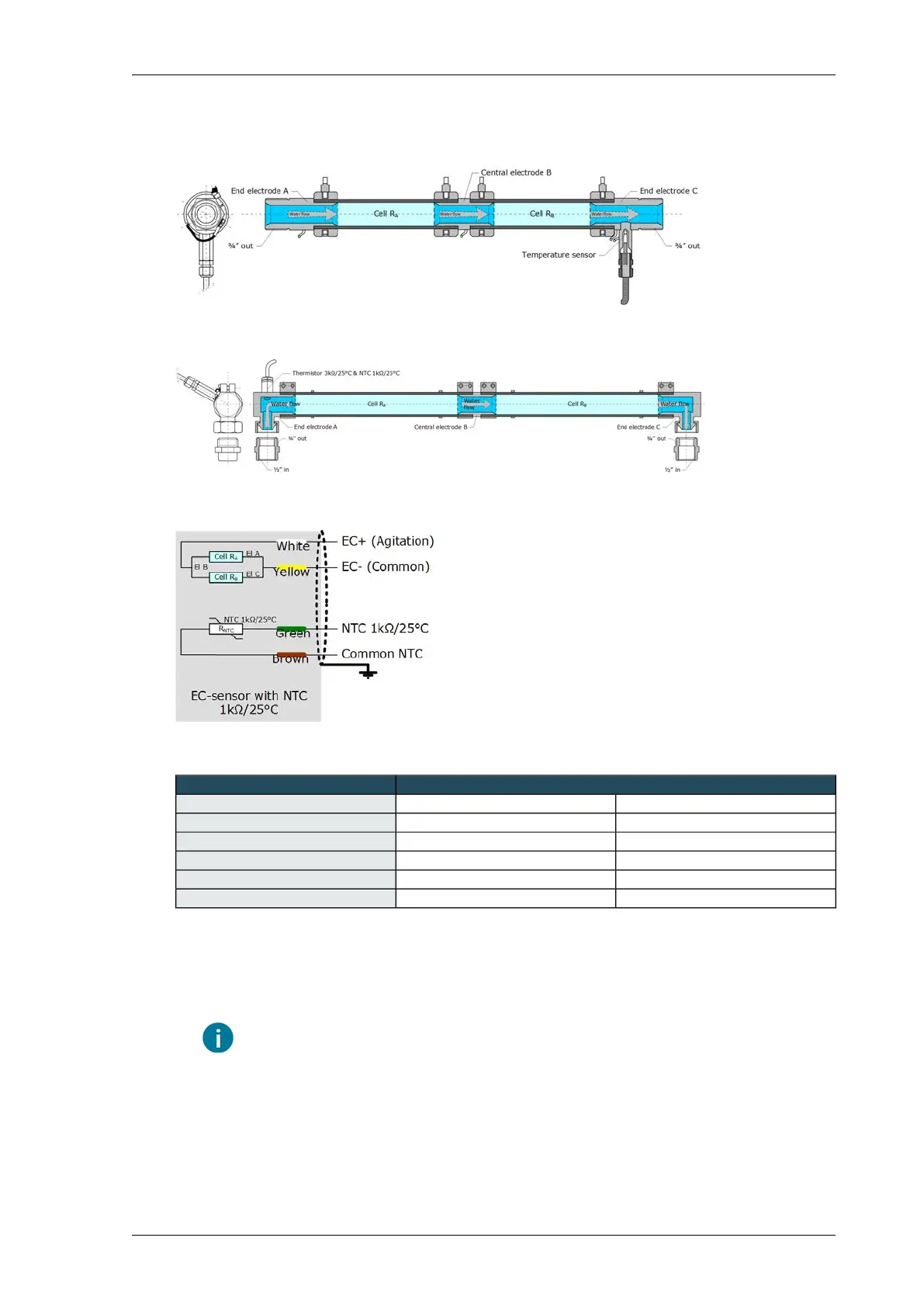
Cross section of inline EC sensor
Cross section of angled EC sensor
Connecting the Compass EC sensor
EC interface VP9943+VP8658EC sensor
Measuring cell 2Measuring cell 1Core colour
3 (EC)6 (EC)White
2 (Comm.)5 (Comm.)Yellow
Do not connectDo not connectGrey
1 (Temp.)4 (Temp.)Green
2 (Comm.)5 (Comm.)Brown
1.
Connect the EC sensor to the interface with a 4-core shielded cable with cores of 0.34 mm
2
(Ø
0.64 mm).
2. It may be possible to extend the cable. Extending the cable will, however, increase the measuring
error (see tables below).
In the case of an EC measurement via single cores, limit the length to 60 m.
3. Connect the shielding on the cable to the earth bar in the housing.
4. Adjust the cell factor with the potentiometer, see Calibrating the EC measurement (Compass)
(page 94).
93Installing Priva Compass - 00.014
EC-DSS interface



 To Next Page