10
M80 FRONT PANEL FEATURES
1 2 3 4 5 6 7
8 9 10
11
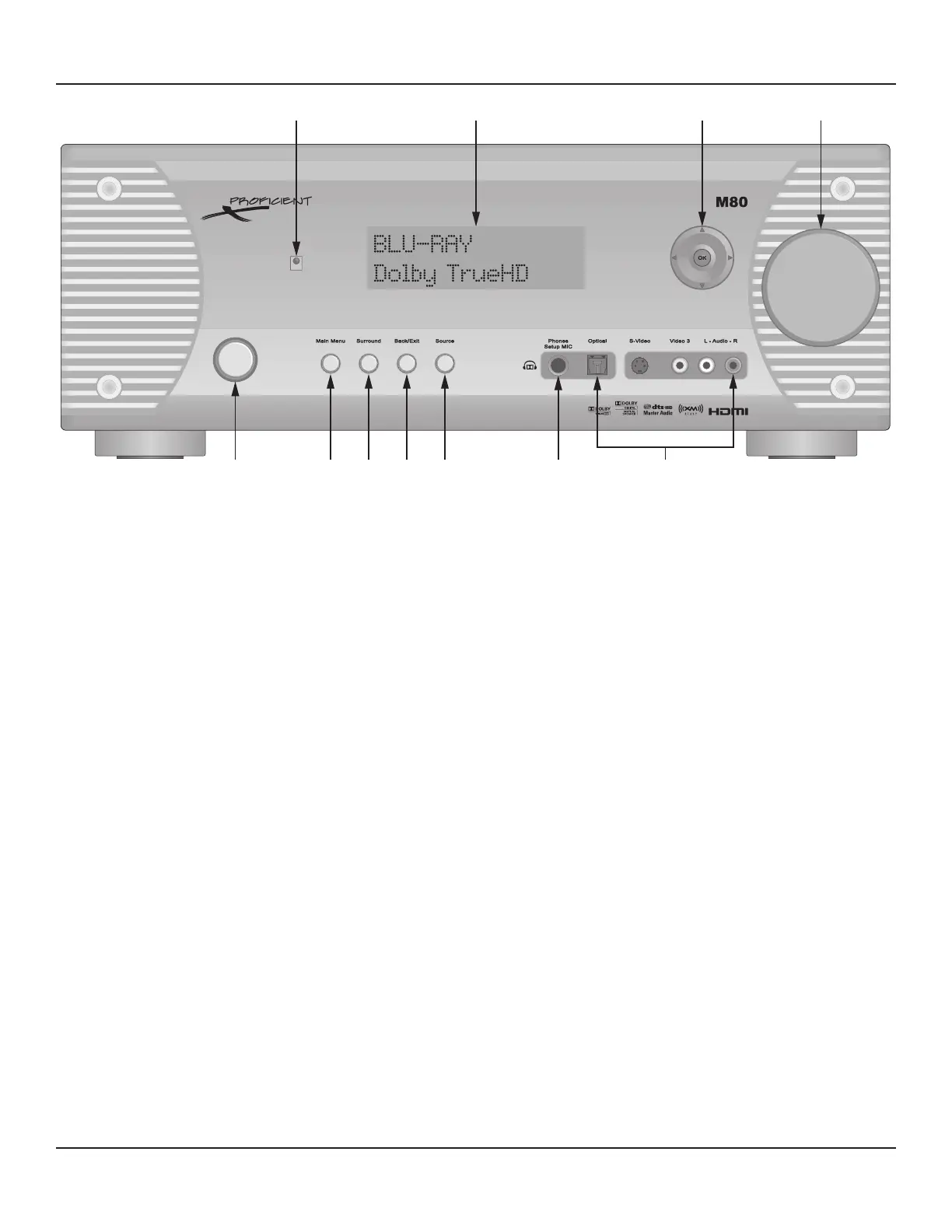
Diagram 1 M80 Front Panel Features
FRONT PANEL
1. ON/STANDBY - Press this button to turn the M80 ON/OFF. In Standby, the button is surrounded by a red backlight to indicate
that the M80 main power is ON. To turn the unit ON, press the button. The backlight turns blue and the Front Panel Display
illuminates. The M80 will go through a power up sequence of about ve seconds after which the receiver is ready for use. To
return to Standby, press the button and the audio signal will be cut, the amp will turn o, the Front Panel Display will turn o
and after a short delay the ON/Standby button backlight will illuminate red.
2. MAIN MENU - Press this button to activate the On-Screen Display (OSD). The OSD is a menu driven control interface that al-
lows setup and conguration of most M80 operating functions. The OSD can also be used to control the M80 in normal user
mode. Menus include: Listening Mode, DSP Options, Tone Controls, Zone 2 Controls and Setup Menu.
3. SURROUND - Press this button to scroll through the available audio surround modes for a selected source. The available
modes will vary given the connection and encoding of the content being played.
4. BACK/EXIT - Press this button when the On-Screen Display (OSD) is open to step backward in menu navigation or ultimately
exit the OSD.
5. SOURCE - With the M80 power ON, press this button repeatedly to select the desired source. The source name or selected
input will appear on the Front Panel Display to indicate the selected source.
6. PHONES/SETUP MIC - Connects to a standard stereo 1/4 inch phone plug for listening through stereo headphones or to the
included SmartEQ Setup Mic for speaker conguration.
DOLBY HEADPHONE - The M80 features Dolby Headphone technology. This feature creates a 5.1 surround sound experi-
ence from stereo content in any standard headphones when used with Dolby Pro Logic II/IIx. The Speaker Outputs are
automatically turned o when headphones are connected to this jack. Dolby H/P will appear on the Front Panel Display
as long as the headphones are connected.
SMARTEQ SETUP MIC - With all of the sophisticated surround capabilities of the M80, calibrating the speaker levels is
highly critical. The SmartEQ Setup Mic is used with the OSD Setup Menu/SmartEQ Speaker Setup to precisely calibrate
speaker levels to compensate for speaker placement, room acoustics, etc. This assures proper balance of the speaker
output levels and delays to deliver the surround audio channels as they were intended to be heard.



 To Next Page