22
SPEAKER PLACEMENT
Front
Left
Front
Right
Video Display
Center
Subwoofer
Surround
Left
Surround
Right
Ideal
Listening
Zone
Optional
Surround
Right
Optional
Surround
Left
30° 30°
30° 30°
20° 20°
A
B C
A=B=C
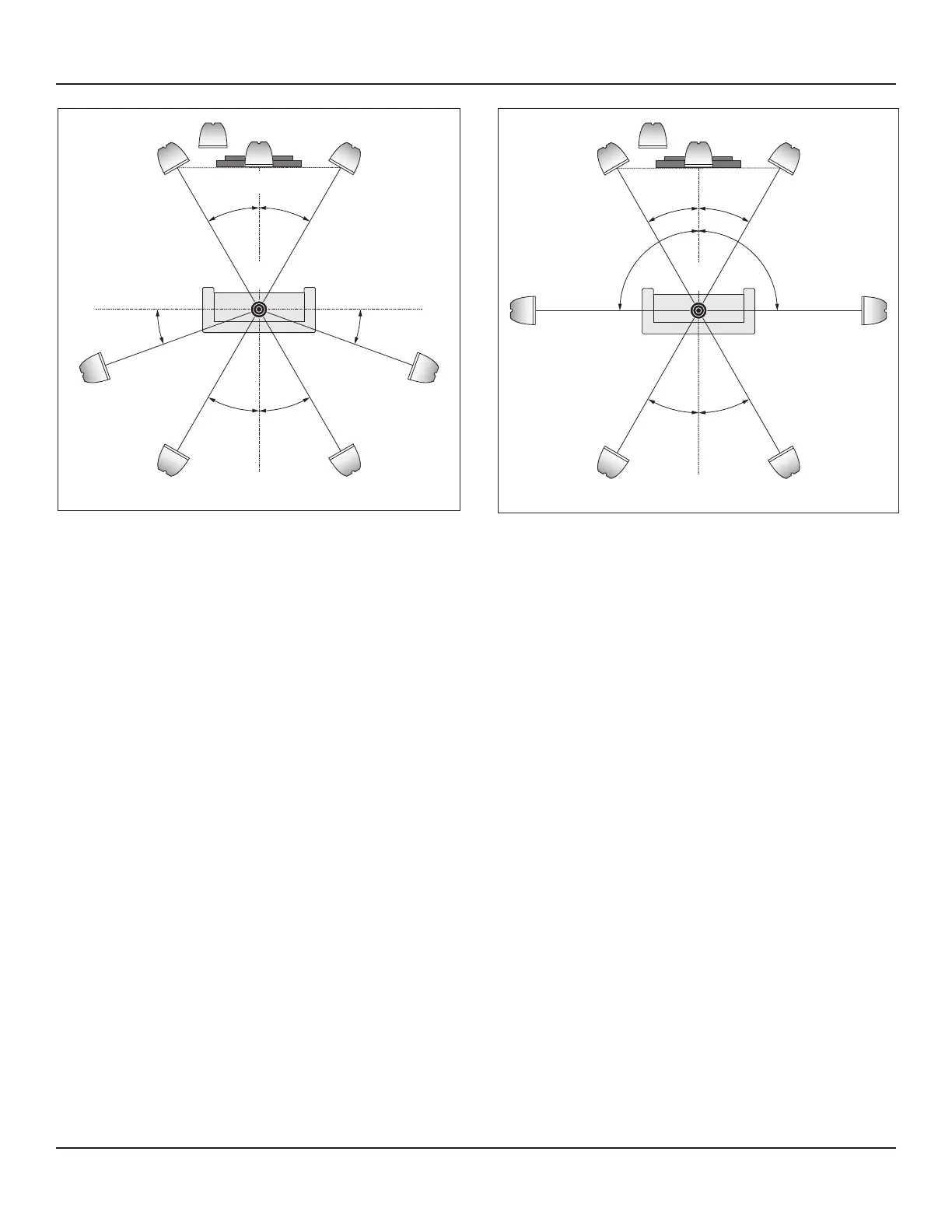
Diagram 5 5.1 Speaker Placement
SPEAKER PLACEMENT
The Procient M80 can be setup for several dierent speaker congurations. They include: stereo, 5.1 Surround, 7.1 Surround and
5.1 Surround with a 2nd stereo zone. The following are brief descriptions of the dierent speaker congurations with instructions
for speaker placement. For descriptions of the various Listening Modes and their compatibility with the dierent speaker congu-
rations, see section: Operating the M80/Listening Modes.
Stereo - Two speaker conguration that would typically be used when a 5.1 or 7.1 conguration is not practical, given the
room layout, or if surround speakers are not available. A subwoofer can be added in this conguration by utilizing the SW
PRE-OUT (subwoofer) jack.
5.1 Surround - Six speaker conguration including Front left/right, Center, Surround left/right speakers and a Subwoofer.
With appropriately encoded content, in a 5.1 system, most of the dialog (voice) gets sent to the Center channel speaker. With
the Center speaker positioned directly above or below the TV or Video Display, voices seem to emanate directly from the
screen. The Front left and right speakers typically ll space with ambient sound (street noise, the sounds in a room, crowd
noise, etc) and soundtrack music. The Surround left/right speakers will not always be playing. They will typically produce
sounds that would naturally occur behind the listener such as reected sound o a back wall or a plane ying overhead from
front to rear. Low frequencies, (bass) get sent to the Subwoofer. A discrete Subwoofer channel enhances natural low frequen-
cy sounds in explosions, jet engines, the pounding of waves or wind and the music from the sound track.
7.1 Surround - Eight speaker conguration similar to 5.1 Surround but with dedicated Surround left/right (side) and
Surround Back left/right positioned speakers for even more realistic reproduction of ambient (environmental) sounds.
5.1 Surround + 2nd Zone - The M80 can be congured to play two dierent sources in two dierent rooms at the same
time. In this conguration, the Main Room can be congured as a 5.1 Surround system as described above in ‘5.1 Surround’.
The Surround Back speakers that can be used for a 7.1 Surround system can also be congured as amplied stereo audio to
a second room. This conguration allows playing one source in 5.1 surround in the Main Room while playing another source,
or the same source, in stereo in another room at the same time! Adding an external amplier to the Zone 2 OUTs will allow a
7.1 Main Room system with a stereo 2nd Zone. See section: Multizone Conguration for additional information.
Note: The M80 has certain default capabilities that allow it to perform straight out of the box. However, Main Room speaker
calibration for 5.1 and 7.1 congurations and Zone 2 Setup must be done in the On-Screen Display (OSD) under: Setup
Menu/Speaker Setup and Zone 2 Controls respectively, to unleash the full potential of the M80.
Front
Left
Front
Right
Video Display
Center
Subwoofer
Surround
Left
Surround
Right
Ideal
Listening
Zone
Surround
Back
Right
Surround
Back
Left
30° 30°
30° 30°
90°90°
Diagram 6 7.1 Speaker Placement



 To Next Page