25
CONNECTIONS
Speaker Connections
1. Use 16AWG (min) 2-conductor stranded speaker wire for speaker connection.
2. Strip approximately 1/2 to 3/4 of an inch o the ends and twist the strands together so there are no loose ends that can cause
shorts.
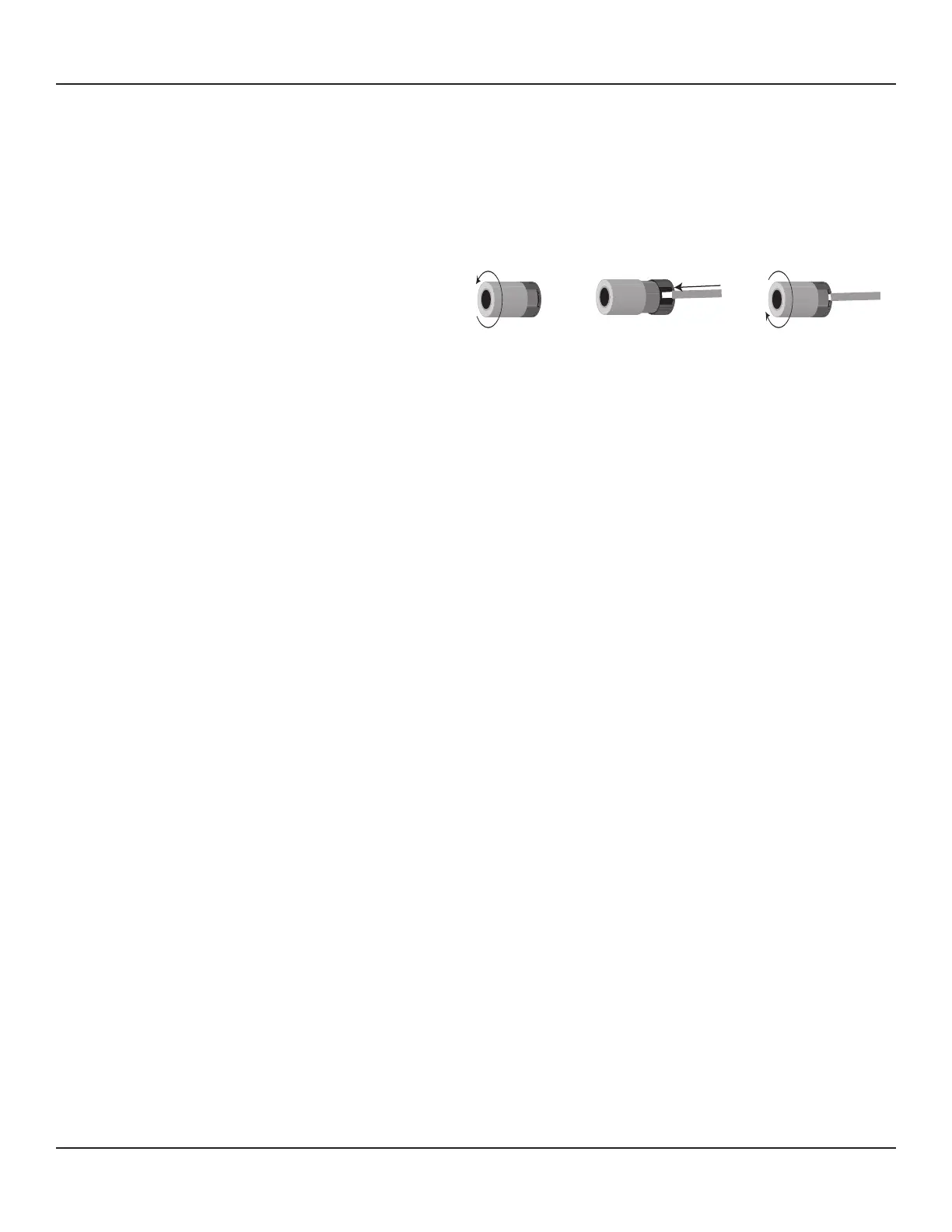
3. Loosen the Speaker Terminals as shown in Diagram 8 so there is enough room between the post and the collar to feed the
stripped wire through without damaging the strands.
4. Tighten the post to secure the wire.
5. Repeat for all Speakers, + and -.
6. Conrm connection and polarity.
7. Connect the speaker wires to the appropriate + and - terminals on the speakers.
8. Conrm connection, polarity and position.
Subwoofer
Diagram 7 shows connections for adding a powered subwoofer with a 12V Control Input to the M80 using the PRE-OUT SW and
Trigger OUT connections. This conguration will have the subwoofer turn ON when the M80 is turned ON and turn OFF when the
M80 is turned OFF. The sub will also mute when the main room speakers mute. To congure a Subwoofer as shown in Diagram 7:
Note: There are several dierent ways to connect a subwoofer to an A/V receiver. One is to have the receiver’s speaker level output
connected to speaker level inputs on the sub. The sub then acts as a crossover, separating the high and low frequencies with the
low frequencies going to the sub and the mid and high frequencies going to the connected left and right speakers. (That congu-
ration would only apply to the M80 in a stereo conguration when only the Front left/right speakers are connected.) The only way
to properly congure a 5.1 or 7.1 system is to connect an amplied sub with a mono or LFE (Low Frequency Eects) input to the
SW-PRE OUT jack. The following describes typical connections for that type of application, with all other speakers connected to
the M80 Speaker Terminals. Please refer to the subwoofer manufacturer’s instructions for connection and operating options for
varying subwoofer applications.
Note: Some audio encoding provides a discrete LFE (Low Frequency Eects) Channel that is engineered as part of a surround
audio mix. Some Listening Modes will ‘manufacture’ a subwoofer channel by separating low frequency content from the audio
program. The M80 accommodates both conditions and outputs LFE or subwoofer information via the Pre-Out SW (subwoofer)
jack, based upon the currently selected audio content and Listening Mode.
Subwoofer Connections
Audio
1. Using a mono RCA-RCA cable, connect the Pre-Out SW jack on the M80 to the LFE or Audio Line IN on the subwoofer.
Some subs will have adjustable crossover points to match the low frequency cut-o of the left and right speakers when
used in a typical stereo satellite/subwoofer conguration. The SmartEQ speaker calibration process will set a subwoofer
crossover point and set the SW jack output level. Set the sub crossover point and output levels to a mid point of their
adjustable range, and allow the SmartEQ process to ne tune the setting for optimum performance. If, prior to running
SmartEQ, the sub level is way too high, or low, adjust as needed to avoid damaging the sub amp or subwoofer driver.
Refer to the sub manufacturer’s instructions for additional information.
Trigger Out
1. Using a mono Mini-Mini Cable, connect the Trigger OUT jack on the M80 to the Control IN on the subwoofer.
Note 1: Some subs may have dierent types of connectors for the Control IN. Be sure to maintain proper polarity when
making this connection. Refer to the sub manufacturer’s instructions for additional information.
Trigger Out Polarity: TIP=+12VDC, SLEEVE=GND
Note 2: Trigger Out has three setup options that are congured in the Source Setup. See sections: Setup Menu/Trigger
Setup and Source Setup/Trigger Out for additional information.
Diagram 8 Bare Wire Connections



 To Next Page