34
R
L
CD PLAYER
OUT
M80
CD Player
Line Level Audio OUT
M80
Analog Audio 6 IN
Stereo RCA-RCA
Patch Cable
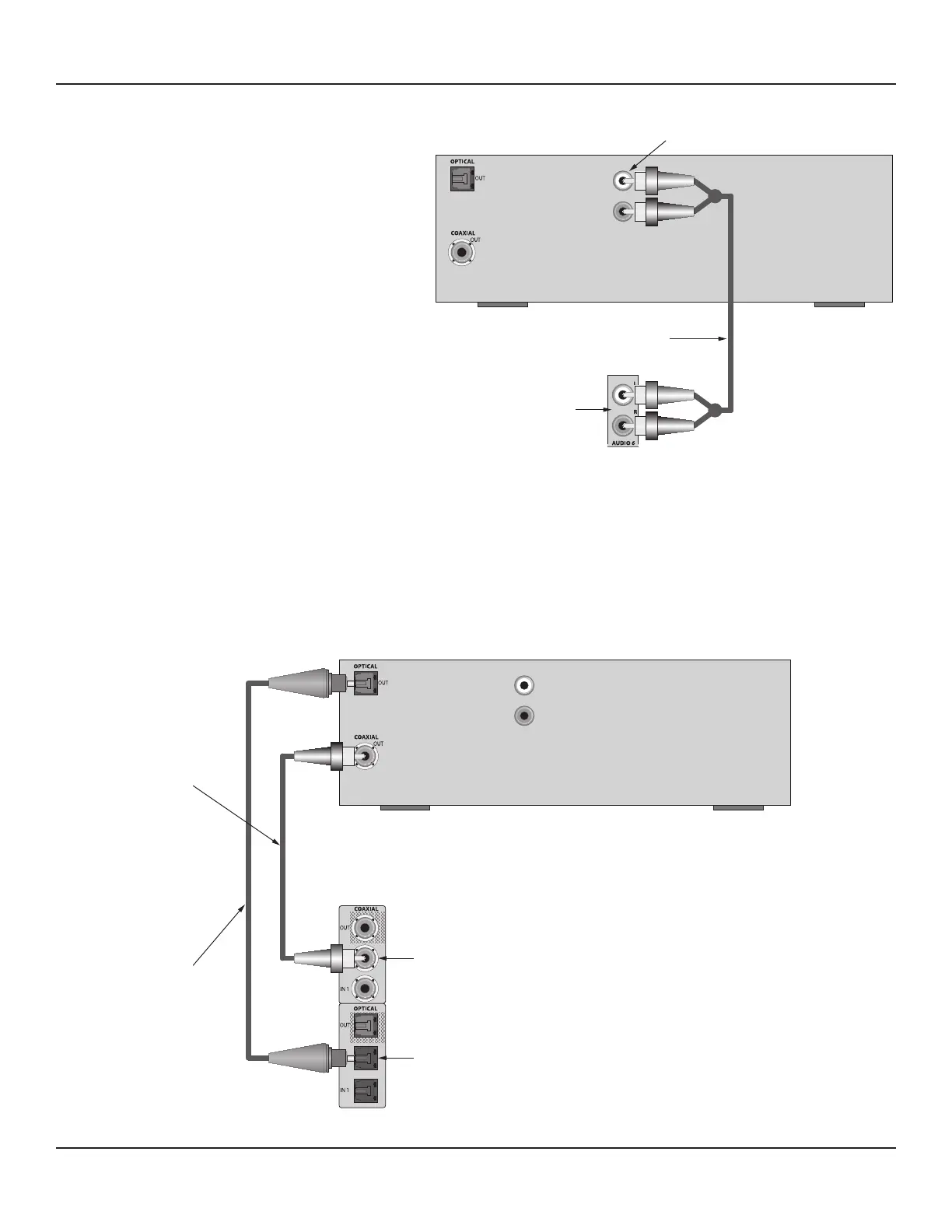
Diagram 17 Audio 6 In Connections (Default)
Audio 6 In Connections (Default)
Connect a CD Player, Tape Deck, Music Server or other
audio playback device to the Audio 6 IN on the M80
Rear Panel as shown in Diagram 17.
These connections allow playback of the Audio Source
connected to these inputs. The analog line level audio
signals received at these inputs will be output at the
Audio 1 OUT, Audio 5 OUT, Zone 2 OUT and Zone 2
PRE-OUT L & R line level audio jacks. See Section: Audio
6 In Connections (Option) for information on optional
connections.
These connections match the Source Setup input de-
fault settings for this source, so no additional congura-
tion is required with these connections.
1. Using a stereo RCA-RCA patch cable with gold ends,
connect the L&R analog line level audio OUT of the
source to the L & R Analog Audio 6 IN on the M80.
Note: If the device is an audio/video playback de-
vice, use any compatible, unused video input. (See
section: Audio/Video 1 2 & 3 Connections for ad-
ditional information.) Be sure to select the appropri-
ate video input in Source Setup.
Audio 6 In Connections (Option)
R
L
CD PLAYER
OUT
M80
Digital Optical Audio
Cable
Digital Coaxial Audio
Cable
M80
Coaxial Audio IN 2
M80
Optical Audio IN 2
Diagram 18 Audio 6 In Connections (Option)
CONNECTIONS



 To Next Page