F
1
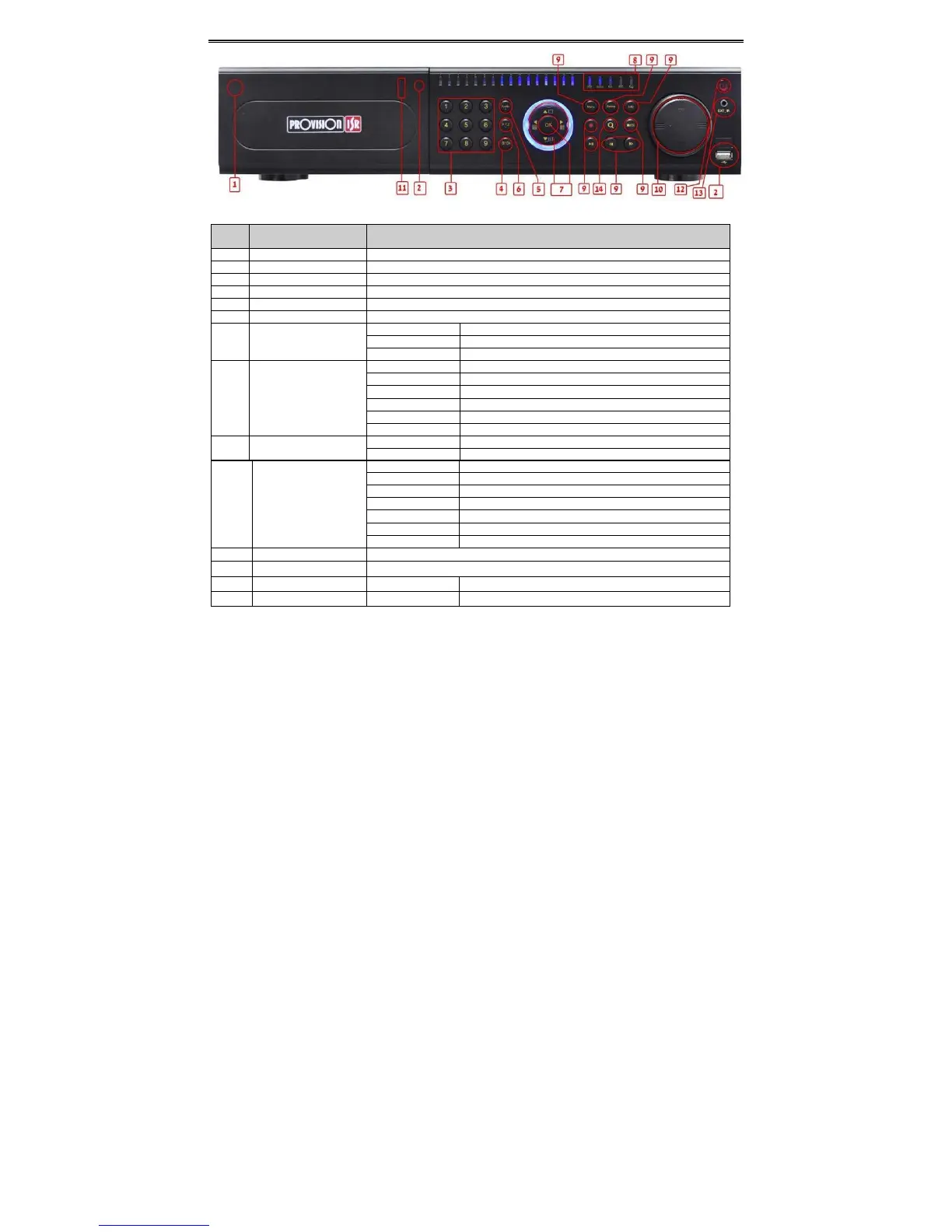
PowerButton Softswitchofftostopfirmwarerunning.Doitbeforepoweroff .
2
DVDbutton Pressthisbutton,usercanplacetheDVDtodobackup.
3
Keys
0‐9
Inputnumber1‐9orchoosecamera
4
(0/—)
1.Representschannelnumber. 2.Indicatesdigitalnumber0
5
Audio/+
1.Controlvoice2.Increasethevalueinsetup
6
P.T. Z . /
‐
1.EnterPTZmodeinlive2.Decreasethevalueinsetup
7
InputbuttonDirectionbutton Changedirectiontoselectitems
Multi‐screen Changescreendisplaymodelike1/4/9/16channel
Enterbutton Confirmselection
8
WorkstateindicatorREC Whenrecording, thelightisblue
HDD WhenHDDiswritingandreading,thelightisblue
Backup Whenbackupfilesanddata, thelightisblue
Net Whenaccesstonetwork,thelightisblue
Play Whenplayingvideo, thelightisblue
Power Powerindicator,whenconnection,thelightisblue
9
FunctionbuttonMENU Entermenuinlive
INFO Checkdata,sameas:Mainmenu=>Information
BACKUP
Enter backup mode in live
SEARCH
Enter search mode
REW
Rewind
FF
Fast for
Esc
10
Jog
Controlrewind/fastforward/framewhenplayingtheimage.
11
USB externalUSBdevices(USBflash,USBHDDforbackup,updatefirmware,USBmouse)
12
IRreceiver IR Remotecontrollerreceiver
13
ExternalIR EXT_IR ExtensionfortheIRreceiver



 To Next Page