Operation Cubing and Weighing Using Qbit for Windows
CubiScan 110-T 18
Cubing and Weighing Using Qbit for Windows
Refer to the Qbit User Guide for instructions on cubing and weighing and
other functions in Qbit. The Qbit User Guide is provided on CD-ROM or
you can download it from the Quantronix website at www.cubiscan.com
.
NOTE
For information on measuring odd-shaped packages, refer to “Measuring
Odd-Shaped Packages” on page 19.
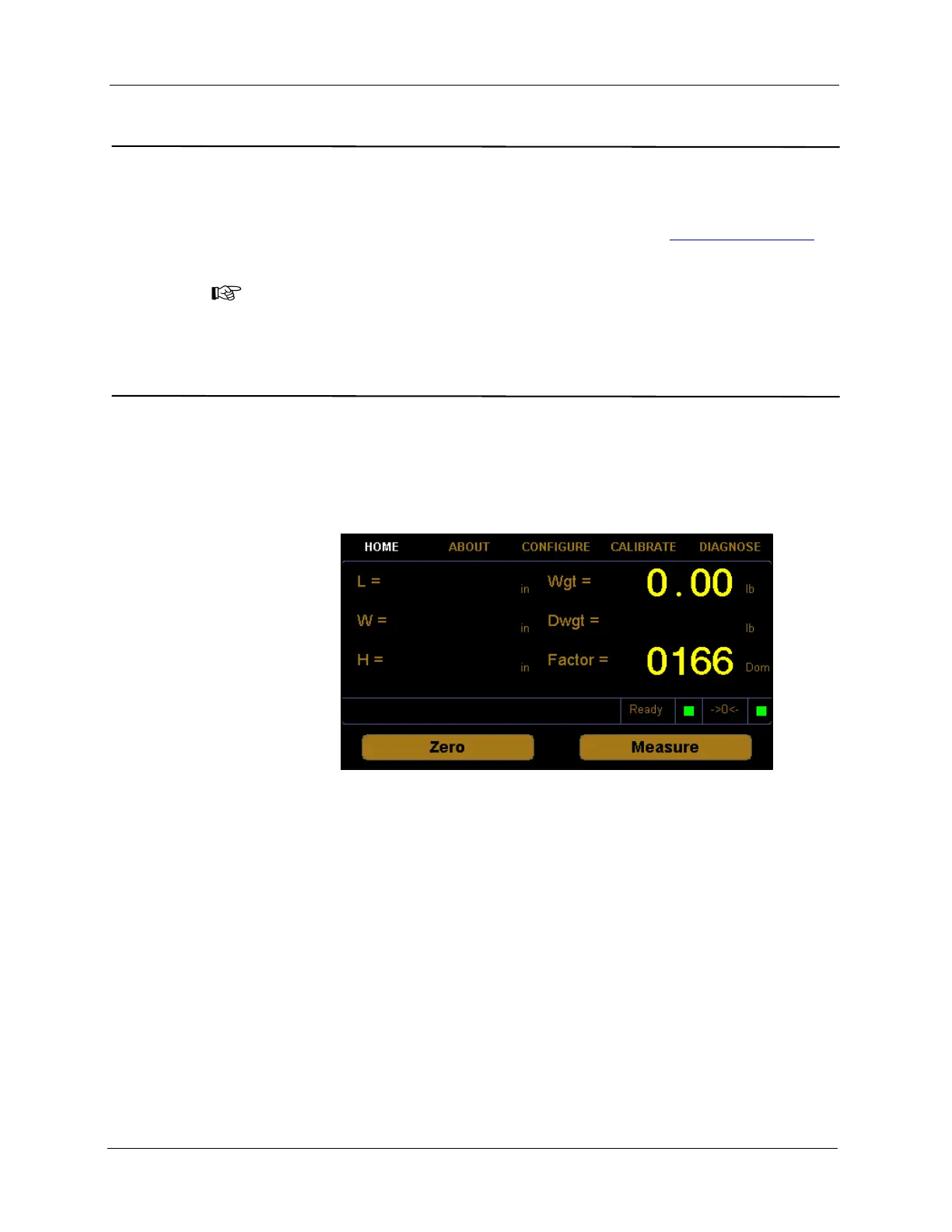
Cubing and Weighing Using the Touchscreen
All controls and displays for the CubiScan 110-T are located on the
touchscreen at the front of the base. If a computer is not connected, you can
use the control panel to cube and weigh packages. Measurements and
weight are displayed on the touchscreen.
L=
W=
H=
These display the measured dimensions in inches (in) or centimeters (cm)
as selected.
Wgt= This displays the measured weight in pounds (lb) or kilograms (kg) as
selected.
Dwgt= This displays the dimensional weight in pounds (lb) or kilograms (kg) as
selected.
Factor= This displays the dimensional factor currently being used to calculate the
dimensional weight. This option can be turned on or off.
Figure 12
CubiScan 110-T Touchscreen



 To Next Page