RAUMED NeuroSmart Instruction Manual
Manufacturer: RAUMEDIC AG, Hermann-Staudinger-Strasse 2, 95233 Helmbrechts, Germany
zwo-541EN Rev 3 / 2022-05-03
Page 34 of 61
The limits for the physiological alarms and their activation can be changed at any time. There are two
selection options.
Warning: If an alarm is deactivated, the alarm limits for this measuring position are not mon-
itored. This means that the acoustic and visual alarms are deactivated.
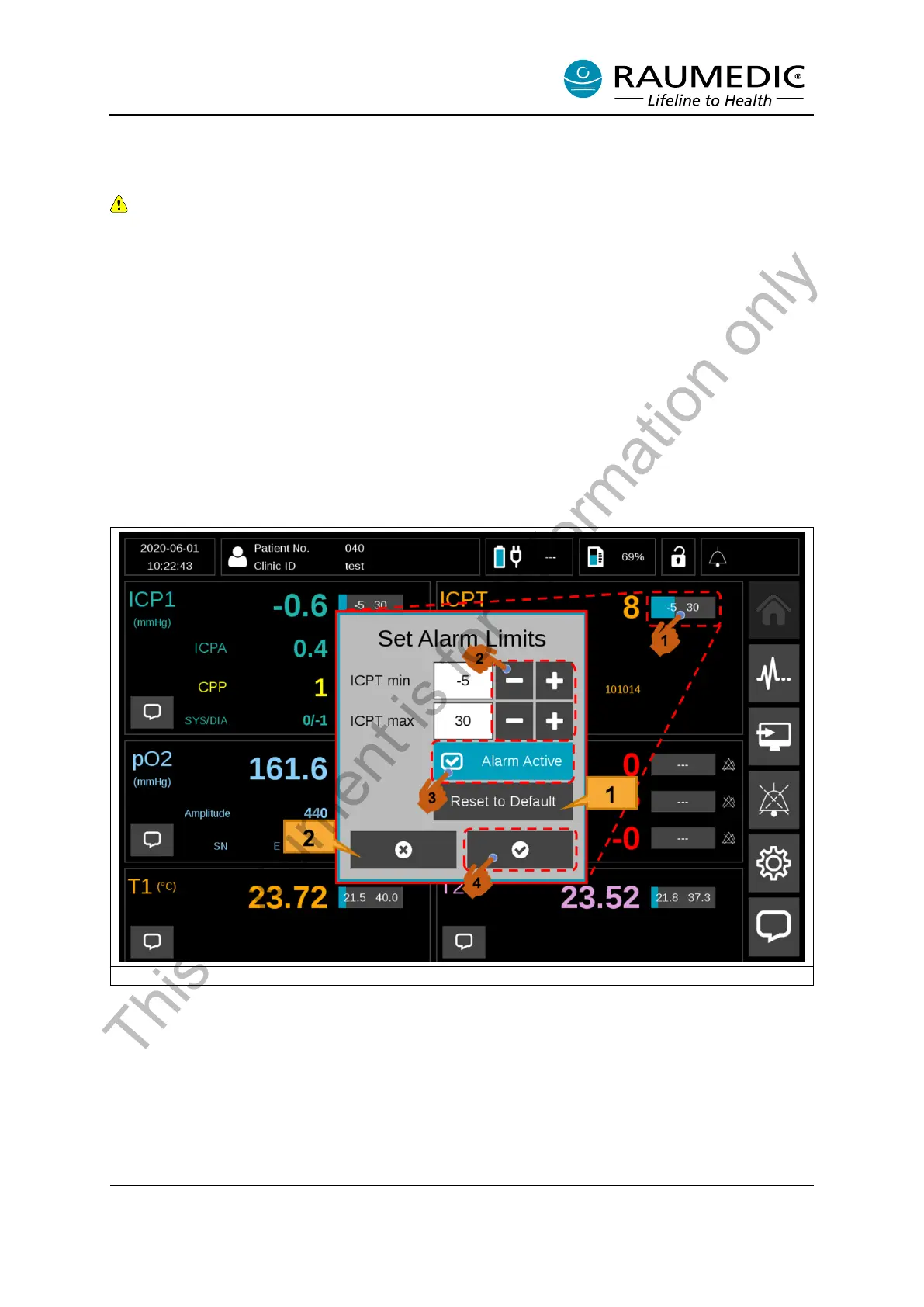
Initial approach: Adjust the alarm limits and alarm activation for individual active measuring po-
sitions.
<1> Press the alarm limit bar to access the alarm limit settings menu for individual measuring positions.
<2> The lower and upper alarm limit can be adjusted with the Plus/Minus buttons. <3> If you wish to
change the alarm activation status, you can do so with the “Alarm Active” button. <4> To make the
change, quit the menu with the Confirm button. See Figure 21.
[1] The default preset alarm limits can be reset with the “Reset to Default” button as per Table 16.
See Figure 21.
[2] If you do not want to make any change but wish to quit the menu, tap the “Cancel” button. See
Figure 21.
Figure 21: Adjust the alarm limits and alarm activation for the individual measuring positions.
This document is for information only



 To Next Page