Redback Technologies
Installation Manual - Redback Smart Hybrid System - v 2.0
29
2.8 Inverter communications connections
2.8.1 ENERGY METER
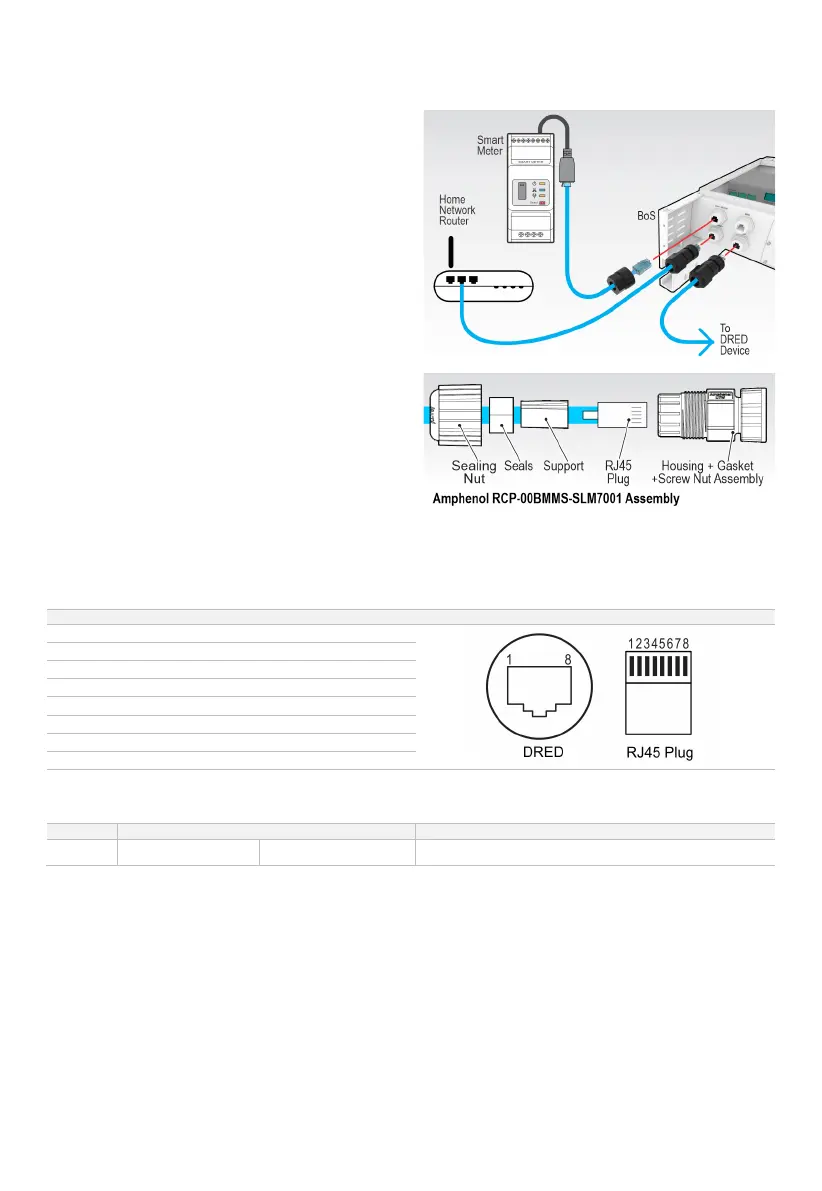
If not already installed, run the Energy Meter Communications
cable to the inverter and insert the RJ45 plug into the KWH
METER port at the bottom of the BoS.
2.8.2 ETHERNET (RECOMMENDED)
The Ethernet port is used if the inverter is to be connected to
the home network using ethernet cable (not Wi-Fi). If not
already installed, run ethernet cable from the home network
to the inverter.
Terminate using Amphenol RCP-00BMMs-SLM7001 configured
straight-thru. Connect to the ETHERNET port.
2.8.3 DRED
An RJ45 socket is provided at the BoS to enable Demand Response Enabled Device control. Run the DRED cable from the DRED
device to the BoS. Terminate using 8-pin RJ45 and Amphenol RCP-00BMMs-SLM7001 gland. Assign pins as below.
METHOD FOR ASSERTING DRM
RJ45 SOCKET ASSERT BY SHORTING PINS
Operate the disconnection device


 To Next Page