Operation
46 Installation Manual - Redback Smart Hybrid System - v2.0
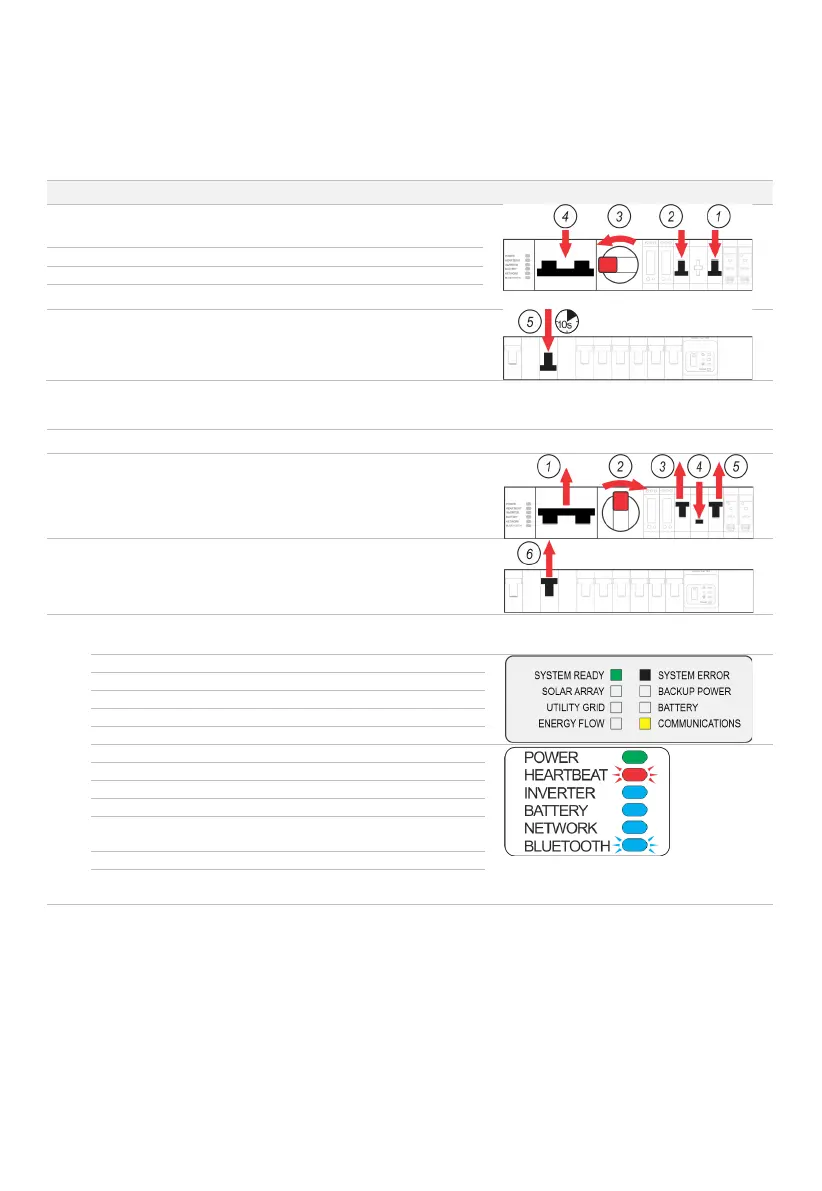
4.4 Inverter restart
Occasionally, it may be necessary to cold boot the inverter, to restart all software. A restart briefly interrupts all inverter
functions, noting that PV, battery, and grid supplies remain energised to the isolators.
STEP PROCEDURE COMMENT/ILLUSTRATION
Open the BoS switchgear hatch.
Switch the INVERTER AC isolator OFF (down).
Switch the BACKUP AC isolator OFF (down).
Turn the PV ARRAY DC isolator OFF (anticlockwise to 9 o’clock).
Switch the BATTERY SYSTEM DC isolator OFF (down).
Turn the Solar Supply Main Switch OFF (on the main switchboard
or sub-board).
Wait 10 seconds.
Working left to right, turn the BoS isolators and switches ON as
shown.
Turn the Solar Supply Main Switch ON.
The inverter will resume normal operation in about 2 minutes,
indicated by:
INVERTER STATUS PANEL LEDS
Varies with configuration
Blue; ON (if batteries are
connected)
Blue; FLASHING (for extra 30
minutes, then OFF)



 To Next Page