Operation
48 Installation Manual - Redback Smart Hybrid System - v2.0
DISCHARGE BATTERY MODE
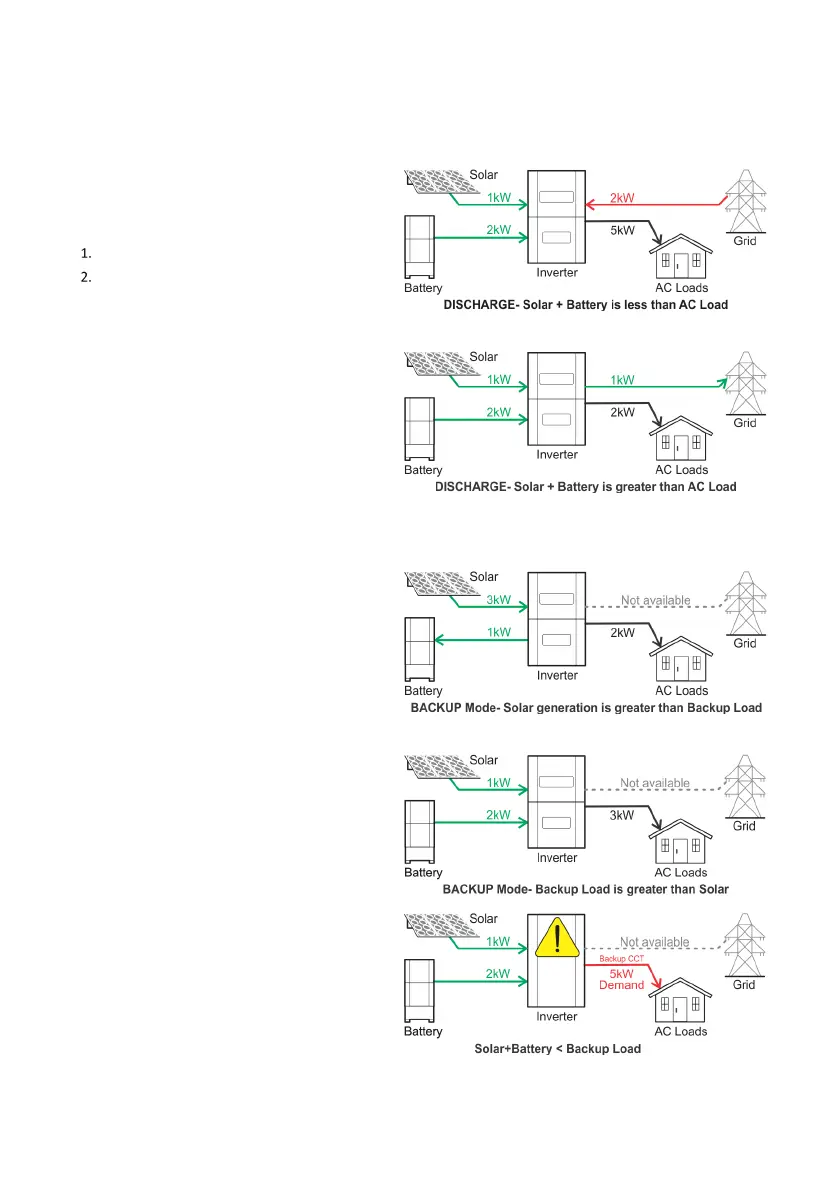
DISCHARGE mode is user selectable on the portal.
DISCHARGE mode prioriti
ses battery discharge to the
AC loads
Grid
Battery discharge is at the nominated Discharge Power,
supplemented by solar
.
AC Loads exceed (Battery + Solar), energy is imported
(Battery + Solar) exceed AC Loads, excess energy may be
(Battery + Solar) exceeds (AC Loads + LEP) the battery
, at the maximum possible rate, up to
the nominated Discharge Power.
BACKUP MODE
BACKUP mode starts automatically when the grid supply is
interrupted (default setting).
SH5000 provides energy to the AC
ackup circuit only. Energy consumption from solar is
sed and excess solar charges the batteries.
se the effectiveness of the AC backup circuit, the
circuit should only support essential appliances such as
refrigerators, or low energy devices such as fans, computers,
tablets or phones.
mode is invoked within 0.05 seconds of a grid
interruption. BACKUP mode reverts to the previous mode
when the inverter detects grid supply has been restored for
over
one minute.
BACKUP mode may also be known as “Stand
-alone Mode”.
Note: If available battery and solar power is less than the
detected
backup load the inverter will consider this an
overload and will automatically shut down.
inverter will restart after approximately one minute. If
persists, the cycle will repeat.



 To Next Page