Operation
40 Installation Manual - Redback Smart Hybrid System - v2.0
3.6 Redback product firmware version
Redback Smart Hybrid inverter firmware version is 222214.
3.6.1 IDENTIFY USING REDBACKINSTALL
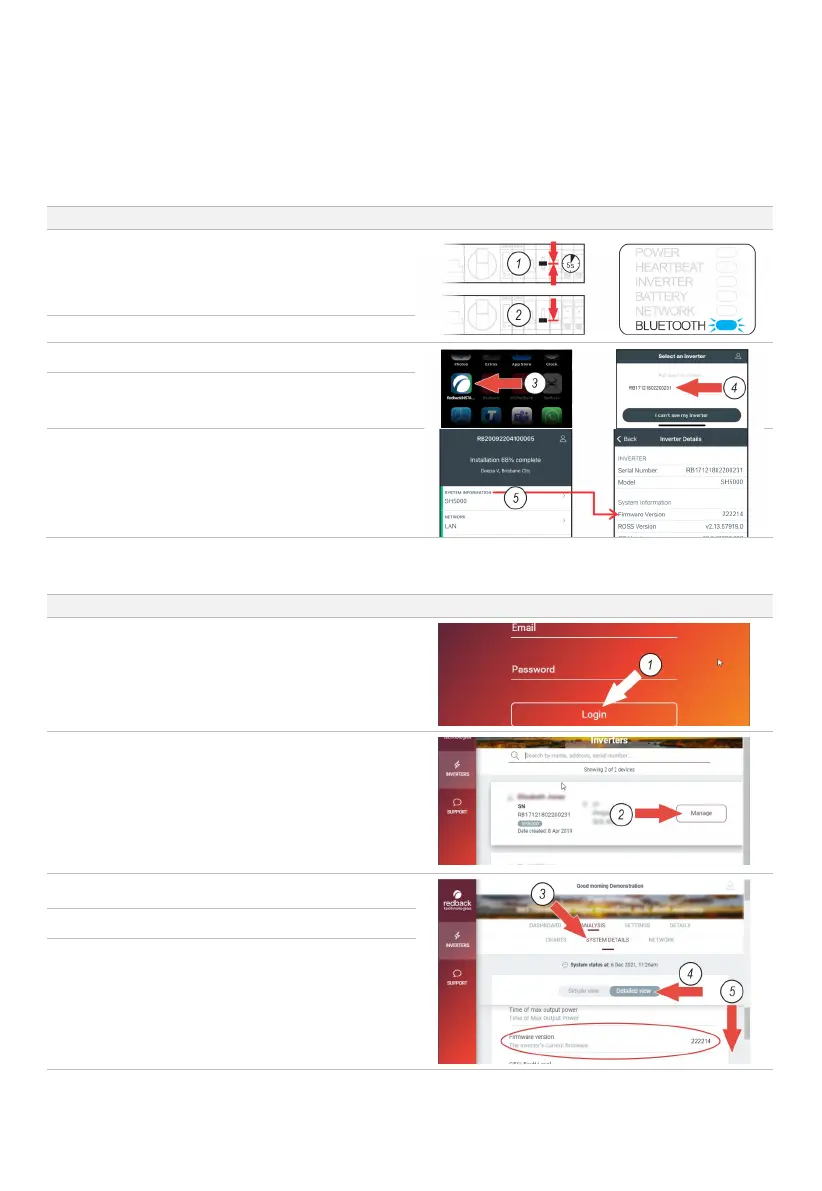
Ensure the EMS Bluetooth LED is flashing, indicating that
Bluetooth is available.
If the LED is not flashing, restart the EMS by moving the
BYPASS switch to the MIDDLE position for 5 seconds,
then return it to the DOWN position.
Wait for the Bluetooth LED to begin flashing steadily.
If not already open, start RedbackINSTALL and sign in.
The app will display a list of nearby Redback products
that are advertising Bluetooth. Select the required
Redback product from the list. Settings page will open.
Touch SYSTEM INFORMATION to view the firmware
version.
3.6.2 IDENTIFY USING THE REDBACK PORTAL
On the internet go to portal.redbacktech.com and login.
The Inverters list will open (showing accessible inverters).
Note: You will be unable to view the firmware of offline
or unregistered inverters.
Find the target inverter and select MANAGE.
The Analysis page will display.
Select DETAILED VIEW as shown.
Scroll to the Firmware version or locate using your
browser’s search function.



 To Next Page