Redback Technologies
Installation Manual - Redback Smart Hybrid System - v 2.0
37
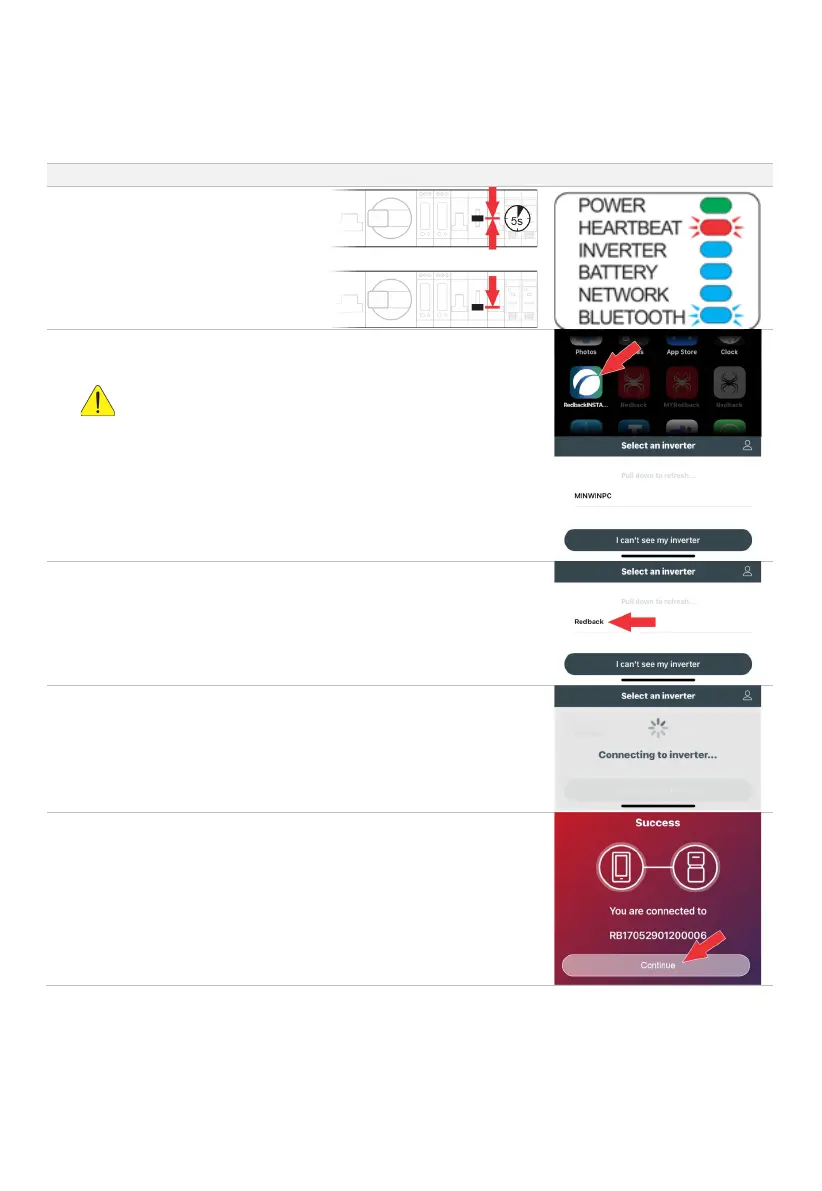
3.4.2 CONNECT REDBACKINSTALL TO THE INVERTER
The RedbackINSTALL app is user friendly… it requires little guidance, and there is in-app information.
# PROCEDURE ILLUSTRATION
Ensure the EMS Bluetooth LED is
flashing, indicating that Bluetooth is
available.
If not flashing, restart the EMS by
moving the BYPASS switch to the
MIDDLE position for 5 seconds, then
return it to the DOWN position.
Open RedbackINSTALL and login.
RedbackINSTALL will scan for products advertising Bluetooth.
Wait up to five minutes.
Do not select MINWINPC if it appears in the inverter list. Wait a few
minutes for the EMS to restart and REDBACK to appear in the list.
REDBACK will appear. Tap to continue.
A success message will appear. Tap Continue to begin onboarding.



 To Next Page