Redback Technologies
Installation Manual - Redback Smart Hybrid System - v 2.0
47
4.5 Inverter operating modes
The inverter operating modes are summarised below. Select modes using the Redback app or portal.
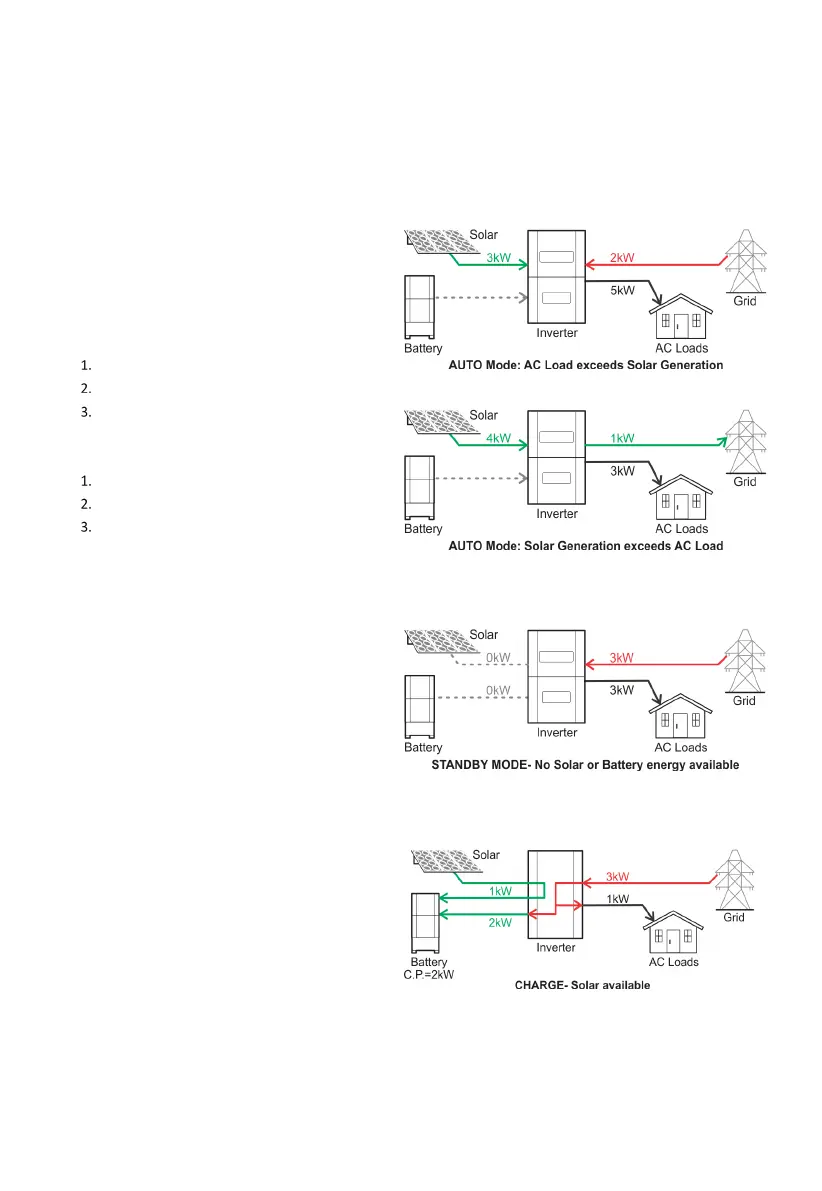
AUTO MODE
AUTO is the default operating mode, maximizing
consumption of self
-generated and stored energy. If the
has been changed, AUTO can be reselected
If AC loads (House) exceeds solar generation, energy sources
are prioriti
sed as follows:
Solar
Battery
Grid
If solar production exceeds AC loads, destinations for self
-
generated energy are prioriti
sed as follows:
AC Loads
Battery (storage)
Grid (if enabled)
STANDBY MODE
STANDBY mode is invoked automatically when no solar or
battery energy is available. The
SH5000 directs grid power
directly to the AC Loads thereby minimising energy losses in
the inverter e.g. heat.
SH5000 automatically reverts to the previous mode of
solar or battery energy is available.
CHARGE BATTERY MODE
CHARGE mode may be used to prepare for a severe weather
event
, and prioritises charging the battery at the nominated
the grid.
vailable solar will supplement the grid charging up to a
maximum charge rate of 4.6kW.
AC Loads are fulfilled by the grid.



 To Next Page