Redback Technologies
Installation Manual - Redback Smart Hybrid System - v 2.0
43
3.8.2 COMPLIANCE INSPECTION
Nominated Compliance Inspectors receive notifications when added as a product user. Their first notification will provide a link
to complete their user registration.
# PROCEDURE ILLUSTRATION
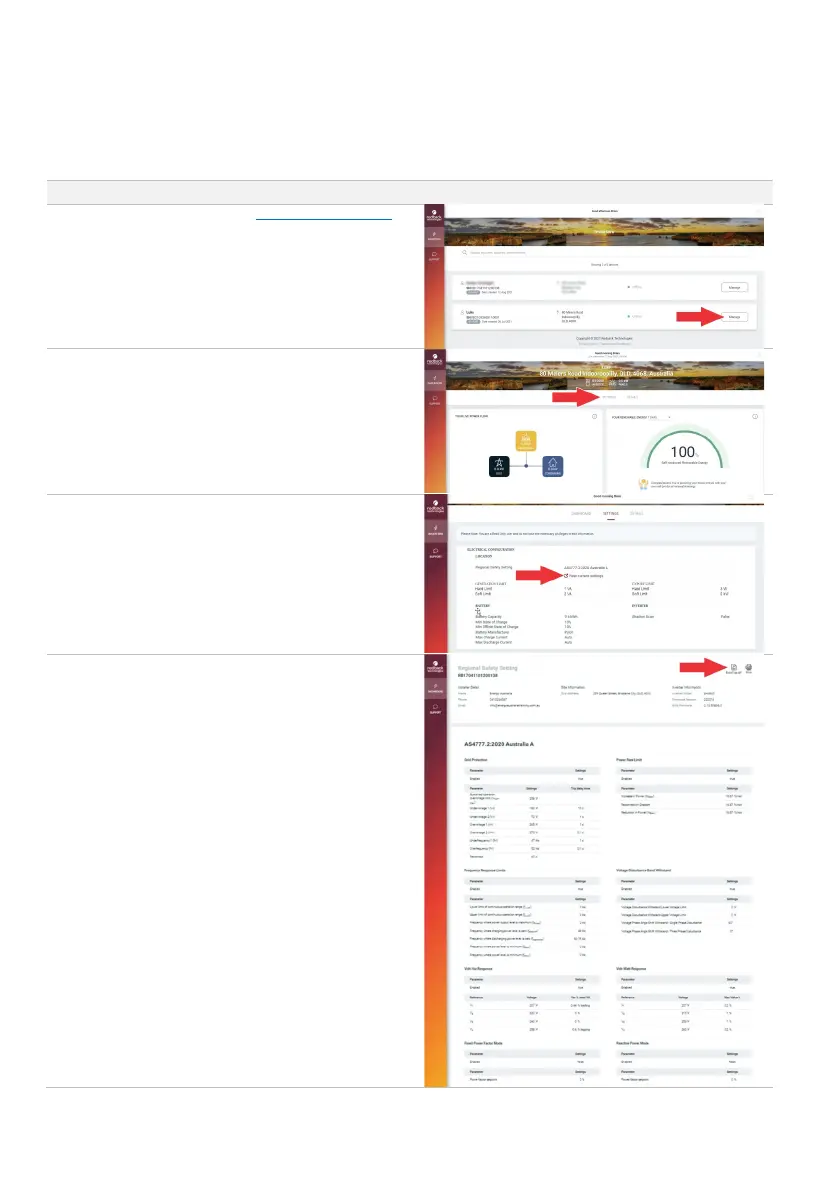
1.
Login to the Redback portal at portal.redbacktech.com
If necessary, search for the required product serial
number.
Select Manage to open the product dashboard.
Note: the first login will require acceptance of the
Redback T&Cs.
2.
Select SETTINGS to open the products general settings.
3.
Select View current settings to see the Detailed Regional
Safety Settings.
4.
The Detailed Regional Safety Settings are read only.
Scroll the page to see all settings.
The settings may be Printed or Exported to PDF for
record keeping.



 To Next Page