Installation
34 Installation Manual - Redback Smart Hybrid System - v2.0
2.11.5 BATTERY BMS, POWER, AND EARTH CONNECTIONS
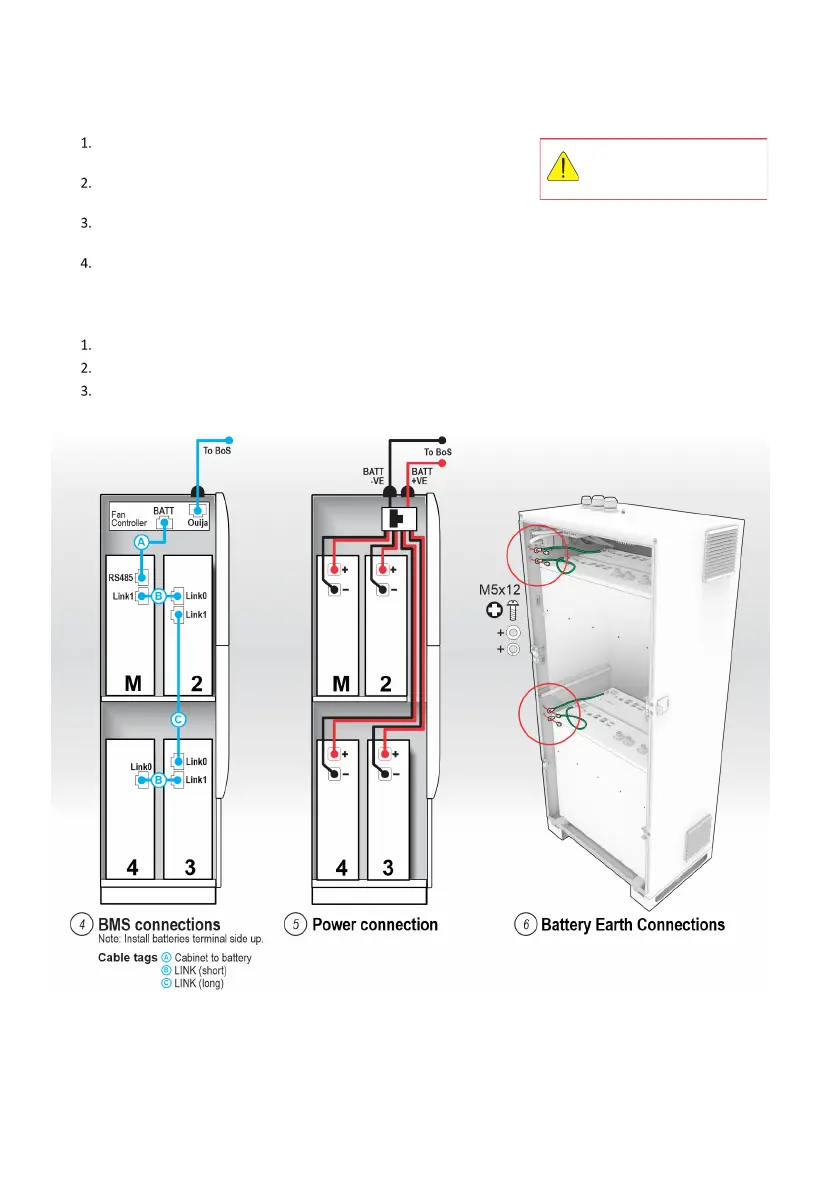
Plug Cable A “Cabinet to Battery”— “RS485” plug into the master
battery “RS485” port.
Plug the Cable A “Cabinet to Battery”— “Battery Port” into the Fan
Controller “BATT” port (on right hand side).
Connect BMS “Link” cables (B, C) in the logical sequence shown. Note: the number and position of batteries may
vary.
Connect one red and one black battery cable to each battery. Observe polarity and labelling.
Notes:
The battery leads are coiled and zip-tied in place for transport. Use end cutters to release the required cables.
Each battery has two positive and two negative terminals. Each pair (positive or negative) is linked internally.
Route cables via the portals at sides of the Battery Shelf. Do not pinch cables.
Cable A is directional. Failing
to match Plugs and Ports will
cause functional errors.



 To Next Page