Redback Technologies
Installation Manual - Redback Smart Hybrid System - v 2.0
41
3.7 Notes on Relay configuration
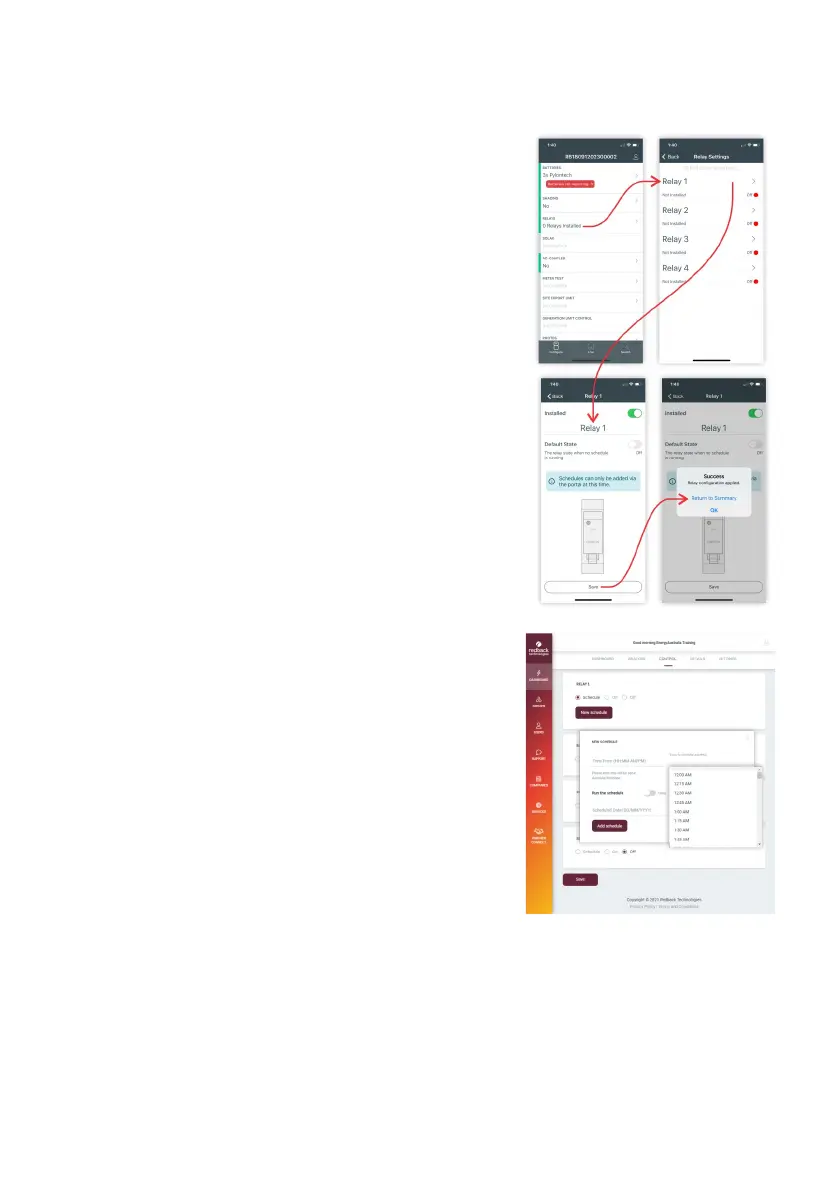
The Redback system supports up to four relays, each controlling a dedicated
circuit and attached loads. Each relay has its own switching schedule, enabling
the owner to move energy consumption to times of solar generation.
Typical app and portal screens are shown on the right.
Relay configuration rights vary.
Installers can:
• Enable relay visibility (RedbackINSTALL)
• Configure as normally ON or normally OFF (RedbackINSTALL)
• Schedule single or multiple relay events (Redback Portal).
• Schedule single or multiple daily relay events (Redback Portal).
Owners can, using the Redback Portal:
• Turn relays ON and OFF manually
• Schedule single or multiple relay events.
• Schedule single or multiple daily relay events.
Configuration notes:
• Scheduled events must activate and deactivate the Relay i.e., ON
and OFF (this is software enforced).
• The inverter must be internet connected to receive new or changed
schedules. When received, the schedules are stored on the inverter:
events occur even if the internet is not available.
• The relays are OFF when the power supply is lost. When power is
restored, the device reads the configuration from memory, and
restores the correct state.
• The relay control system is software based: features are frequently
added or improved, and the latest documentation is accessible in
the Redback Apps or Portal.



 To Next Page